


Effective multichannel outreach is a sequenced campaign, not a simultaneous blast. It strategically layers channels like email, LinkedIn, and phone to build progressive familiarity so your final ask feels like a follow-up.
For the best results, maintain channel-specific messaging, respect platform limits, and work with precise timing to avoid overwhelming prospects.
The goal is to leverage each channel’s unique strength: email for detail, LinkedIn for validation, and phone/SMS for urgency, all orchestrated from a central platform to track engagement and drive reply rates above single-channel efforts.
If you're running cold email campaigns, you've probably noticed that the prospects who reply tend to have seen your name somewhere else first. Maybe they spotted your LinkedIn profile after your first email. Maybe your connection request landed the day before your follow-up. That extra touchpoint is what made your name stick.
This pattern is consistent enough that sales teams have started engineering it on purpose, and the numbers back it up. Research shows that outreach combining email, LinkedIn, and phone increases response rates by 287% compared to using just one channel.
In this post, we'll walk you through the channel combinations that actually work for B2B sales, how to structure sequences so each touch builds on the last, and how to pull it all together in Instantly's CRM. By the end, you'll have a framework you can adapt to your own outreach and start testing this week.
Does Adding Channels Really Improve Email Performance?
Short answer: yes. But not in the way you might think.
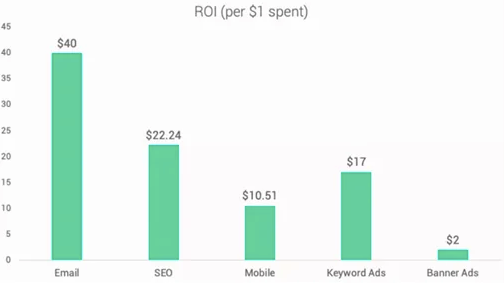
When you add LinkedIn or phone touches to your email sequences, prospects start perceiving your emails differently. Here's what the data says: according to Expandi's analysis, LinkedIn messages average a 10.3% response rate compared to 5.1% for cold email. On the other hand, cold email delivers an average ROI of $40 for every $1 spent and lets you reach far more prospects at scale than LinkedIn ever could.
So what happens when you use both together?
Sales teams on Reddit have noticed something interesting. A prospect might ignore three emails in a row, then reply warmly after seeing a LinkedIn connection request from the same person. The name registers, and suddenly, the next email feels familiar instead of cold.

This is the real value of multi-channel outreach. You're building recognition before you ask for anything, and that recognition makes your emails land differently.
Which Channels Work Best With Email?
Not every channel pairing makes sense for every audience. The right combination depends on who you're targeting and how they prefer to communicate.
- Email + LinkedIn is the most common starting point for B2B outreach. Email carries the detailed pitch. LinkedIn adds a personal layer and gives prospects a way to check your credibility before they respond. They can see your headline, your content, and your mutual connections. This combination works especially well for reaching decision-makers at mid-size and enterprise companies who are active on the platform.
- Email + Phone works better for time-sensitive offers or high-ticket sales. A well-timed call after an email sequence can move a warm lead to a booked meeting faster than waiting for a reply. This pairing suits sales teams focused on outbound to SMBs or founder-led companies, where the buyer is often the one answering the phone.
- Email + SMS is effective for leads who've already opted in, like webinar signups or demo requests. Cold SMS to people who haven't given consent can get you fined under TCPA regulations. But a short text to someone expecting your follow-up has a better chance of being read than email number four in their inbox.
Here's a quick reference:
Multi-Channel Outreach Combinations
| Channel Combo | Best For | Typical Use Case |
|---|---|---|
| Email + LinkedIn | B2B, mid-market to enterprise | Decision-makers who research before responding |
| Email + Phone | SMBs, founder-led companies, high-ticket sales | Time-sensitive offers, faster deal cycles |
| Email + SMS | Warm leads, inbound follow-up | Webinar registrants, demo requests, event attendees |
The goal is to pick two or three channels that match how your prospects actually communicate, then build sequences around them.
How to Structure a Multi-Channel Sequence
Timing matters as much as channel selection. You want to create a rhythm where each touch feels like a natural continuation, not a coordinated attack.
Here's a framework that works for most B2B outreach:
Day 1: First cold email. This is your opening pitch. Keep it short, personalized, and focused on one problem you can solve. You're not trying to close anything here. You're trying to earn enough interest to get a reply.
Day 2: LinkedIn profile visit. Don't send a message just yet. The visit notification alone is enough. The prospect sees your name, maybe clicks through to your profile, and starts to register who you are.
Day 3: LinkedIn connection request. Send a brief, friendly note with your request. Reference something specific from their profile or company. The idea is to give them a reason to accept that feels personal, not templated.
Day 5: Follow-up email. This one should take a different angle than your first email. Add a case study, a relevant result, or a question that invites a reply. Give them a fresh reason to respond, not just a reminder that you exist.
Day 8: LinkedIn message or second follow-up email. If they've accepted your connection request, send a short LinkedIn message. If not, send another email. Either way, acknowledge that you've reached out before and offer a low-commitment next step. Something like a 15-minute call or a quick question works well here.
Day 14: Final email. Be direct that this is your last message. The "breakup email" often gets the reply that earlier touches didn't. Something about knowing it's the last chance prompts people to respond.
This structure gives you six touchpoints across two channels over two weeks. Enough to stay visible without overwhelming the prospect.
Note: If you're adding phone to the mix, days 6 and 10 work well, after your name has shown up a few times but before the final email.
What Breaks a Multi-Channel Sequence?
Multi-channel outreach can backfire when the execution feels coordinated rather than natural. There are a handful of patterns that keep showing up in campaigns that underperform:
1. Sending identical messages across channels
If your LinkedIn message is a copy of your email, it signals that you're running an automated blast. Email can handle more detail, but LinkedIn should feel like a quick, conversational note. This is the difference between building familiarity and creating fatigue:

2. Moving too fast between touchpoints
Hitting a prospect with an email, LinkedIn request, and phone call on the same day feels aggressive. Space your touchpoints by at least 24 to 48 hours so the prospect has time to notice each one separately.
3. Ignoring channel-specific limits
Each channel has its own limits: LinkedIn caps connection requests to 100 per week, email domains need proper warmup to maintain deliverability, and SMS requires prior consent. Respect the boundaries of each platform, or you risk account restrictions and spam complaints that hurt your entire outreach operation.
4. Tracking nothing
Multi-channel adds complexity. Without clear data on which channel is driving replies, you have no way of knowing where to focus. Use a CRM or outreach platform that tracks engagement across all touchpoints so you can see what's working and double down on it.
How Instantly Supports Multi-Channel Outreach
Instantly is an email-first platform, but as you might guess, there's much more you can do with it when running multi-channel sequences.
Let's take a closer look at the core features that matter for multi-channel outreach:
Unlimited email accounts with automated warmup
This is the foundation. Per-seat pricing gets expensive fast as you scale, but Instantly offers flat-fee pricing with unlimited email accounts starting at $37 per month. You can connect as many inboxes as you need without paying more every time you add a rep.
The automated warmup runs through a network of 4.2 million real accounts. What this does is gradually ramp your sending volume from 5 to 15 to 30 emails per day over several weeks, building sender reputation before your campaigns go live.
New domains that start blasting 100 emails on day one end up in spam, which is exactly what warmup prevents. See how to set up automated warmup on your email accounts in Instantly:
Hyper CRM with Calling & SMS
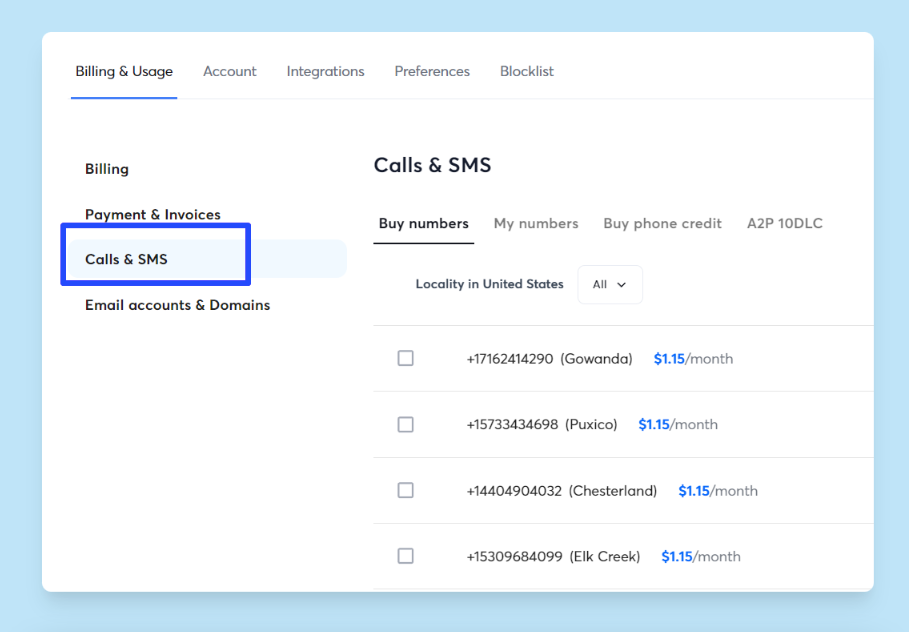
The Hyper CRM plan ($97/month) includes built-in calling and SMS functionality. You can purchase phone numbers directly on the platform, send texts, make calls, and log all activity alongside your email conversations.
The unified inbox pulls everything together: email replies, SMS conversations, and call logs all show up in one place. If you're running multiple email accounts, replies from all of them appear here, too. Everything you need to know about a prospect is right there.
Lead database with built-in verification
Instantly SuperSearch database includes 450 million B2B contacts with built-in verification. There's a useful detail here for multi-channel outreach: the database includes phone numbers alongside email addresses.
So say you're building a list for a sequence that includes SMS or calls. You can filter for contacts that have both email and phone data, which means you're not stuck running email-only because half your list is missing numbers.
Watch how SuperSearch helps you build verified lead lists for multi-channel sequences:
AI Reply Agent for managing response volume
Multi-channel sequences generate more replies. Of course, that's the point. But reply volume can overwhelm reps if you're not prepared for it.
Instantly's AI Reply Agent classifies incoming replies by intent and drafts contextually relevant responses. You can run it in Human-in-the-Loop mode (review before sending) or Autopilot mode (fully automated).
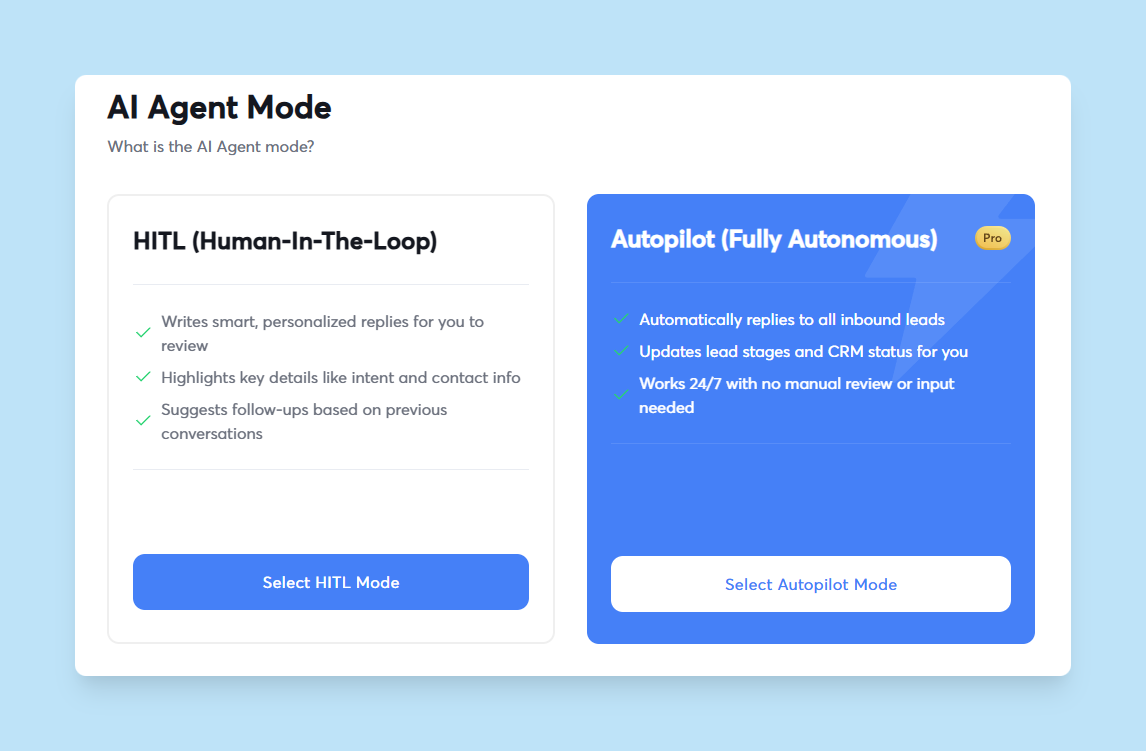
Either way, it ensures prospects get timely responses even when replies spike during evenings or weekends.
The setup keeps email at the center while layering in additional channels as your process matures. You don't need to adopt everything at once. Start with email, get your sequences right, then add SMS and calling when you're ready.
Key Takeaways
The shift to multi-channel doesn't require a complete overhaul. Most teams start with email + LinkedIn, get comfortable with the timing, and add SMS or phone later. The complexity grows with you.
Here's a quick recap of what we covered:
- A second channel makes your name familiar before you pitch. That familiarity shifts your emails from cold outreach to something that feels more like a follow-up.
- Email + LinkedIn is the go-to B2B pairing. Email + Phone suits SMBs and faster sales cycles, while email + SMS works best for leads who've already opted in.
- Spacing touchpoints 24-48 hours apart prevents them from blurring together.
- Copying the same message across channels undermines the whole sequence. Each channel needs its own tone.
Instantly handles the email foundation with unlimited accounts and automated warmup, and the Hyper CRM plan adds calling and SMS when you're ready to expand. Try it free here.


