


Updated March 12, 2026
TL;DR: Sales Leaders need a follow-up cadence built on consistent deliverability, precise automation, and data-driven optimization. Instantly's unlimited accounts, 4.2M+ deliverability network, and AI agents allow you to scale follow-ups across your team without per-seat penalties while maintaining primary inbox placement. Continuous A/B testing, list hygiene, and bounce monitoring protect sender reputation and increase reply rates.
The average sales rep gives up after just two follow-ups. Yet research shows 80% of sales require at least five touches to close, with B2B deals often needing 6-8 follow-ups spread over 3-4 weeks before prospects are ready to engage. Without a structured system, your team misses the narrow window when prospects are ready to buy.
This guide provides Sales Leaders with an actionable playbook to design, implement, and optimize a high-performing sales follow-up cadence. If you're new to cold outreach, start with our cold emailing guide for the fundamentals.
Your winning follow-up cadence checklist
Before diving into the detailed playbook, use this checklist to ensure you have the foundations in place:
- Set up and warm at least 2 sending accounts (allow 2-4 weeks for proper warmup)
- Source and verify 300+ leads matching your Ideal Customer Profile
- Draft a 3-4 step email sequence with personalization variables
- Configure A/B tests for subject lines and opening lines
- Set send windows and daily limits (start at 30-50 emails per day)
- Monitor bounce rate weekly (keep hard bounces under 2%)
- Track reply rate and meetings booked for continuous optimization
Why does a sales follow-up cadence need a systematic approach
Sales follow-up is a revenue system, not a "nice to have." Without structure, reps miss timing windows, forget touchpoints, or burn domains with aggressive sending that lands in spam. A systematic approach turns email outreach into a predictable pipeline engine.
The cost of inconsistent follow-ups
Manual follow-ups create friction. Reps juggle spreadsheets, calendar reminders, and CRM tasks while trying to remember who got which message and when. A purpose-built B2B cold email tool eliminates this overhead by automating the entire sequence.
Deliverability crashes compound the problem. Send too aggressively from cold domains, and you land in spam. Your open rates tank, reply rates drop, and monthly targets slip.
Manual processes also limit scale. Hiring more reps means more training, more mistakes, and compounding per-seat software costs. One Sales Leader noted the time savings from automation:
A structured, automated cadence removes these bottlenecks and creates a repeatable system your team can execute consistently. Learn more about transforming sales outreach with email automation.
What Sales Leaders prioritize in a cadence
Sales Leaders managing quota-carrying teams focus on three outcomes: consistent primary inbox placement, scalable automation that doesn't require constant oversight, and transparent reporting that ties to revenue.
- Deliverability comes first. If your emails land in spam, reply rates drop to near zero. You need domain warmup, health monitoring, and pacing controls built into the cadence system. Instantly's automated warmup and deliverability network provide the infrastructure to maintain sender reputation at scale.
- Automation is non-negotiable. Reps should focus on live conversations, not manually scheduling follow-ups. The best cadences trigger automatically based on time delays, lead status changes, or reply behavior. Instantly's subsequences allow you to set up trigger-based follow-ups that adapt to prospect engagement without manual intervention.
- Reporting must be auditable. You need metrics that tie email activity to meetings booked and pipeline created. Vague analytics that don't match CRM records destroy trust.
One user on G2 praised the clarity Instantly provides here:
"I love that Instantly just works and does the basics exceptionally well, focusing on the 'simple things that actually matter'. The interface is intuitive, making the setup process smooth and straightforward." - Chico C. on G2
Finally, Sales Leaders want predictable pricing. Flat-fee models that include unlimited sending accounts let you scale without per-seat penalties. Instantly supports this approach across all plans.
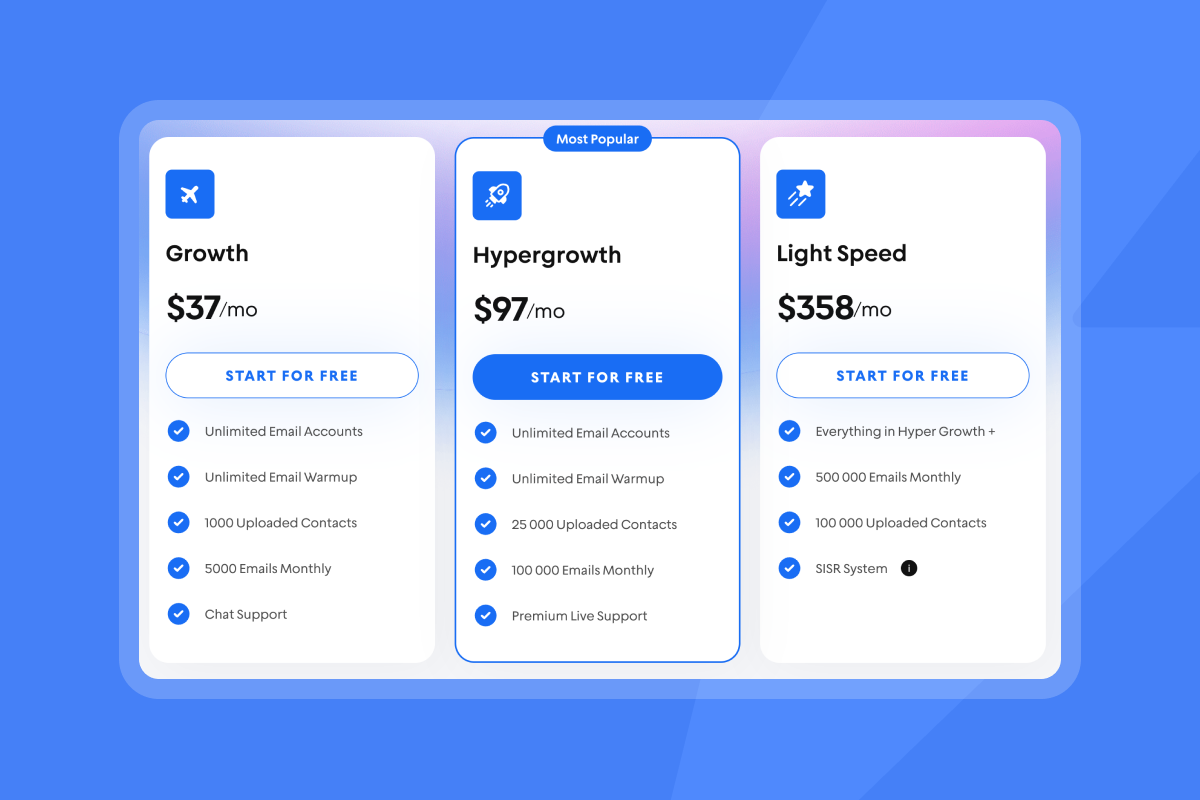
Key components of an effective sales follow-up cadence
An effective sales follow-up cadence balances structure with flexibility. It requires clear goals, high-converting content, optimal timing, and the right mix of channels. This section breaks down each component into actionable elements.
Defining your cadence goals and persona
Start by defining what success looks like. Are you booking demos, scheduling discovery calls, or generating content downloads? Your cadence structure changes based on the goal.
Next, map the cadence to a specific persona. Cold outreach to CFOs requires a different approach than nurturing inbound marketing leads. Segment your lists by role, industry, company size, and engagement history.
For cold outreach, aim for 3-4 email steps over 10-14 days. Strong campaigns typically achieve reply rates between 5-10%, with the best performers exceeding 10%. For inbound nurturing, extend the cadence to 8-12 touchpoints over several weeks, adding more value-driven content at each step.
Post-demo follow-ups should be shorter, more personalized, and focused on addressing specific pain points discussed in the meeting. A complete guide to email sequence examples provides templates for different scenarios.
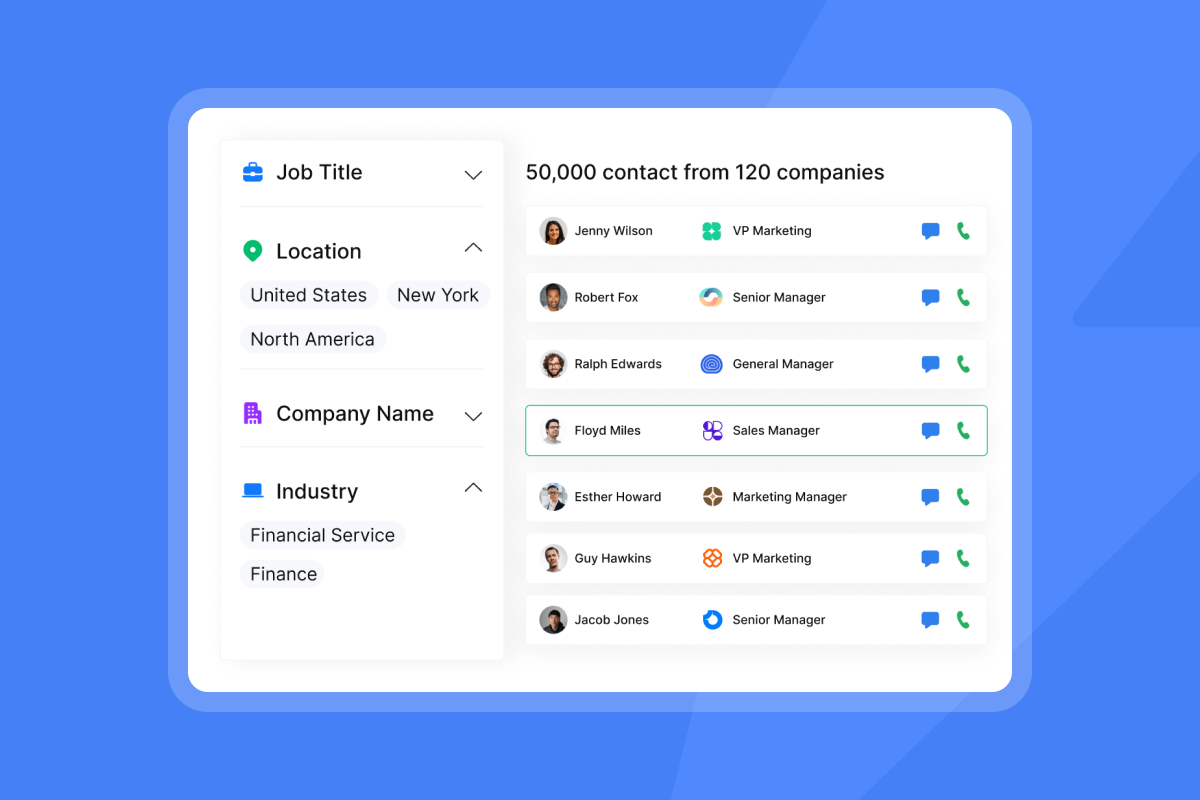
Use Instantly's B2B Lead Finder to build targeted lists of verified contacts, filtered by role, industry, and company criteria. Clean, segmented data is the foundation of a high-performing cadence. Watch Instantly's SuperSearch in action in this tutorial below:
Crafting high-converting follow-up emails
Each email in your cadence must provide new value. Avoid generic "just checking in" messages. Reference specific pain points, share relevant case studies, or offer a useful resource.
- Personalization goes beyond the name. Use custom fields to insert company-specific details, recent news, or role-based challenges. Personalized cold emails that include specific details and custom variables typically achieve higher reply rates than generic broadcasts.
- Instantly's AI Copilot automatically drafts multi-step sequences with built-in personalization variables and spintax, speeding up content creation while maintaining relevance.
- Subject lines drive opens. Keep them short, specific, and relevant. Test multiple variations to identify top performers. Most B2B emails perform best Tuesday through Thursday between 8:30 a.m. and 10:30 a.m. in the recipient's local time zone.
- CTAs must be clear and low-effort. Ask for one action per email. "Reply if you're interested" or "Book a 15-minute chat here" work better than vague requests.
- Spintax improves deliverability and testing. Spintax creates variations in subject lines, body content, and CTAs. This helps avoid spam filters that flag exact duplicate messages at scale while enabling continuous A/B testing. Instantly automatically adds spintax to AI-generated sequences or lets you apply it manually.
One Sales Leader noted the impact of good deliverability infrastructure:
"I like that instantly can handle large scale email campaigns without worrying about deliverability. The automation for inbox rotation, warm up and sending limits makes outreach very smooth and saves a lot of manual work." - Anjali T. on G2
Integrating multi-channel touchpoints
Email is the core of most B2B cadences, but adding phone calls, LinkedIn messages, or personalized video can increase engagement. The key is coordinated timing.
For example, structure a cadence like this:
- Day 1: Initial email introducing value proposition
- Day 3: Follow-up email with case study
- Day 5: LinkedIn connection request (manual task)
- Day 7: Third email addressing common objection
- Day 10: Phone call (manual task)
- Day 12: Final "breakup" email
While Instantly specializes in email automation, you can integrate manual tasks for calls and social touches into your workflow. Using Zapier integrations connects Instantly with CRM systems for task creation and tracking.
Multi-channel approaches help you meet prospects where they prefer to engage. A full tutorial on setting up campaigns walks through building multi-step sequences.
Optimal timing and frequency for follow-ups
- Timing affects engagement and sender reputation. For cold outreach, space emails 2-4 days apart to allow prospects time to engage without appearing aggressive. For warm leads who have engaged, you can tighten the interval to 1-2 days. Post-demo follow-ups should go out within 24 hours while the conversation is fresh.
- Send windows also impact performance. Most B2B emails perform best Tuesday through Thursday, with peak engagement between 8:30 a.m. and 10:30 a.m. in the recipient's local time zone. Test your specific audience to confirm optimal windows.
- Instantly's scheduling settings let you configure send times and daily limits to improve delivery rates.
- Limit daily sends per inbox to protect sender reputation. Start with 30-50 emails per day during warmup, then Gradually increase to 50-100 per inbox as domain health stabilizes over 2-4 weeks.
- Instantly's slow ramp plan provides a structured approach to scaling volume safely while maintaining primary inbox placement.
How to build your sales follow-up cadence with Instantly
Building a cadence in Instantly follows a repeatable six-step process: set up and warm inboxes, source verified leads, design your sequence with testing, automate follow-ups and replies, monitor deliverability, and manage replies in the Unibox. Each step includes specific actions and Instantly features to implement.
For a complete visual walkthrough of the entire process, watch this comprehensive Instantly tutorial that demonstrates setup, sequence building, warmup monitoring, and reply management from start to finish.
Step 1: Set up unlimited inboxes and warmup for deliverability
Deliverability starts before you send the first email. Proper inbox setup and warmup build sender reputation so your messages land in the primary inbox, not spam.
- Configure email accounts:
Connect your sending accounts to Instantly. Enable two-factor authentication and use methods like Google App Passwords for secure connection. Consider using Instantly's done-for-you VIP service to set up domains and email accounts with automatic warmup handled by experts. - Authenticate your domains:
Set up SPF, DKIM, and DMARC records. Proper DNS configuration is critical for deliverability. Missing authentication is a primary cause of emails landing in spam. - Warm up your inboxes:
New email accounts and domains need 2-4 weeks of warmup before high-volume sending. Instantly's automated warmup gradually increases sending volume and engagement through its deliverability network. Start at 30-50 emails per day and ramp slowly, increasing by 20-50% daily as reputation builds. - Test inbox placement:
Use Instantly's Inbox Placement tests to check where your emails land (primary inbox, promotions, or spam) across major providers like Gmail and Outlook. Run tests weekly during warmup and monthly after launch.
One user highlighted this feature:
"Few features I like the most about instantly are as below. 1. Inbox placement test 2. Their email tracking system. 3. Lead reply automatic drafted with the help of AI. 4. AI Spam word checker. Also their customer support is also good." - Sakshi S. on G2
The 7 key benefits of slow ramp warmup explains why rushing this step damages long-term deliverability and checkout our setting up warmup tutorial below:
Step 2: Source verified leads with SuperSearch
Clean, verified contact data reduces bounces and improves reply rates. High bounce rates damage sender reputation and trigger spam filters.
Instantly's SuperSearch provides access to verified B2B contacts with waterfall enrichment across multiple providers. Use advanced filters to target prospects by role, industry, company size, and location. A complete guide to verified contacts explains how data quality impacts deliverability and ROI.
Lead sourcing checklist:
- Define your ICP: Specify job titles, industries, company size, and geographic criteria
- Apply filters: Use SuperSearch to build targeted lists matching your ideal customer profile
- Verify contacts: Instantly verifies email addresses during export to reduce bounces
- Enrich with AI: Use Instantly's AI features to add personalization variables and context to each lead
- Export to campaigns: Import leads directly into your Instantly campaigns for immediate use
Industry benchmarks recommend keeping hard bounce rates under 2% to maintain sender reputation. Some experts suggest targeting 1% or lower for optimal deliverability.
Step 3: Design your sequence with A/B testing and spintax
Sequence design determines how prospects experience your outreach. A well-structured cadence balances persistence with value at each touchpoint.
- Use AI to draft your sequence:
Instantly's AI Sequence Generator creates entire multi-step email sequences based on your company, offer, target audience, and case studies. The AI automatically includes personalization variables and spintax.
- Build your sequence manually (if preferred):
In the Campaigns dashboard, click "Add New" and name your campaign. Navigate to the Sequence section and add email steps with defined delays between each touchpoint (e.g., "Send next message in 3 days").
Example cadence structure:
| Step | Type | Content Focus | Delay | Instantly Feature |
|---|---|---|---|---|
| 1 | Value prop intro | - | AI Sequence Generator + personalization | |
| 2 | Case study/social proof | 3 days | Spintax for variation | |
| 3 | Address common objection | 3 days | A/Z subject line testing | |
| 4 | "Breakup" question | 4 days | Subsequence trigger on reply |
- Add personalization:
Use custom fields like{{first_name}},{{company_name}}, and industry-specific details to tailor each message. Dynamic personalization at scale makes each email feel uniquely crafted for the recipient. - Create email variants for A/B testing:
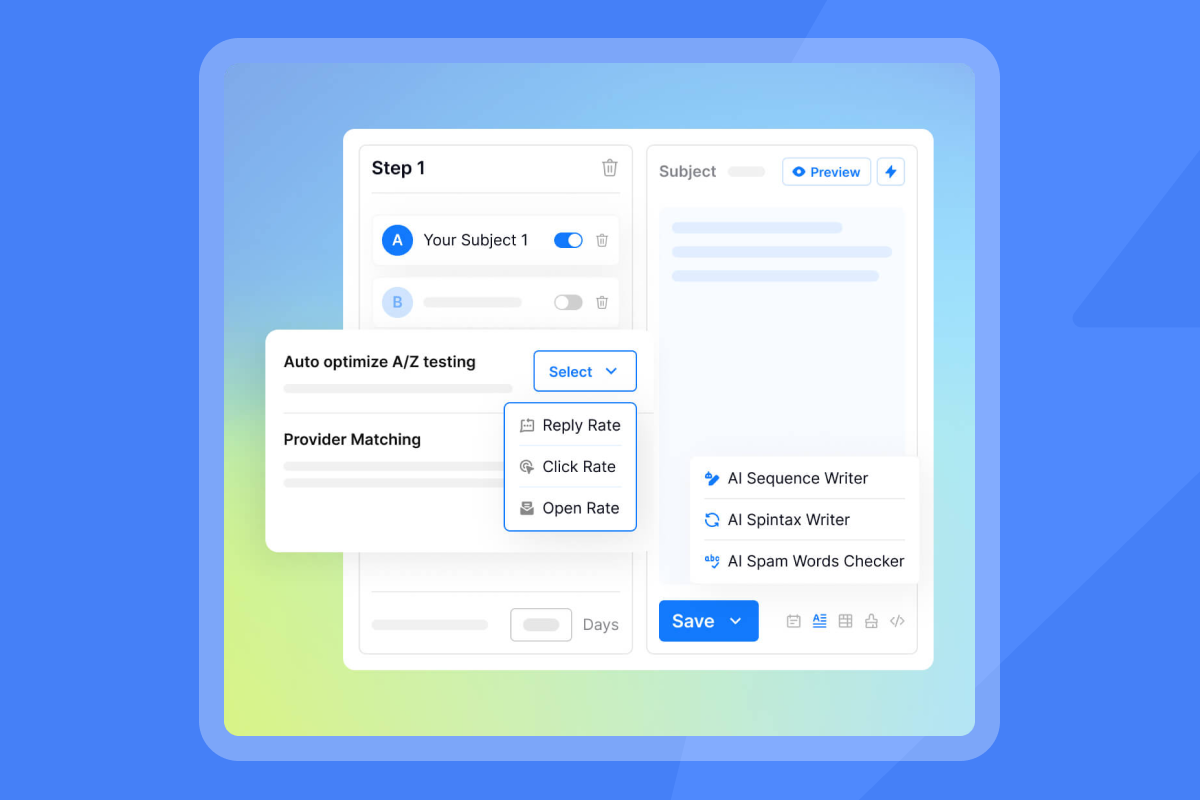
Add multiple subject lines and body variations to each step. Instantly supports A/Z testing with unlimited variations, automatically scaling the best-performing elements based on reply rates, click rates, or open rates. - Implement spintax:
Spintax creates variations in your copy, helping you avoid spam filters and continuously test different phrasing. Apply spintax to subject lines, opening sentences, and CTAs. The AI generator adds spintax automatically, or you can apply it manually for more control.
One user highlighted the platform's ease of use:
"The user interface is straightforward and intuitive, making it easy to get started without facing a steep learning curve. The automation features have saved me considerable time." - Aziz A. on G2
Best practices for cold email sequences provide additional frameworks for different buyer personas and sales scenarios.
Step 4: Automate follow-ups and reply handling with AI agents
Automation ensures consistent execution without manual oversight. Instantly provides two key AI agents to handle this: automated sequencing and intelligent reply handling.
- Automated follow-ups:
Once you launch a campaign, Instantly automatically sends follow-up emails based on the delays you configured. Enable "Stop sending emails on reply" so prospects who respond exit the sequence immediately. - Trigger-based subsequences:
Instantly's Subsequences feature (available on Hypergrowth and Light Speed plans) triggers new follow-up paths based on lead behavior.
For example:
- If a lead replies with "Interested," trigger a subsequence that sends detailed product information and a meeting link
- If a lead is marked "Wrong Person," trigger a subsequence asking for the correct contact
- If a lead sends an out-of-office reply, pause the main sequence and resume when they return
Set up subsequences before launching your main campaign for full automation.
- AI Reply Agent:
Instantly's AI Reply Agent automatically handles lead replies in under 5 minutes. Configure it in Human-in-the-Loop mode (where reps approve AI-drafted responses) or Autopilot mode (where the AI responds automatically).
The AI Reply Agent uses 5 credits per reply. Calculate your monthly credit needs by estimating expected reply volume (e.g., 200 replies per month = 1,000 credits). Integrate the AI Reply Agent with Slack for real-time notifications and approval workflows.
Step 5: Monitor deliverability and domain health
Continuous monitoring protects your sender reputation and ensures primary inbox placement. Sales Leaders need clear visibility into deliverability metrics to prevent issues before they impact performance.
Key deliverability metrics to track:
- Inbox placement rate: Target primary inbox placement for the majority of your emails. Use Instantly's automated Inbox Placement tests to monitor where your emails land across providers.
- Bounce rate: Keep hard bounces under 2%. Instantly's auto-pause feature stops campaigns with high bounce rates to protect sender reputation.
- Spam complaint rate: Aim for under 0.3%, ideally under 0.1%. Rates above 0.3% typically trigger deliverability issues with major providers.
- Open rate: While not a perfect metric, sudden drops may signal deliverability problems. Check DNS records and warmup status first.
Deliverability safeguards:
- Use Instantly's Spam Word Checker to identify risky phrases before sending
- Monitor warmup health scores for each sending account in the dashboard
- Set up Rules & Alerts to automate campaign pauses when metrics exceed risk thresholds
- Run inbox placement tests before scaling volume
Instantly's Light Speed plan includes SISR (Server & IP Sharding & Rotation) with dedicated and private IP pools, further improving deliverability for high-volume senders.
Email deliverability best practices provide comprehensive guidance on maintaining strong sender reputation over time.
Step 6: Manage replies and opportunities in the Unibox
Centralizing replies and pipeline management ensures no lead falls through the cracks. The Unibox consolidates all campaign responses into a single interface for efficient triage and follow-up.
Unibox features:
- Master Inbox: View all replies from all campaigns in one place. Tag, assign, and respond to leads without switching between email clients.
- Lead status tracking: Mark leads as "Interested," "Not Interested," "Wrong Person," or custom statuses. These statuses trigger subsequences automatically.
- Task management: Create follow-up tasks, set reminders, and assign leads to specific reps.
- Opportunities pipeline: Move qualified leads into the pipeline view to track progress toward closed deals. For strategies to re-engage stalled deals, see our guide on CRM analytics tools for sales performance.
Instantly's CRM capabilities allow for calling and SMS directly from the browser on the Hyper CRM plan, combining email, phone, and text in one interface.
For teams using Salesforce or HubSpot, Instantly's bidirectional sync via OutboundSync logs all activity automatically and keeps CRM fields in sync with Instantly lead statuses.
Measuring and optimizing your cadence for peak performance
Building the cadence is the first step. Continuous measurement and optimization ensure long-term success. Our guide on revamping outreach campaigns with email automation walks through how to refine your sequences over time.
Key metrics to track: reply rates, booked meetings, and pipeline
Focus on metrics that tie directly to revenue outcomes rather than vanity metrics that don't predict success.
Primary metrics:
- Reply rate: The percentage of recipients who respond. Target 5-10% for cold outreach, with strong campaigns achieving 10% or higher. Calculate reply rate accurately by dividing total replies by total emails sent.
- Meeting booked rate: The percentage of replies that convert to scheduled meetings. This metric connects email activity to pipeline.
- Cost per meeting: Divide total campaign costs (software, data, rep time) by meetings booked. This is your efficiency benchmark.
- Opportunities created: Track how many leads move from meeting to qualified opportunity in your CRM.
- Pipeline coverage: Measure total pipeline value generated from email outreach to demonstrate ROI.
Secondary metrics:
- Open rate: While imperfect due to tracking pixel limitations, it signals deliverability health
- Click-through rate (CTR): Measures engagement with links in your emails
- Bounce rate: Monitors list quality and deliverability risk
- Unsubscribe rate: High unsubscribes suggest messaging or frequency issues
Instantly's analytics dashboard tracks these metrics in real time, with reporting that ties to campaign performance.
One user appreciated the learning curve:
"I appreciate the guidance Instantly offers for the warm-up stage of cold email campaigns, which was entirely new to me. This feature is vital, guiding me according to my needs and current understanding of cold email outreach." - Cyril T. on G2
A comprehensive guide to tracking reply rates provides systems for defining, analyzing, and improving email performance over time.
A/B testing strategies for continuous improvement
A/B testing is how you turn a good cadence into a great one. Test one variable at a time to isolate what drives performance improvements.
Elements to test:
- Subject lines: Test length, personalization, question vs. statement, urgency, and curiosity
- Opening lines: Test direct value propositions vs. personalized observations
- Email length: Test short (50-75 words) vs. medium (100-150 words)
- CTAs: Test different asks, button vs. link, and low-effort vs. high-commitment requests
- Follow-up timing: Test 2-day vs. 3-day vs. 4-day delays between touchpoints
- Personalization level: Test generic vs. role-based vs. company-specific personalization
Instantly's A/Z testing supports unlimited variations and can automate optimization by scaling the best-performing campaigns based on your chosen success metric (reply rate, click rate, or open rate).
When analyzing test results, focus on statistical significance, compare multiple metrics simultaneously, assess sample size adequacy, and account for external factors that might skew results.
A guide to boosting reply rates with A/B testing walks through integrated testing strategies using Instantly's platform, including how to structure tests and interpret results for continuous improvement.
Drive consistent sales growth with a strategic follow-up cadence
A structured sales follow-up cadence is the difference between hoping for replies and building a predictable pipeline. It combines deliverability infrastructure, automation, and continuous optimization to ensure your team books more meetings without manual busywork or deliverability crises.
For Sales Leaders, Instantly provides the complete system: unlimited email accounts and warmup, a 4.2M+ deliverability network, verified leads through SuperSearch, AI agents for content creation and reply handling, and transparent reporting that ties email activity to revenue outcomes. No per-seat penalties. No clunky UIs. No billing traps.
The next move is yours. Take the playbook in this guide, adapt it to your team's needs, and build a cadence that consistently converts leads into meetings and pipeline.
Start a free trial and work through the checklist at the top of this article, implement one section at a time, and measure results weekly to identify what works for your specific audience and offer.
Related resources:
- Watch this complete Instantly walkthrough for a step-by-step guide to setting up your first campaign
- Explore how to generate 200 calls per month using Instantly's features at scale
FAQs
How many follow-up emails should be in a sales cadence?
For cold outreach, use 3-4 email steps over 10-14 days. For warm leads or inbound nurturing, extend to 8-12 touchpoints over several weeks. Include a final "breakup" email to elicit a clear yes or no. Track your cadence performance by step. If reply rates drop to near zero after step 3, trim to 3 emails. If you see consistent engagement through step 6, extend the cadence. Balancing persistence with value at each step produces the best results.
What is the best time to send sales follow-up emails?
Most B2B emails perform best Tuesday through Thursday, between 8:30 a.m. and 10:30 a.m. in the recipient's local time zone. Test your specific audience to confirm optimal windows, as industry and buyer persona can influence engagement patterns. Mastering email send windows provides analysis frameworks and tools to identify peak engagement times for your audience.
How does Instantly ensure email deliverability for follow-ups?
Instantly uses a multi-layered approach: a deliverability network for warmup, automated inbox placement testing, bounce monitoring with auto-pause features, and SISR (Server & IP Sharding & Rotation) on higher-tier plans. The platform monitors bounce rates, spam complaints, and inbox placement continuously. The complete system includes DNS authentication, gradual volume ramping, and continuous health monitoring.
Can Instantly automate multi-channel follow-ups?
Instantly specializes in email automation but supports multi-channel workflows through integration with third-party tools and bidirectional CRM sync with Salesforce and HubSpot. The Hyper CRM plan includes calling and SMS directly in the browser. For LinkedIn outreach, coordinate manual tasks alongside email sequences using Instantly's campaign dashboard and task management features.
Key terminology glossary
Cadence: A structured sequence of touchpoints (emails, calls, social) designed to engage a prospect over time, typically including 3-12 steps with defined delays between each.
Deliverability: The ability of an email to reach the recipient's primary inbox, avoiding promotions tabs or spam folders. Measured by inbox placement rate and influenced by sender reputation, authentication, and engagement metrics.
Warmup: The process of gradually increasing email sending volume from a new or cold inbox to build sender reputation. Typically takes 2-4 weeks, starting at 30 emails per day and ramping by 20-50% daily.
Primary inbox: The main inbox where important emails land, as opposed to promotions or spam folders. High-performing campaigns achieve strong primary inbox placement rates.
Sender reputation: A score assigned by mailbox providers (e.g., Gmail, Outlook) based on sending behavior, engagement, bounces, and spam complaints. Directly impacts deliverability.
Reply rate: The percentage of emails that receive a response. Target 5-10% for cold outreach, with strong performance at 10% or higher.
Subsequence: An automated follow-up path triggered by specific conditions, such as a lead status change, keyword in a reply, or time-based trigger.
Spintax: Syntax that creates variations in email copy, subject lines, and CTAs to improve deliverability by avoiding exact duplicates and enable continuous A/B testing at scale.
Bounce rate: The percentage of emails that cannot be delivered. Hard bounces are permanent failures due to invalid addresses. Keep hard bounces under 2% to protect sender reputation.
Unibox: Instantly's centralized inbox for managing all replies and conversations from multiple campaigns in one place, with lead tagging, status tracking, and task management.


