.svg)
%20(1).svg)


Updated October 21, 2026
TL;DR: An email deliverability audit reviews the technical, reputational, and data-quality factors that decide whether your emails reach the inbox: authentication (SPF, DKIM, DMARC), domain and IP reputation, bounce rates (keep under 2%), inbox placement by provider, sending volume (up to 30 emails per inbox per day), and list quality. Run a full audit before any new sending setup or volume increase. Quick checks take hours, reputation trends take weeks. Aim for 90%+ of emails accepted, and fix the audit findings before you scale.
Sending cold emails is an exciting thing. The promise of high returns with low costs is tempting, and starting cold outreach campaigns doesn’t take much. However, many focus too much on email copy, lead quality, and volume.
Your emails won’t land in your prospects’ inboxes if you have poor email deliverability. If you’re serious about scaling volume, an email deliverability audit should be actively implemented in every cold outreach campaign.
Is this for you?
This is for you if
You're running cold email at volume and need a structured way to check why deliverability is slipping.
This isn't for you if
You're sending to a small, warm list and haven't seen any deliverability issues.
What Is an Email Deliverability Audit?
An email deliverability audit is a review of the technical, reputational and data-quality factors that affect whether your emails reach the inbox, promotions tab or spam folder.
It examines areas such as domain authentication, sender and IP reputation, bounce rates, inbox placement, sending behavior and contact-list quality. The goal is to identify the issues reducing deliverability and determine what needs to change before campaigns are scaled.
For sales teams managing multiple domains or sending accounts, a regular email deliverability audit also helps isolate problems before they spread across the wider outreach program.
What’s Included in an Email Deliverability Audit?
An email deliverability audit monitors how many sent messages land in your prospects’ primary inboxes. Aim for 90%+ of sent messages accepted by recipient servers. Here are the factors that you should consider in your email deliverability audit:
| Audit factor | What to check | Healthy threshold |
|---|---|---|
| Authentication | SPF, DKIM, DMARC all passing | All three valid |
| Inbox placement | Primary vs promotions vs spam, by provider | Primary inbox majority |
| Bounce rate | Hard bounces per campaign and per domain | Under 2% |
| Spam complaints | Postmaster Tools / SNDS | Under 0.3%, target 0.1% |
| Sending volume | Per-inbox daily sends | Up to 30 per inbox |
| List quality | Verification age, catch-alls, duplicates | Verified before every campaign |
| Blacklists | Domain and IP listings | Zero listings |
Email Infrastructure
Email infrastructure is the foundation of your cold outreach. Before launching any campaign, you need proper setups for domain authentication, warm-up sequences, inbox rotation, and sender/domain reputation management to ensure your emails reach the inbox.
Domain and Sender Reputation
Your domain and sender reputation depend on how recipients and email providers interact with your emails. Spam complaints, bounces, or shared IP abuse can tank your deliverability. Use warmed-up alternate domains for cold outreach, and avoid platforms with poor IP hygiene.
Shared Vs. Dedicated Email Servers
Even if you’re sending high-quality emails to segmented leads that match your ICP, your deliverability can still suffer if others on the same IP are spamming or getting flagged. That's why Instantly created the SISR system (Server & IP Sharding and Rotation System), available on Light Speed and above.
It automatically rotates and replaces bad IPs, protecting your sender reputation and keeping deliverability high at scale. It’s like having a dedicated email server at a fraction of the cost.
Sending Volume and Frequency
Sudden spikes in sending volume look suspicious to email providers. That’s why you should slowly ramp up volume even if your tool says it can send “unlimited emails.” Email best practice says that for every domain, you can add three inboxes, each sending up to 30 emails daily.
Bounce Rates
If your emails are bouncing, that’s an issue you need to fix. High bounce rates mean you’re sending to bad or outdated addresses, which can tank your sender score quickly. Keep it under 2%, and always verify, clean, and segment lead lists before adding them to campaigns.
Spam Triggers in Content
Words like “FREE,” excessive caps, multiple links, or image-heavy emails can trigger spam filters, even if your message is solid. If your content feels overly promotional or gimmicky, inbox providers will treat it that way.
Instantly’s Inbox Placement Test makes it easy to spot these issues before you hit send. It shows whether your email is landing in the inbox, promotions tab or spam folder across different providers, allowing you to fix deliverability problems early. For more ways to protect your sender reputation and reach the inbox, see our best practices for better inbox placement.
List Quality, Segmentation, and Engagement
How you prospect and segment leads directly affects email deliverability. Even if you’re targeting your ICP, different decision-makers value different things. A company gearing up to scale would want different solutions than a start-up implementing its go-to-market strategy.

Review Contact Data Quality
Poor contact data can make a deliverability problem look like an infrastructure issue. During the audit, review where your leads came from, when they were last verified and whether certain segments are generating more bounces than others.
An outdated or poorly maintained email marketing database increases hard bounces and weakens engagement signals. Check for invalid addresses, duplicate contacts, catch-all domains and segments with consistently low response rates before scaling campaign volume.
What usually goes wrong here
- Auditing content and copy but skipping infrastructure. Authentication and domain reputation usually matter more than the email copy itself. Check your inbox placement
- Running the audit once and never again. Deliverability drifts over time. A one-time audit misses the next bounce spike. Monitor it over time
- Treating all bounces the same in the audit. A hard bounce and a soft bounce point to different root causes and need different fixes. Verify your list first
A Step-by-Step Guide to Auditing Your Email Deliverability Rates
If you want to audit your email program deliverability properly, you need to look beyond individual campaigns. Review your authentication, inbox placement, bounce rates and sender reputation together to understand what’s affecting performance. The steps below walk through the process.
Authenticate and Warmup Domains Before Launching Campaigns
Ensure that domains are fully authenticated (DMARC, DKIM, SPF). Email providers won’t trust your emails if they’re not. Then, warm up your email domains and sending accounts at least two weeks before launching campaigns, and expect 4 to 6 weeks to reach full campaign volume, per Instantly's 2026 benchmark report. But before you do, run an inbox placement test.
Run an Inbox Placement Test
Instantly.ai makes deliverability audits easy by testing campaigns before they’re live. With the Inbox Placement Test feature, you can do:
- One-off tests: Analyze deliverability for one-time campaigns
- Automated tests: Recurring tests that track and auto-optimize email performance
- And test outside of Instantly: Analyze email deliverability when sending outside Instantly
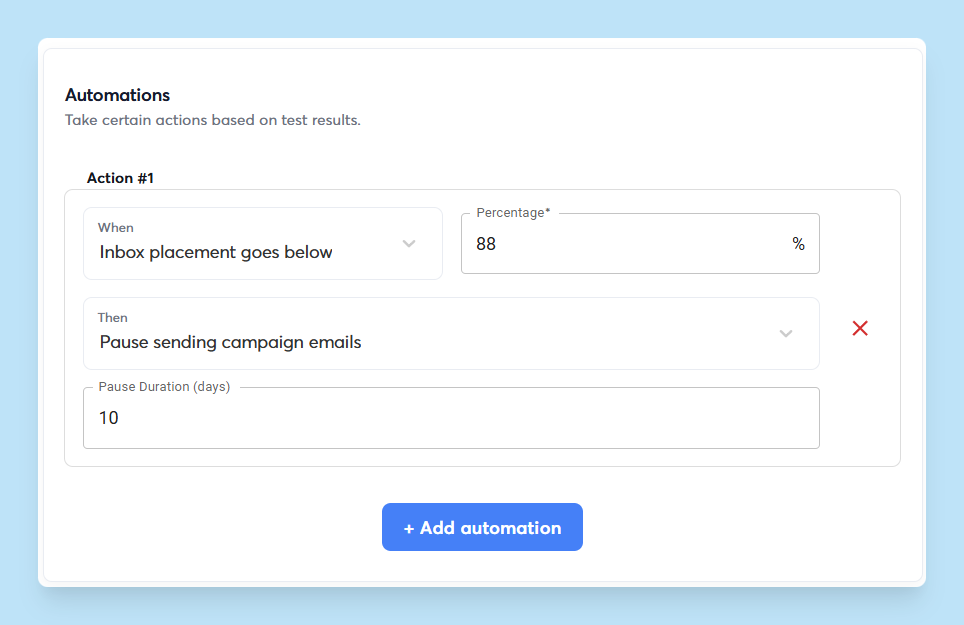
There are also options for automated workflows that trigger based on email performance. For example, when a campaign goes below a certain threshold, Instantly can pause that campaign so you can find any underlying issues ASAP.
Review Bounce Rates
Find your bounce data inside your sending platform’s analytics dashboard. High hard bounce rates (above 2%) indicate poor list quality. You should also monitor spam complaint rates and block lists, and see if your domain is added.
Try looking at the domain bounce rates as well. The high bounce rates may be from a specific alternate domain. If that’s the case, it’s best to pause sending from that domain until you find the issue causing the high bounce rates.
Monitor Sender IP Reputation
If the IP you're sending from has a poor reputation, whether from your activity or someone else’s, it can quickly affect your deliverability. This is especially important if you're using a shared IP pool, where others’ spammy behavior can affect your results.
That’s where Instantly’s SISR system comes in. It automatically rotates and replaces underperforming IPs in your sending pool, so you always use clean, high-reputation infrastructure.
Track Deliverability Over Time
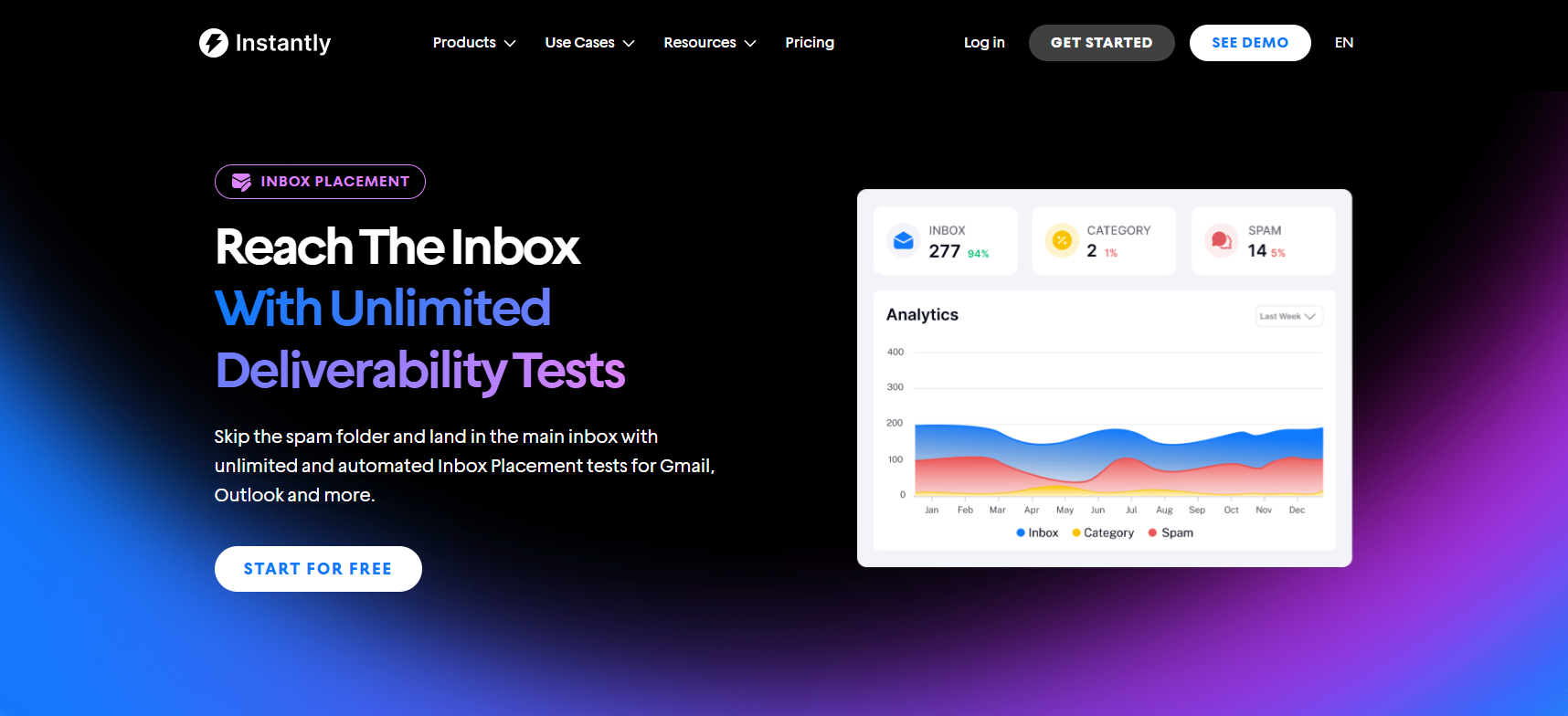
Deliverability isn't static. It changes with volume, engagement, and behavior. The more you scale, the more you'll need to ensure deliverability rates are pristine. Instantly's Inbox Placement Test feature does this for you automatically, so you don't have to worry about scaling. If your audit uncovers declining performance, learn how to improve email deliverability before increasing your sending volume.
The feature also monitors your IPs and domains against 94 blacklists, so you won’t have to worry about burning domains. Plus, you can test unlimited email accounts in parallel to get consistent deliverability without spending time and resources manually testing.
How Long Does an Email Deliverability Audit Take?
How long an email deliverability audit takes depends on the size and complexity of your setup. A basic review of one domain and a small number of inboxes may take a few hours, while an audit covering multiple domains, sending accounts and campaigns can take several days.
Some checks can be completed immediately, including SPF, DKIM, and DMARC validation, email blacklist monitoring, bounce-rate analysis and inbox placement testing. Other issues take longer to assess because sender reputation and placement trends need to be monitored over time.
If an email deliverability audit identifies damaged domains, sudden increases in volume or consistently poor inbox placement, recovery may take several weeks. For that reason, an email deliverability audit should be treated as both a point-in-time review and an ongoing monitoring process.
Email Deliverability Health Audit Tools
Email deliverability health audit tools help you identify whether performance issues come from your infrastructure, sending reputation, campaign setup, or contact data.
At a minimum, your audit process should let you validate SPF, DKIM and DMARC records, run inbox placement tests, monitor domain and IP blacklists and review bounce rates across individual sending accounts.
For larger outreach programs, automated monitoring is especially useful. Instantly’s Inbox Placement tests can run one-off or recurring checks across multiple accounts, helping teams spot whether a decline is limited to one inbox, domain, campaign, or email provider before it affects the wider program.
By the end of the audit, you should have a clear picture of which domains and sending accounts are healthy, where inbox placement is declining and which issues need to be fixed before you increase sending volume. This gives you a baseline you can compare against future email deliverability audits as your outreach program grows.
Why Use Instantly for Email Deliverability Audits?
Running an email deliverability audit across multiple domains and sending accounts can become difficult when authentication checks, inbox placement tests, lead verification and campaign monitoring sit across separate tools.
Instantly brings these workflows together within its cold email software. Teams can run inbox placement tests, monitor domain and IP health, track bounce rates and identify underperforming accounts before deliverability problems affect the wider campaign.
The Email warmup tool helps prepare new sending accounts and maintain healthy sending patterns, while email verification helps remove invalid contacts before they increase bounce rates. For teams scaling outreach, the platform can also automate recurring tests and pause campaigns when performance drops below a set threshold.
This makes it easier to treat deliverability auditing as an ongoing process rather than a one-off check. Start your 14 day free trial and monitor email deliverability across your outreach campaigns from one platform.
Key Takeaways
Poor email deliverability is a silent killer, especially when scaling cold outreach campaigns. To ensure pristine deliverability, you’ll need to consistently monitor domains, sending IPs, and lead lists. Here’s a quick recap of how to do just that:
- Authenticate domains before using them in campaigns
- Ensure lead lists are verified, cleaned, and segmented
- Run inbox placement tests to see issues before starting cold outreach
- Review bounce rates and look out for spam triggers in your email copy
- Monitor sender IP reputation and track deliverability over time
Instantly has every tool you need to automate and simplify all of the above. Ready to start scaling with high email deliverability? Try Instantly for free today.

Frequently Asked Questions About Email Deliverability Audits
What is an email deliverability audit?
An email deliverability audit checks the factors that determine where your emails land. It looks at your sending setup, domain reputation, bounce rates, list quality, sending patterns and inbox placement to uncover anything pushing messages toward spam.
How long does an email deliverability audit take?
A review of one domain and a small number of inboxes can often be completed in a few hours. Larger setups may take several days to assess properly, especially when you need to compare performance across multiple domains or campaigns. Fixing damaged reputation can take much longer.
How often should you run an email deliverability audit?
Run a full audit before launching a new sending setup or making a major increase in volume. After that, keep an eye on placement, bounce rates, blacklists, account health and run another detailed review if performance starts to slip.
Which tools are used to audit email program deliverability?
You will usually need tools for checking SPF, DKIM, and DMARC, monitoring blacklists, verifying email addresses, reviewing bounce data and testing inbox placement. For larger outreach programs, automated monitoring makes it easier to spot problems early.
What is the first step in auditing email deliverability?
Start with your sending domains. Confirm that SPF, DKIM, and DMARC are set up correctly, then move on to sender reputation, inbox placement, bounce rates, sending volume and contact quality.
Can poor contact data affect email deliverability?
Yes, outdated or invalid addresses increase bounces, while poorly targeted contacts tend to generate weaker engagement. Both can hurt sender reputation and make it harder to reach the inbox.


