



Updated November 26, 2026
TL;DR: This guide shows one way to draft a coordinated multi-touch sequence across email, LinkedIn, and voicemail. Growth marketers running multi-channel sequences can use it to produce a coordinated asset set that fits each channel, with Email 1 front-loaded because 58% of replies come from Step 1. You build a single master prompt on a structured campaign brief. In practice, the brief should define your ICP, offer, pain point, brand voice, and channel-tone variables before you generate, because vague inputs can lead to generic copy that reads as disconnected across channels. The approach below uses one prompt to draft all six assets (3 emails + 2 LinkedIn touches + 1 voicemail script) in a single pass. You can then A/B test the outputs to see which versions earn replies. Instantly.ai's 2026 benchmark report puts the platform average reply rate at 3.43%, so use that as your control baseline.
A single-channel prompt may give you a usable email. That same copy can sound off when you paste it into LinkedIn. Turn it into a voicemail script and it can come across as stiff and robotic.
The cause is usually the prompt, not the model. A prompt written for one asset often produces copy that only fits one asset.
This guide is for growth marketers who run multi-channel sequences. It walks through one example of a master prompt that drafts 3 emails, 2 LinkedIn touches, and 1 voicemail script from a single campaign brief. Each asset is written to fit its medium.
Core components of high-converting outreach prompts
This guide breaks a high-converting prompt into three layers: context, constraints, and channel-tone variables. Channel-tone variables are the settings that adjust tone and length for each channel.
The context layer defines who you are targeting, what you are offering, and why it matters. The constraints layer sets boundaries like word count, cadence, and banned phrases. The channel-tone variables adjust tone and structure for each medium so email stays concise, LinkedIn reads like a peer note, and voicemail sounds conversational.
Without these layers, you get generic copy. With them, you get a coordinated asset set that feels like one conversation across three channels.
Why single-asset prompts break sequences
Single-asset prompts ignore cadence logic and channel context. You ask for a cold email, the AI produces a 200-word email, and you paste it into LinkedIn where it sounds like a sales pitch.
The problem compounds when you consider that 58% of cold email replies come from Step 1, per Instantly's 2026 benchmark report. A weak first touch costs you replies, but strong follow-ups can win back some of them. The practical move is to front-load your strongest angle into Email 1 and treat every touch after it as a real chance to win the reply.
One approach worth testing is a master prompt that drafts all six assets in a single pass. It includes channel-tone variables in the prompt so each asset fits its channel.
Standardizing multi-channel copy outputs
In this guide's setup, one master prompt drafts a structured asset set. Each touchpoint is written to follow the same campaign logic. Each channel plays a distinct role. Email 1 introduces the offer. The LinkedIn touch follows up in a peer-to-peer tone. The voicemail script adds a reason to respond without repeating the same pitch.
Channel-tone variables do much of the work here. Email stays under 80 words with one CTA. LinkedIn reads like a short note from a peer, not a sales email. Voicemail scripts stay under 30 seconds and sound conversational.
Blueprint for building high-intent outreach briefs
The campaign brief is the input layer. Without it, the prompt has nothing to anchor on. To gather prospect details before you fill it in, try these AI prospecting prompts.
A good brief defines your ICP, offer, pain point, proof point, CTA, sequence length, and cadence. It also includes a brand voice block with tone adjectives, sentence length preferences, banned phrases, and example sentences. Every asset the AI generates should trace back to a parameter in the brief.
Key parameters for sequence prompts
A high-intent brief includes seven required parameters:
- ICP (Ideal Customer Profile): Job title, company size, industry, and any firmographic details that matter for targeting.
- Offer: What you are selling or proposing, stated in one sentence.
- Pain point: The specific problem your ICP faces that your offer solves.
- Proof point: One credible data point, case study, or customer result that supports your claim.
- CTA (Call to Action): The one action you want the prospect to take, such as booking a call, replying, or visiting a link.
- Sequence length: The number of touches in the sequence (typically 6 touches: 3 emails, 2 LinkedIn, 1 voicemail).
- Cadence: The timing between touches (typically 3-4 days apart early in the sequence, per Instantly's 2026 benchmark report).
Each parameter improves output quality. The ICP prevents generic copy. The pain point ensures relevance. The proof point adds credibility. The cadence ensures the AI understands the sequence structure, not just individual assets.
Defining brand voice for AI prompts
A brand voice block tells the AI how to sound. It includes tone adjectives, sentence length preferences, banned phrases, and example sentences.
Here is a copy-pasteable brand voice block:
Brand Voice:
- Tone: Direct, helpful, no hype. Use contractions. Avoid buzzwords like "synergy" or "game-changing."
- Sentence length: 15-20 words on average. Short sentences preferred.
- Banned phrases: "Hope this email finds you well," "Touching base," "Just following up," "Game-changer," "Revolutionary."
- Example sentences: "You mentioned X problem. Here is how to solve it." "Most teams see Y result in Z weeks."
The brand voice block lives in the master prompt, not in post-editing. If you have to rewrite every output to match your voice, the prompt failed.
Defining cadence and send intervals
Cadence is a prompt variable, not an afterthought. The AI needs to know the sequence structure so it can write follow-ups that reference previous touches without repeating them.
Instantly's 2026 benchmark report found that 4-7 steps is the optimal sequence length for cold email. Fewer leaves replies on the table. More erodes reply rates and raises spam complaints.
For a 6-touch multi-channel sequence, the cadence looks like this:
- Day 1: Email 1
- Day 3: LinkedIn touch 1
- Day 5: Email 2
- Day 8: Voicemail
- Day 10: LinkedIn touch 2
- Day 12: Email 3
Email touches can be 3-4 days apart early in the sequence. In this cadence, LinkedIn touches are spaced wider (Day 3 and Day 10) because the sequence uses LinkedIn sparingly as a secondary channel. Voicemail works best after email touch 2 or 3, when the prospect has seen your name but has not replied.

Master prompt: 3 emails + 2 LinkedIn touches + 1 voicemail script
This is the centerpiece. The master prompt generates all six assets in one pass, with channel-tone variables baked in. Copy this prompt and replace the bracketed placeholders with your campaign brief data:
You are an expert B2B copywriter. Generate a 6-touch multi-channel outreach sequence based on the campaign brief below.

CAMPAIGN BRIEF:
- ICP: [Job title, company size, industry]
- Offer: [What you are selling, one sentence]
- Pain point: [The specific problem your ICP faces]
- Proof point: [One credible data point or customer result]
- CTA: [The single action you want the prospect to take]
- Sequence length: 6 touches (3 emails, 2 LinkedIn touches, 1 voicemail script)
- Cadence: Day 1 (Email 1), Day 3 (LinkedIn 1), Day 5 (Email 2), Day 8 (Voicemail), Day 10 (LinkedIn 2), Day 12 (Email 3)

BRAND VOICE:
- Tone: [e.g., Direct, helpful, no hype]
- Sentence length: [e.g., 15-20 words average]
- Banned phrases: [e.g., "Hope this email finds you well," "Touching base," "Game-changer"]
- Example sentences: [e.g., "You mentioned X problem. Here is how to solve it."]

CHANNEL-TONE VARIABLES:
- Email: Under 80 words, one CTA, one proof point, no jargon. Subject line of 6 to 10 words, about 35 characters, and preview it on mobile.
- LinkedIn: Under 100 words, peer-to-peer tone, reference a shared context or trigger event, ask a small question.
- Voicemail: Under 30 seconds when read aloud, conversational tone, permission-based (e.g., "If this is not relevant, no worries"), reference the email you sent.

OUTPUT FORMAT:
Generate all six assets in this order:
1. Email 1 (Day 1)
2. LinkedIn touch 1 (Day 3)
3. Email 2 (Day 5)
4. Voicemail script (Day 8)
5. LinkedIn touch 2 (Day 10)
6. Email 3 (Day 12)

For each asset, include the day it sends and the channel. Do not repeat the same pitch across touches. Each touch should advance the conversation, not restate it.
This prompt produces a coordinated asset set because it defines the sequence structure, cadence, and channel-tone variables before generation.
Building the full sequence prompt
The master prompt has four components: role, context, constraints, and output format.
The role ("You are an expert B2B copywriter") sets the baseline for quality. The context (campaign brief) anchors the output to your specific ICP and offer. The constraints (brand voice, channel-tone variables) prevent generic copy. The output format forces the model to produce all six assets in one pass, which ensures the sequence feels connected.
Without the output format section, the AI might produce three emails and stop. Or it might produce six assets but ignore the cadence logic.
Adjusting prompts for brand voice
You can swap the brand voice block without rewriting the whole prompt. Just replace the tone adjectives, sentence length, banned phrases, and example sentences with your own.
Here is a before/after example of a tone adjustment:
Before (generic): "Hope this email finds you well. This message is to share a solution that could help your team."
After (with brand voice block applied): "You mentioned scaling outbound is a bottleneck. Here is how teams like yours cut ramp time in half."
The difference is specificity. The brand voice block forces the AI to reference the ICP's pain point and skip the fluff. For more copy-ready templates, see these AI outreach copy prompts.
Optimizing output for A/B testing
You can instruct the model to produce two variants per touchpoint by adding this line to the output format section:
For each asset, generate two variants: Variant A (control) and Variant B (test). Vary the subject line for emails, the opening line for LinkedIn, and the hook for voicemail.
This gives you 12 assets to test (6 touches × 2 variants). You can then convert the output into Spintax for per-lead variation.
Spintax uses the format {{RANDOM | option1 | option2}} to create variations. For example:
Subject: {{RANDOM | Quick question about [pain point] | [First name], saw your post on [topic]}}
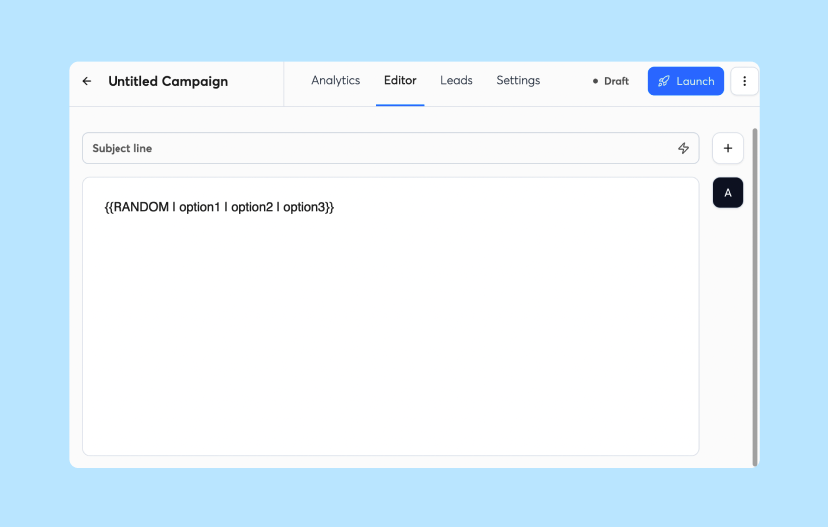
Each lead receives a unique combination of these variations, which can reduce identical-copy flags and give you data on which variant performs best.
Maintaining brand voice across every sequence step
To audit outputs for voice consistency, read each asset aloud and ask: does this sound like one person wrote it, or three different people? If the email sounds formal, the LinkedIn touch sounds casual, and the voicemail sounds robotic, the brand voice block needs tightening.
Email: structural rules for high replies
Instantly's 2026 benchmark report found that elite first-touch emails average fewer than 80 words. Keep it short, one CTA, one proof point, no jargon.
Here is a well-structured email output:
Subject: Scaling outbound for [Company name]

Hi [First name],

You mentioned scaling outbound is a bottleneck. Most teams cut ramp time in half by automating follow-ups and keeping lists clean.

[Customer name] booked 15 demos in 10 days with this exact setup.

Worth a 10-minute call next week?

[Your name]
This email is 47 words, has one CTA, one proof point, and no fluff. The proof point ("[Customer name] booked 15 demos in 10 days") is illustrative. Replace it with your actual customer result.
Structuring credible LinkedIn prompts
LinkedIn reads like a peer note, not a sales email. Keep it under 100 words, reference a shared context or trigger event, and ask a small question.
Here is a LinkedIn touch output:
Hi [First name], saw your post on scaling SDR teams. Many B2B SaaS teams are working on this exact problem. Curious, are you testing multi-channel sequences or sticking to email only?
This is 31 words, references a shared context (their post), and asks a small question.
Voicemail scripts: tone and timing
Voicemail scripts stay under 30 seconds, use a conversational tone, and reference the email you sent.
Here is a voicemail script output:
Hi [First name], this is [Your name] from [Company]. An email about scaling outbound for [Company name] went out last week. Not sure if it's a fit, but a direct call seemed worth trying. If it's relevant, a 10-minute call can show you how [Customer name] cut ramp time in half. If not, no worries. The number is [Phone number]. Thanks.
This script takes approximately 25-30 seconds at a normal pace. It references the email, uses a permission-based tone ("If not, no worries"), and includes a clear CTA.
How to write multi-touch sequences with AI
Follow these five steps to turn the master prompt into a live, testable campaign.
Step 1: set your reply rate goal and campaign intent
Set the baseline before you generate any copy. Instantly's 2026 benchmark report puts the platform average reply rate at 3.43%, with top-quartile senders reaching 5.5%+.
Define what a win looks like for this sequence. If your current reply rate is 2%, a realistic goal is 4% (double your baseline, but still below top quartile). If you are already at 4%, aim for 6%.
Also define the intent. Is this sequence for booking demos, driving webinar signups, or qualifying leads? The CTA in your campaign brief should match the intent.
Step 2: plot your touchpoint cadence
Map the 6 touches across a timeline using the cadence from the master prompt.
Remember that 58% of replies come from Step 1 and 42% from follow-ups. Front-load quality into Email 1 and LinkedIn touch 1. If those touches are weak, later follow-ups have less to work with.
Step 3: build assets with master prompts
Use the master prompt from the previous section. Replace the bracketed placeholders with your campaign brief data, then generate all six assets in one pass. For longer cadences, see these prompts for sales sequences.
You can also use Instantly's AI Sequence Writer to generate a full multi-step email sequence from the business details and customer profile configured in Copilot. The AI Sequence Writer is built into the platform.
Once you have the output, review each asset for voice consistency and channel fit. If an asset feels off, adjust the brand voice block or channel-tone variables and regenerate.
Step 4: calibrate tone for higher replies
Run the output through a tone check. Does each asset sound native to its channel? Does the email stay under 80 words? Does the LinkedIn touch read like a peer note? Does the voicemail script stay under 30 seconds?
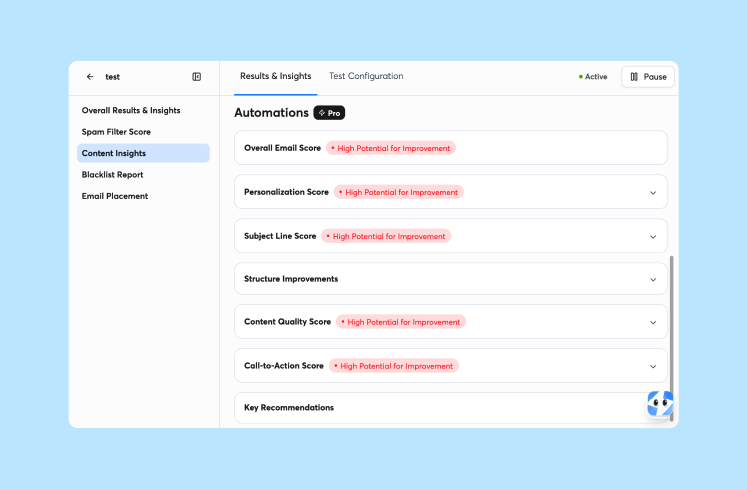
You can also use Instantly's AI Spam Words Checker to flag spam-triggering language in email copy. The tool uses an AI model that evaluates context, not just keyword-matching, so it catches phrases that might hurt deliverability even if they are not on a traditional spam list.
If an asset fails the tone check, rewrite it manually or adjust the master prompt and regenerate.
Step 5: audit channel reply rates
Track reply rates by touchpoint in your analytics. Instantly's 2026 benchmark report found that 58% of replies come from Step 1 and 42% come from follow-ups, so use that split as a diagnostic.
As a working rule, if Step 1 contributes less than half of total replies, review Step 1 first. If LinkedIn touches are driving more replies than email, consider shifting budget to LinkedIn. If voicemail is not driving callbacks, test a shorter script or a different hook.
Use the data to identify which channel or step underperforms, then adjust the master prompt accordingly.
A/B testing frameworks for outbound sequences
A/B testing multi-touch sequences requires isolating one variable at a time. If you change the subject line, opening line, and CTA in the same test, you will not know which change drove the lift.
Measuring lift in multi-touch tests
Define the metric before you run the test. For multi-touch sequences, the metric is reply rate by step, not just aggregate reply rate.
Use the benchmark baselines as control numbers. Instantly's 2026 benchmark report puts the average reply rate at 3.43% and top quartile at 5.5%+. If your current sequence is at 3%, a realistic test goal is 4.5% (halfway to top quartile).
Run each test until you have enough sends to trust the result. As a rough guide, at least 100 sends per variant gives you a directional read, though 500+ per variant gives you a more reliable signal. Larger samples improve confidence, and the sample you need depends on the size of the lift you are trying to detect.
Using Spintax for variant tests
Spintax lets you test multiple variants without creating separate campaigns. The syntax is {{RANDOM | option1 | option2}}.
Here is an example of a Spintax subject line:
Subject: {{RANDOM | Quick question about [pain point] | [First name], saw your post on [topic] | Scaling [outcome] for [Company name]}}
Each lead receives one of the three options, chosen at random. This can reduce identical-copy flags and give you data on which variant performs best.
You can also use Instantly's AI Spintax Writer to auto-generate Spintax variants from existing copy. Just paste in your email or LinkedIn touch, and the tool will create multiple variations with Spintax syntax baked in.
Tracking reply rates by touchpoint
Use step-level analytics to see which touchpoint drives replies. If Email 1 has a 2% reply rate, Email 2 has a 1% reply rate, and LinkedIn touch 1 has a 4% reply rate, LinkedIn is outperforming email.
Instantly's 2026 benchmark report found that 58% of replies come from Step 1, so if Step 1 is underperforming, fix Step 1 before touching follow-ups.
You can also use A/Z testing to test multiple variants per step. Growth includes A/Z testing, but the full 26-variant capability is gated to Hypergrowth ($107/mo) and above.
Solving performance dips in automated outreach
Performance dips usually trace to copy fatigue, channel mismatch, or scope creep in prompts.
Why identical copy kills engagement
Identical copy across leads and channels triggers spam filters and reader fatigue. If every lead receives the same email, email providers flag it as bulk mail. If your LinkedIn touch is a copy-paste of your email, prospects ignore it because it does not feel native to the platform.
Spintax and A/Z testing add per-lead variation. Spintax varies copy at the lead level, which can reduce identical-copy flags, and A/Z testing lets you test multiple variants to find what drives replies. Growth includes A/Z testing, but the full 26-variant capability is gated to Hypergrowth ($107/mo) and above.
Tailoring prompts to channel specs
Reiterate channel-tone variables in every prompt. Email stays under 80 words, LinkedIn stays under 100 words, voicemail stays under 30 seconds.
Here is a quick checklist for auditing each asset:
- Email: Under 80 words, one CTA, one proof point, no jargon, subject line of 6 to 10 words (about 35 characters), previewed on mobile.
- LinkedIn: Under 100 words, peer-to-peer tone, references shared context or trigger event, asks a small question.
- Voicemail: Under 30 seconds when read aloud, conversational tone, permission-based, references the email you sent.
If an asset fails the checklist, rewrite it or adjust the master prompt.
Limiting scope in multi-channel prompts
Do not ask one prompt to do everything. Limit scope to one campaign, one ICP, one offer.
If you try to generate assets for multiple ICPs or offers in one prompt, the output will be generic. The AI cannot write specific copy if the brief is vague. Scope creep produces generic output. Keep the brief tight, and the output will be specific.
Try Instantly free and use the AI Sequence Writer to turn this prompt framework into a live multi-step campaign. The AI Sequence Writer generates a full sequence from the business details and customer profile configured in Copilot, and you can A/B test the output with Spintax and A/Z testing built in. Growth includes A/Z testing, but the full 26-variant capability is gated to Hypergrowth ($107/mo) and above.
FAQs: multi-touch outreach copy prompts
How many touches should a multi-channel sequence include?
Six touches is one common setup for B2B outbound, not the standard. Treat this cadence as one testable template: 3 emails, 2 LinkedIn touches, and 1 voicemail. Instantly's 2026 benchmark report found that 4-7 steps is the optimal range for cold email, so a 6-touch multi-channel sequence fits within that window.
Can you use the same prompt for different industries?
Yes, but you need to swap the campaign brief data for each industry. The master prompt structure stays the same, but the ICP, pain point, proof point, and brand voice block should change to match the new industry.
What's the best order for email, LinkedIn, and voicemail?
Start with email on Day 1, add LinkedIn on Day 3, follow up with email on Day 5, leave a voicemail on Day 8, add a second LinkedIn touch on Day 10, and close with email on Day 12. This cadence front-loads the highest-reply channels (email and LinkedIn) and uses voicemail as a mid-sequence pattern interrupt.
How do you maintain brand voice across all assets?
Use a brand voice block in your master prompt with tone adjectives, sentence length preferences, banned phrases, and example sentences. If you have to rewrite every output, the brand voice block needs tightening.
Should you generate all assets at once or iterate?
Generate all six assets in one pass using the master prompt. This ensures the sequence feels connected and each touch references the same campaign logic. You can iterate on individual assets after the first generation, but start with a full pass to get the structure right.
Key terms glossary
Multi-touch sequence: A multi-touch sequence is a coordinated series of outreach touches across multiple channels (email, LinkedIn, voicemail) that reference the same campaign logic and advance the conversation.
Channel-tone variables: Channel-tone variables are prompt parameters that adjust the tone, length, and structure of copy for each channel. Email stays under 80 words, LinkedIn reads like a peer note, and voicemail stays under 30 seconds.
Campaign brief: A campaign brief is the input layer for a master prompt. It defines the ICP, offer, pain point, proof point, CTA, sequence length, and cadence for a multi-touch sequence.
Spintax: Spin syntax (or Spintax) is a formatting method that creates per-lead copy variation using the syntax {{RANDOM | option1 | option2}}. Each lead receives a unique combination of variations, which can reduce identical-copy flags and give you data on which variant performs best.
Read next
- ChatGPT prompts for value proposition messaging: one core story for every persona: Learn how to turn one core value proposition into prompts that fit each buyer persona.
- Industry-specific outreach prompts: SaaS, agency, recruiting, and e-commerce: See how to adapt your outreach prompts to the buyers and language of four common industries.
- AI prospecting prompts: common mistakes and fixes: Find out which mistakes make AI prospecting prompts return weak results and how to fix them.


