



Updated November 25, 2026
TL;DR: AI-generated prospect data requires validation before it enters your CRM. Growth marketers running outbound experiments should run this checklist before every import to keep attribution clean and A/B test results valid. Run this six-step checklist: validate firmographics against a second source, cross-reference through waterfall enrichment providers, filter risky emails with verification, confirm job titles against LinkedIn, screen company data for mismatches, and verify inbox placement setup. Target a bounce rate below 2%. Instantly.ai Lead Finder runs waterfall enrichment across seven providers (1 credit for an own-database match, 2 credits for a partner match, 0 credits if no match). Built-in email verification is a separate step that costs 0.25 credits per lead. Together they catch hallucinated data before it reaches your campaigns.
Hallucinated AI-generated qualification data can misdirect sales effort and skew the pipeline numbers you report on. For Growth Marketers running outbound experiments, unvalidated AI data corrupts attribution, inflates bounce rates, and makes A/B test results impossible to trust. This guide gives you a six-step validation checklist that keeps AI-generated prospect data clean enough for sequencing and revenue tracking.
Why raw AI lead data sabotages pipeline accuracy
AI prospecting tools generate confident outputs even when source data is incomplete. AI hallucinations happen when an AI tool produces confident but incorrect output that sounds right but isn't true. When you prompt an AI to "research Company X" without verified source documents, it can invent false details rather than return an empty field.
For a repeatable workflow, try these ChatGPT prompts for prospecting.
A hallucinated job title routes your enterprise sequence to a coordinator. A fabricated "saw your recent funding announcement" opening line triggers an immediate unsubscribe. These failures don't show up as bounces. They show up as zero replies and inconclusive A/B tests.
Mitigating AI data hallucinations
The mechanism is probabilistic generation. When an AI enrichment tool encounters a contact with a missing job title, it predicts the most likely title based on company size, industry patterns, and the person's name. If source data shows "John Smith, Acme Corp, 50 employees, SaaS," the AI might output "VP of Sales" because that's statistically common. But John Smith is actually the Director of Marketing.
Data quality and hallucinations are common failure points in AI sales tools. The problem compounds when you import unvalidated outputs directly into your CRM: every downstream decision (segmentation, personalization, attribution) inherits the error.
To see how constrained prompts prevent bad data, read about AI prospecting prompt mistakes.
The fix is treating every AI-enriched field as a hypothesis that should pass deterministic verification (syntax, MX record, and SMTP checks for emails) before it earns a place in your CRM.
Ensuring data accuracy for experiments
Dirty data breaks experiment validity. If half your list bounces at 6% and the other half at 1%, you can't isolate whether your subject line variant or send window drove the reply rate difference.
In practice, unverified lists tend to bounce more than verified ones, which can put sender reputation at risk. Instantly's 2026 benchmark report found that top-quartile senders maintain bounce rates below 2%, a threshold that requires a validation layer between AI enrichment and campaign launch.
Tracking leads from source to revenue
Attribution breaks when a lead's source field is wrong. If your AI tool claims a prospect came from "LinkedIn Sales Navigator export" but the data actually came from a third-party database match, your source-to-revenue reporting measures the wrong channel.
The solution is a validation contract. Define mandatory fields and verification thresholds before enrichment runs, then route outputs through deterministic checks and waterfall fallback. Only verified fields get mapped to your CRM.
Proven methods to verify AI lead data
This six-step checklist checks each AI-generated field against a second source before it reaches your CRM, so only verified data enters your campaigns.
1. Validate core firmographic inputs
Start with company name, domain, industry, and employee count. These fields anchor every downstream personalization and segmentation decision.
Single-source enrichment queries one database and returns whatever it holds, even if stale. Waterfall enrichment queries multiple providers in sequence and stops at the first verified result, so gaps left by provider one get filled by providers two and three.
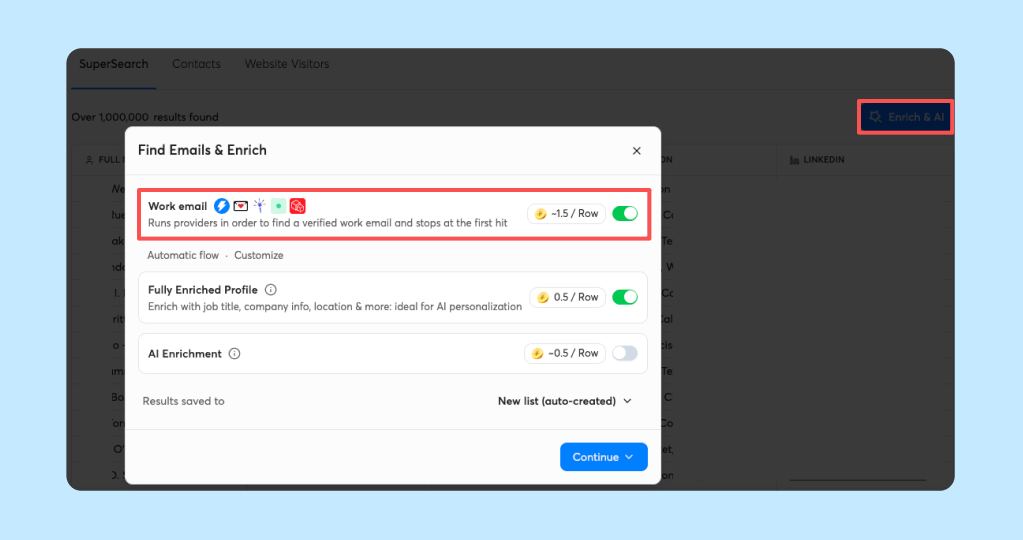
Use deterministic database matching for firmographics, not AI prediction. If a company name doesn't match a public business registry, flag it. If the domain doesn't resolve at all, flag it too.
Pass threshold: Flag any company name that does not match a public registry and any domain that does not resolve at all.
2. Validate leads via third-party sources
Cross-reference enriched fields against at least one independent data provider.
Instantly's Lead Finder runs waterfall enrichment across seven data partners (BetterContact, ContactOut, Findymail, IcyPeas, LeadMagic, Prospeo, and Wiza). The system checks Instantly's own database first (1 credit per verified match), then falls back through partners (2 credits per partner match). You pay 0 credits if no provider returns a verified email. Every match passes through syntax validation, MX record verification, and SMTP handshake.
Pass threshold: Every email must come from a verified database match, not an AI prediction.
3. Filter leads to prevent soft bounces
A soft bounce occurs when an email is temporarily undeliverable. A hard bounce means the address doesn't exist. Both damage sender reputation, though hard bounces are generally treated as more severe by receiving servers.
Instantly's email verification classifies every address into three categories: verified (passed syntax, MX, and SMTP checks), risky (passed syntax but failed SMTP or MX), and invalid (failed one or more checks). Per Instantly's verification documentation, catch-all domains, which accept all addresses and make standard SMTP verification unreliable, sit inside the risky category. Risky addresses look correct but may not deliver, and sending to them can push your bounce rate past the below-2% threshold in Instantly's 2026 benchmark report.
Instantly's built-in Email Verification engine costs 0.25 credits per lead. You can verify leads as you upload them to a campaign or after upload, and each lead comes back as Verified, Invalid, or Risky. For example, verifying 1,000 leads costs 250 credits. A separate catch-all verification pass (also 0.25 credits per lead) can recover an estimated 300-400 additional usable contacts per 1,000 leads that standard verification would mark as risky, catch-all, or unknown.
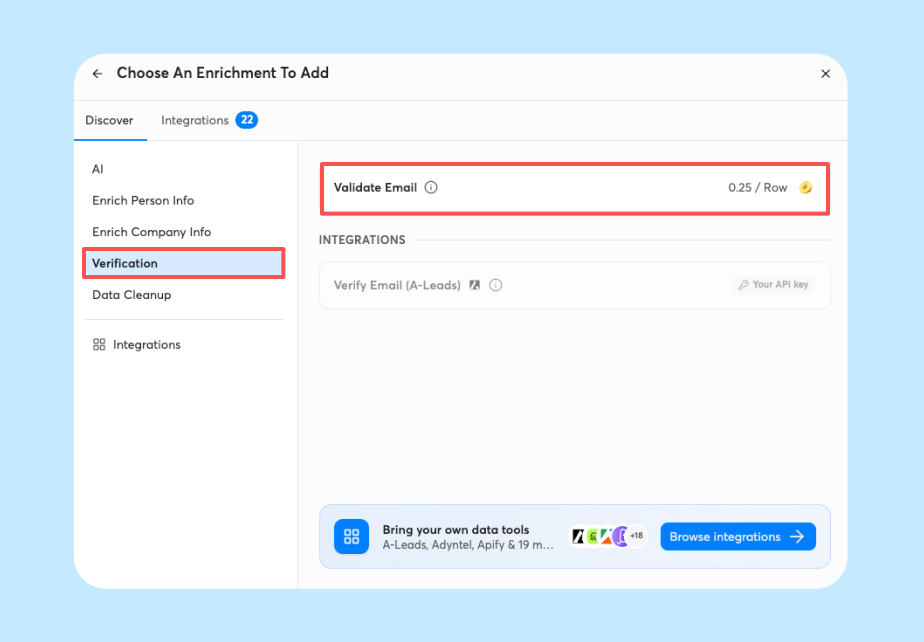
Pass threshold: Send only to valid addresses. Reject invalid and risky outright. Decide on catch-all based on your risk tolerance.
4. Confirm prospect job level accuracy
Job title and seniority are the most hallucination-prone fields in AI enrichment. An AI tool given "VP of Sales," "Director of Marketing," and "Sales Manager" from fragmented sources might output "VP of Marketing" because that pattern appears frequently in its training data.
As a working rule, spot-check 5 to 10% of each batch against LinkedIn or company team pages. If your sample shows a high error rate, treat your whole list as likely carrying a similar error rate, since a small sample gives only a rough estimate. Re-verify through a deterministic source.
Pass threshold: As a working rule, if your sample audit surfaces more than 10% job title errors, treat the whole batch as suspect and re-verify it against LinkedIn or company team pages before import.
5. Screen prospect firmographics accuracy
Verify company revenue, funding stage, and tech stack against the company's own published data. If enrichment claims Series C but their website states Series B, the enrichment is stale or hallucinated. If enrichment says 500 employees but LinkedIn shows 150, that's a data quality issue that will misroute segmentation. When in doubt, rely on the company's own published information over a third-party database, then re-verify the database record.
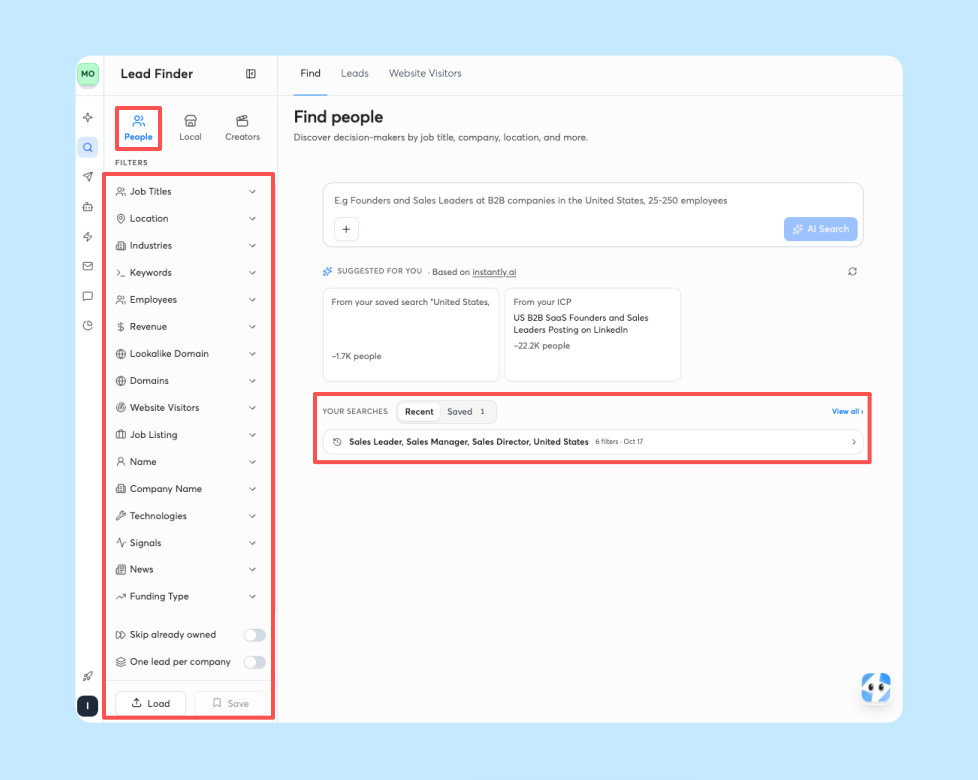
Pass threshold: Aim for high accuracy on employee count and industry. Set your exact threshold from sample audit results. Treat revenue and funding fields with more caution, since private companies often don't publish them.
6. Validate setup for inbox placement
Even a perfect list bounces if your domain reputation is broken. Before sending to any validated list, confirm your DNS records (SPF, DKIM, DMARC) are configured correctly and warmup status is active.
Run an Inbox Placement test to confirm emails land in the primary inbox. Instantly's Inbox Placement tool monitors blacklists and sends test emails to seed addresses across major providers (Gmail, Outlook, Yahoo).
Pass threshold: 90% or higher inbox placement across seed addresses. No blacklist hits.

Optimizing enrichment sequences for CRM sync
The validation layer sits between AI enrichment and CRM import.
Choosing the right enrichment and verification layer for your stack
Here is how the tools in your stack compare on enrichment and verification so you can choose the right layer for your workflow.
| Tool | Enrichment Method | Verification Included | Credit Model |
|---|---|---|---|
| Instantly Lead Finder | Waterfall across 7 partners | Yes, built-in (0.25 credits/lead) | 1 credit own-database match, 2 credits partner match, 0 if no match |
| Apollo | Waterfall (own database first, then partner providers) | Yes, built-in | Per seat + credits |
| Clay | Custom waterfall logic | Marketplace providers or your own key | Platform fee + provider costs |
| NeverBounce | Standalone verification API | Core product | Pay per verification |
| ZeroBounce | Standalone verification API | Core product | Pay per verification |
Apollo pairs its database with built-in verification, and Instantly matches that with waterfall fallback across seven providers on a credit model (1 credit for an own-database match, 2 credits for a partner match, 0 if no match), so you avoid per-seat pricing.
Clay offers flexible waterfall logic you build yourself, and Instantly's pre-built waterfall runs automatically when you click "Convert into leads," so you skip workflow construction and pay 0 credits when no provider returns a verified email.
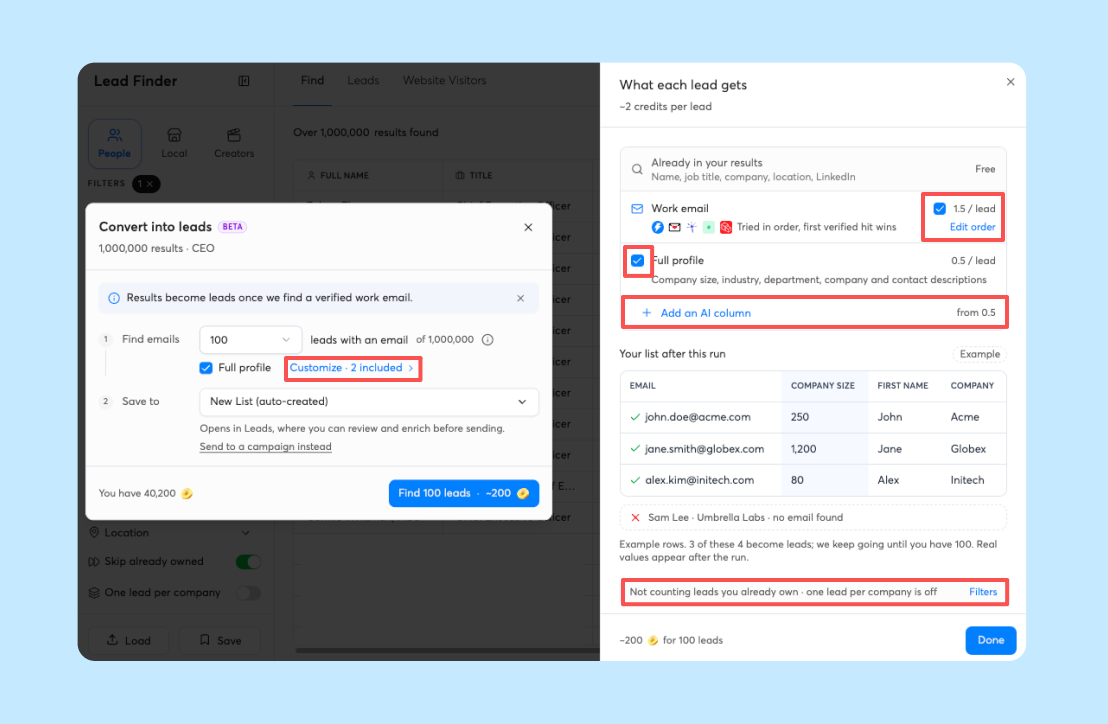
NeverBounce and ZeroBounce provide strong verification APIs, and Instantly bundles verification directly into Lead Finder at 0.25 credits per lead, so you avoid integration overhead and per-verification costs.
Defining secondary verification logic
Verification must run after the waterfall, not inside it. Running verification once at the end avoids paying for the same check repeatedly. If each provider verifies its own output, a record passing through three providers gets checked three times and billed three times.
| Method | Data Source | Accuracy | Common Use Case |
|---|---|---|---|
| Deterministic | Database matching, MX validation, SMTP handshake | High, confirms deliverability | Pre-send filtering, compliance |
| Probabilistic | AI prediction, pattern matching | Lower, predicts missing fields rather than confirming them | Draft values for initial list building, verified before use |
Deterministic verification answers "can you send to this address?" Probabilistic enrichment answers "who is this person likely to be?" You need both, in that order.
Filtering low-quality AI leads
Set thresholds and drop leads that fail them: missing mandatory fields (email, job title, or company is blank), risky email status, job title mismatch with company size, unverified job title with no LinkedIn match, or catch-all domain.
Instantly's BounceShield automatically skips known high-risk recipients based on real-time and historical bounce data. It's enabled by default. To disable it (not recommended), toggle off BounceProtect in Settings > Allow risky emails.
Human audit for AI data accuracy
As a working rule, schedule a manual review of 5 to 10% of enriched leads. Check email, job title, company, and intent signal.
For a closer look at time, cost, and accuracy, see AI versus manual research.
Even good enrichment tools carry some inaccuracy, and bounce rates can climb quickly enough to affect sender reputation if verification is skipped.
As a working rule, if your audit shows more than 10% inaccuracy on critical fields, pause the enrichment source and investigate.
Verification checkpoints before CRM sync
The final gate before CRM import is a series of automated checks that catch duplicates, unsubscribes, and sync errors.
Scrubbing AI leads for inbox placement
Run the list through Email Verification before import. Depending on your risk tolerance, you might accept valid and unknown addresses but reject risky and invalid outright. The 0.25 credits per lead cost is cheaper than the sender reputation damage from a 5% bounce rate.
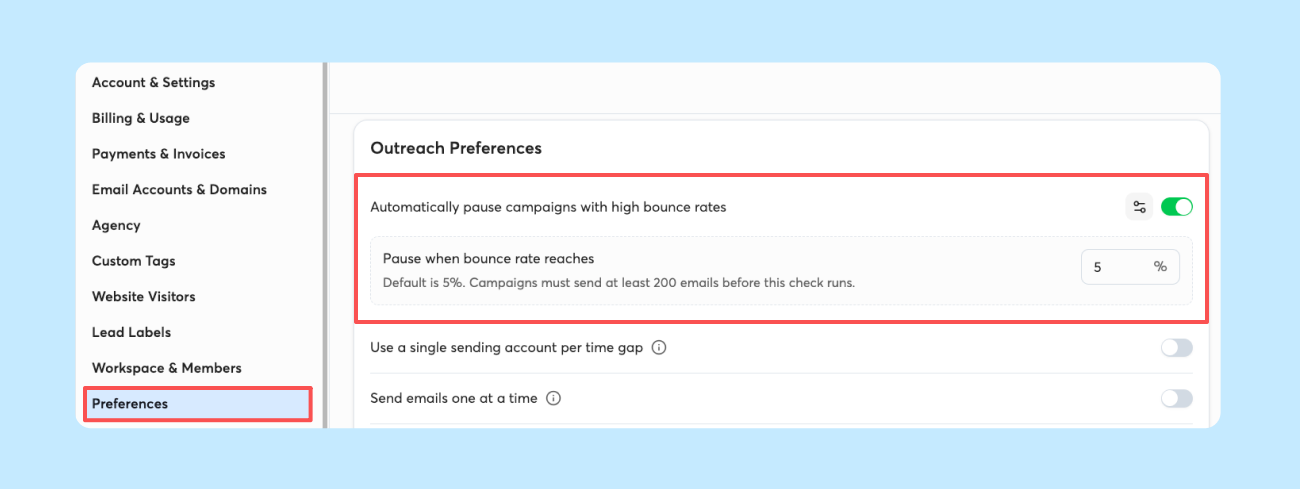
Instantly's high bounce auto-pause feature stops campaigns automatically when bounce rate exceeds 5% after 200 sends. This protects your domain, but it's reactive. The proactive move is verifying before you send.
Preventing duplicate lead entries
Dedupe by email and domain before CRM sync. Use Instantly's Global Blocklist to prevent re-importing bounced or unsubscribed leads. The blocklist is workspace-wide and checks at import time. You can configure it manually, via CSV upload (max 5MB), or through a live Google Sheets sync. Instantly also runs duplicate lead detection automatically when you import a CSV or sync from HubSpot.
Mapping required AI prospect fields
Define a data contract before enrichment runs:
| Field | Required | Notes |
|---|---|---|
| Yes | The only field Instantly requires. Verify it before import (recommended) | |
| First Name | Optional | Optional in Instantly, but recommended for personalization |
| Last Name | Optional | Optional in Instantly, but useful for record matching and compliance |
| Company | Yes | Must match business registry |
| Job Title | Yes | Spot-check against LinkedIn or the company team page |
| LinkedIn URL | Optional | Enables third-party Automations actions |
Only map verified fields to your CRM. If a field didn't pass verification, leave it blank rather than import it dirty.
Preventing outreach to opted-out leads
Check against suppression lists and unsubscribe history before every import. Instantly's AI Blocklist Triggers automatically blocklist leads based on unsubscribe status, account status, or reply-content keyword matches. Unsubscribe-based blocklisting is available on all plans. Only status-based and reply-content blocklisting require Hypergrowth or above. The system applies workspace-wide, so a lead who unsubscribed from Campaign A won't receive Campaign B.
Establishing ongoing health checks for AI data
Validation isn't a one-time cleanup. It's a recurring system that tracks data quality over time and flags when a source starts decaying.
Bounce rate tracking by source
Track bounce rate per enrichment source to identify which provider is staling. If Provider A shipped with 1% bounces but now delivers 4%, that provider's data is outdated. Rotate them out and fall back to Provider B.
Instantly's analytics dashboard reports bounce rate in Workspace Analytics, which shows the average bounce rate across your workspaces and lets you view or export bounce rate for each workspace. Set a threshold: below 2% is healthy. If you're meaningfully above 2%, your list has a hygiene problem, not a deliverability problem.
Reply rate correlation analysis
Compare reply rates across validated versus unvalidated lead cohorts. Instantly's 2026 benchmark report shows the platform average reply rate is 3.43%. Top-quartile senders reach 5.5% or higher. Top 10% hit 10.7% or higher.
If your unvalidated list replies at 2% and your validated list replies at 6%, the validation layer is working. If both reply at 2%, validation isn't the problem. Your messaging is. Compare your validated cohort against Instantly's 2026 benchmark report. A reply rate below the 3.43% platform average points to a messaging problem, and 5.5% or higher puts you in the top quartile.
Benchmarks for AI prospect data hygiene
Define a verification hit rate baseline: the percentage of AI-enriched leads that pass deterministic verification. Set your own starting target from your first audited batches, and expect own-database matches to pass at a higher rate than partner matches. Treat a sustained drop from your baseline as a warning sign that the enrichment source may be degrading. A declining trend means it's time to rotate providers or tighten your data contract.
Scheduled audits to validate AI lists
Set a recurring audit cadence based on volume. High-volume senders should audit weekly, while lower-volume senders can audit monthly. Spot-check new enrichment runs against your data contract. Log audit results in a spreadsheet or your CRM. Trigger re-enrichment or provider rotation if quality dips below your threshold.
Instantly's Deliverability AI Agent (available on Hypergrowth and above) monitors bounce rates, DNS health, blocklists, and warmup scores automatically. It runs every 24 hours and surfaces what's affected, why it matters, and one-click fixes.
Must-have filters for reliable CRM imports
The final layer is a set of filters and rules that catch errors during the CRM sync process itself.
Screening data before CRM upload
Run the six-step validation checklist as a pre-import gate. If a lead fails any step, don't import it. The cost of cleanup (manual CRM edits, attribution errors, re-segmentation) is higher than the cost of skipping it.
Instantly's Lead Finder ships with pre-verified leads, so if you're sourcing directly from its database of 450M+ verified B2B leads, you skip the manual screening step. CSV and HubSpot imports do not come pre-verified, so you'll need to run verification before mapping fields to your CRM.
Ensuring AI data accuracy at entry
Set field-level validation rules in your CRM or import tool. Map only verified fields to CRM properties. Leave unverified fields blank rather than import them as "unknown" or placeholder values.
For HubSpot users, Instantly's native integration handles lead import and Lead Finder export. To log activity (replies, opens, status changes) to the HubSpot contact timeline, build a workflow in the Automations builder. An Instantly trigger (Lead Replies, Email Opened) pairs with a HubSpot action (create/update contact, note, task). See the HubSpot integration guide for setup steps.
Detecting sync errors in prospect data
Monitor for field mismatches, encoding errors, and dropped records after sync. If your CRM shows 1,000 leads imported but only 950 have emails, 50 records lost their email field during sync.
Use Instantly's Automations to log sync events and flag failures. Create a workflow that triggers on "Lead added to list" and logs the event to a Google Sheet or Slack channel. If the expected field count doesn't match the actual count, you'll catch it immediately.
CSV imports to Instantly auto-map columns (max 50 variables, 20 characters per column name) and require a mandatory email column and the file saved in UTF-8 format. Lead counts update within 5 minutes. See the CSV import guide for formatting rules.
In short, validate every AI-generated field against a second source before it reaches your CRM. Check firmographics, run waterfall enrichment, verify emails, confirm job titles, and test inbox placement. Expect a bounce rate below 2%, cleaner attribution, and A/B test results you can trust.
Try Instantly free and run your next AI-generated list through Lead Finder's waterfall enrichment and verification before it touches your CRM. Instantly's native verification layer (0.25 credits per lead) classifies addresses valid, invalid, or risky, while waterfall enrichment across seven providers fills coverage gaps and catches hallucinations before they reach your campaign.
FAQs: validate AI-generated prospect data
What bounce rate indicates bad AI data quality?
Aim for below 2%, the bounce-rate threshold in Instantly's 2026 benchmark report. Above 5%, Instantly's auto-pause feature stops campaigns after 200 sends. As a suggested working scale (not an industry benchmark), below 1% is excellent, 1 to 2% is healthy, 2 to 3% requires monitoring, 3 to 5% means re-verify your list, and above 5% requires a full cleanup before you send again.
How often should you audit AI-generated leads?
Weekly for high-volume senders, monthly for low volume. As a working rule, spot-check 5 to 10% of each batch against LinkedIn or company websites. If quality degrades after two consecutive audits, pause new enrichment and investigate the source.
Can waterfall enrichment fix hallucinated data?
Yes, when it falls back to deterministic database matches. A waterfall checks providers one after another and stops at the first confirmed value. It cannot fix a field that no provider can confirm. If all seven partners in Instantly's waterfall return no match, the field stays blank rather than importing a hallucinated guess.
Which fields matter most for validation?
Email (deliverability), job title (persona fit), company (relevance), and seniority (decision-maker status). These four fields drive bounce rate and sequence fit. Validate them first. Validate secondary fields (intent signals, tech stack, funding stage) second.
Should you validate before or after CRM import?
Before. Validation after import means dirty data has already entered your attribution and sequencing. By then, you can't separate signal from noise in your reporting.
Key terms glossary
Waterfall enrichment: A process that checks multiple data providers in sequence until a verified match is found. If Provider 1 doesn't have the data, the system moves to Provider 2, then Provider 3, until a confirmed result is returned or all providers are exhausted.
Verification hit rate: The percentage of enriched leads that pass deterministic verification (syntax check, MX record validation, SMTP handshake). Set your own baseline from your first audited batches, and expect own-database matches to pass at a higher rate than multi-provider waterfall matches.
Firmographics: Company-level attributes such as industry, size, revenue, location, funding stage, and technology adoption. Used for segmentation and ICP matching.
Hallucination: AI-generated information that is plausible but false, often filling gaps where source data is missing or incomplete. Common in job titles, company firmographics, and intent signals.
Bounce rate: The percentage of sent emails that are rejected by the receiving server. Healthy cold email sits below 2%. In practice, unverified lists tend to bounce more than verified ones.
Read next
- AI prospecting prompts: common mistakes and fixes: Fix loose targeting, missing context, hallucinated data, and unverified contacts in your prompts.
- AI Prompts for Sales Prospecting: 10 Best Prompts to Try: Copy ready-made prompts that help you find, qualify, and write to prospects faster.
- How to Automate Prospect Research With AI Sales Assistants: Learn how AI assistants gather and organize prospect data so you spend less time on manual research.


