


Updated November 5, 2026
TL;DR: This guide organizes an AI company research workflow into four stages: prompt, validate, sync, and optimize. The prompt is the easiest part. The hard parts are validation, field mapping, and feedback loops, where agency operators lose money and burn domains. Instantly.ai combines Lead Finder, Copilot, Automations, and deliverability protections in one platform. Outreach is a flat fee with unlimited accounts, and Lead Finder and Copilot run on a separate Instantly Credits subscription. Instantly's 2026 benchmark report puts the platform average reply rate at 3.43 percent, with top-quartile senders reaching 5.5 percent or more. Build validation first, map AI outputs to CRM fields before you sync, and measure reply rates by data origin.
AI research tools can produce 100 enriched leads in minutes or 100 confidently wrong leads that burn a client domain. Most teams skip the validation layer and pay for it in bounce rates, but a repeatable AI company research workflow is a routing system, not a prompt library. If you run a lead-gen agency and manage outreach across multiple client domains, this guide is for you.
Why AI outperforms manual lead research at scale
Manual research is the bottleneck. Every prospect needs time for identification, company research, trigger detection, enrichment, and drafting. Across a team, that time multiplies with every SDR you add.
AI research compresses that to minutes. The AI Sales Agent costs 5 Instantly Credits per generated lead, and Copilot handles research, targeting, and campaign creation from a single credit pool. The speed gain is real, but only if the data is right.
The cost of manual research per lead
Volume without validation is a liability. AI-enriched data can include confidently wrong details, so it must pass through fact-checking rules before it reaches a sequence.
When to use manual research
Some operators argue manual research produces better results for high-value accounts, which is fair for six-figure deals. The answer is a hybrid approach: AI for volume, human review for high-value prospects. Route any lead with a low enrichment confidence score to manual research. AI research is not instant, so build your workflow to run enrichment in batches overnight and validation checks before the morning send window.
Manual research tends to deliver the highest accuracy but the slowest output, while fully automated AI research reverses those priorities.
| Method | Time per lead | Cost per lead | Data accuracy risk | Best use case |
|---|---|---|---|---|
| Manual research | Slowest, since every lead is researched by hand | Labor cost only | Low (human verified) | High-value accounts |
| AI-assisted (AI + human check) | Minutes, depending on review depth | Credits + spot-check labor | Varies with review depth (spot checks catch hallucinated data) | Hybrid workflows that pair AI volume with human review of high-value accounts |
| Fully automated AI | Fastest at batch scale, with no human review time | Credits only | High without validation | Volume prospecting with guardrails |
Design principles for AI-powered outreach engines
The prompt is not the product. A repeatable AI-powered cold outreach process is a validation and routing system, and most teams skip the validation.
The 4-step AI research workflow
- Prompt: Design research prompts that produce structured, usable data for cold outreach.
- Validate: Verify emails, check AI outputs against public sources, and route low-confidence leads to manual review before they reach a sequence.
- Sync: Map enriched data to CRM fields and push it into your email platform without manual re-entry.
- Optimize: Compare reply rates by lead source, test email variants, and retrain prompts when AI-enriched leads underperform.
Where AI agents drive lead data
Instantly runs a lineup of AI agents, and the credit system documentation lists six that are billed through Instantly Credits: AI Reply Agent (5 credits per reply), plus AI Sales Agent, AI Recruiting Agent, AI Investment Agent, AI User Research Agent, and AI Partnership Agent (5 credits per enriched lead each). The Deliverability AI Agent is included in Outreach on Hypergrowth and above. For company research, Copilot and AI Sales Agent do the heavy lifting. Lead Finder Agent monitors campaign lead counts and automatically tops up fresh leads when the count drops below your threshold.
Integration points with cold email tools
Your AI research to cold email pipeline only works if the data moves. Instantly connects to HubSpot natively, plus Zapier, Make, and Clay for orchestration. The Automations builder supports trigger-action flows with conditional branching, so you can route enriched leads into campaigns when a HubSpot contact is updated or a Zapier webhook fires. Clay users can push waterfall-enriched data directly, per Instantly's Clay integration guide.
Each stage has a distinct failure mode, and each failure mode has a known fix you can automate.
| Stage | Key actions | Tools | Potential failure mode | Possible fix |
|---|---|---|---|---|
| Prompt | Write prompts that return the same structured fields every time, starting from Lead Finder's AI Prompts & Enrichment templates | Copilot, AI Sales Agent, or a comparable research AI | Open-ended prompts can return generic outputs that could apply to any company | Add constraints to the prompt: set fixed output fields, require a verified work email, and require a recent funding or hiring trigger |
| Validate | Verify emails, check AI outputs against public sources, and route low-confidence leads to manual review | BounceShield (skips known high-risk recipients) and lead verification (marks emails valid, invalid, or risky at 0.25 credits per lead) | Unverified AI-enriched emails may push bounce rate above the 2% healthy threshold | Auto-pause at 5% after 200 sends |
| Sync | Map CRM fields, push to campaign | Automations, Zapier, HubSpot | Column names may not match campaign variables, so enriched data fails to map | Match column names to campaign variables, then use the native HubSpot integration or a Zapier or webhook flow |
| Optimize | Compare reply rates by lead source, test email variants, and retrain prompts | Analytics, A/Z testing (Growth includes A/Z testing, and the full 26-variant capability requires Hypergrowth at $107/mo or above) | AI-enriched leads may reply or convert below your manual-list baseline, or below the 3.43% platform average | Retrain the prompt with tighter constraints, or add providers through waterfall enrichment |
Stage 1: designing research prompts that produce usable data
The goal is structured data you can map to a field, not clever copy.
Prompt engineering for repeatable results
Write prompts that return the same fields every time: company name, industry, employee count, recent trigger (funding, hiring, expansion), and a verified work email. Avoid open-ended prompts like "describe this company." Lead Finder supports AI Prompts & Enrichment with models from OpenAI, Anthropic, Google, DeepSeek, xAI, and Perplexity, plus public community templates, so you do not start from scratch. Test any public template on a small batch before you run it on a full list.
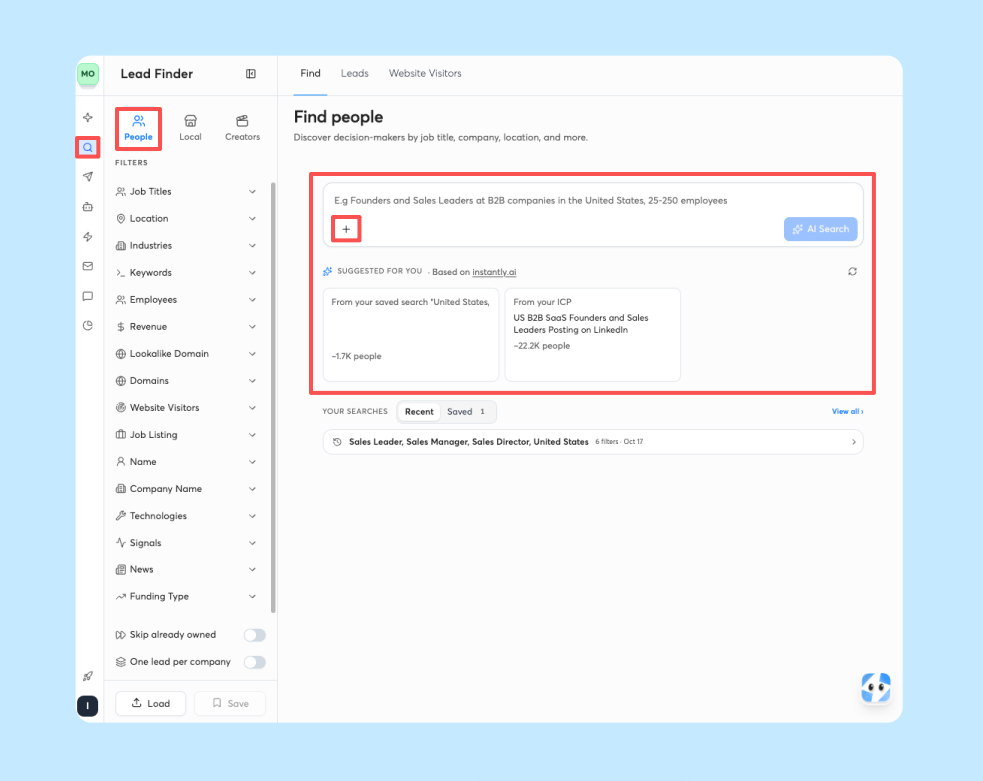
Clay offers enrichment waterfall workflows, and Instantly brings the same waterfall logic natively inside Lead Finder with seven providers, so you skip the separate tool and the per-row markup. Apollo positions its enterprise offering around governance and admin controls for multi-team organizations, backed by 240M+ contacts and 30M+ accounts. Instantly's 450M+ B2B leads come on a flat fee with unlimited accounts, so there is no per-seat tax as you scale.
Customizing prompts for firm vs lead data
Firmographic data (company size, revenue, industry) needs different prompts than contact-level data (job title, direct email, LinkedIn activity). Build two prompt templates: one for company research, one for contact research. The Signals filter in Lead Finder surfaces buyer-intent data across social activity, buying intent, growth signals, and company activity, with roughly 5.8 million new signals matched weekly.
Mapping AI research to CRM fields
Before you sync anything, map every AI output field to a CRM field. If the AI returns "recent funding round," your CRM needs a field for that. Instantly's CSV import auto-maps columns up to 50 variables, but the column names must match your campaign variables.
Customizing data for target markets
Different markets need different triggers. A SaaS company cares about tech stack changes, while a recruiting firm cares about leadership changes. Build prompt templates per client vertical and store them in a shared doc your junior staff can copy. Copilot Tasks let you schedule recurring research prompts daily, weekly, or monthly, so each client's research runs on autopilot.

Stage 2: validating AI outputs before they reach your sequences
Validation is not optional. Skip it and AI-enriched leads will tank your bounce rate.
Automated fact-checking rules
Build rules that flag suspicious outputs before they sync. Check that the email domain matches the company website. Verify the employee count is plausible for the industry. Cross-reference the funding trigger against a public source. Instantly's AI Spam Words Checker flags spam-triggering language in your copy, but you need equivalent checks for the data itself.
Identifying high-risk data points
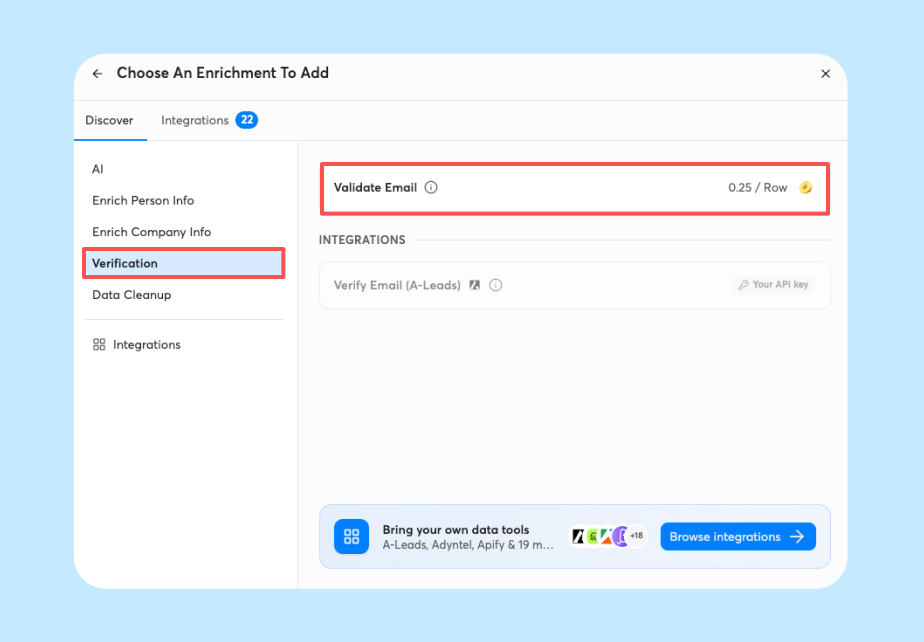
High-risk data points include emails from free providers (Gmail, Yahoo) for B2B outreach, job titles that do not match your target seniority, and companies with no website or a parked domain. BounceShield automatically skips known high-risk recipients based on real-time and historical bounce data and is enabled by default. To disable it for a specific send, toggle off BounceProtect in Settings.
Isolating low-confidence AI lead data
Any lead with a low enrichment confidence score should route to a manual review list, not a live campaign. Build this in as a hard gate. Lead verification costs 0.25 credits per lead and classifies addresses as valid, invalid, or risky before sending. Lead Finder-sourced leads ship pre-verified. CSV and CRM imports do not.
Bounce-risk checks and email verification
Run every imported list through verification before the first send. Instantly's high bounce auto-pause triggers at 5% bounce rate after a minimum 200 sends, but the 2026 benchmark report sets the healthy threshold below 2 percent. If your bounce rate crosses 2 percent, pause, re-verify, and restart at a lower send cap.
Stage 3: syncing research data to your CRM and email platform
Manual re-entry kills the ROI of AI research. The workflow only pays off if enriched data flows into campaigns without a human copying and pasting.
Cleaning research before CRM import
Standardize formats before import: dates in ISO format, employee counts as integers, industry tags matching your CRM picklist values. Instantly's CSV import requires UTF-8 encoding and a mandatory email column, and Instantly updates lead counts within 5 minutes of upload.
Merging overlapping prospect profiles
Duplicates waste credits and confuse reporting. Use your CRM's deduplication rules before pushing to Instantly. The HubSpot integration in Automations supports bidirectional sync, so when a HubSpot contact is updated, you can trigger an Instantly action like adding the lead to a campaign or list.
Automating AI-driven outreach sequences
Once the data is in, automate the sequence build. AI Sequence Writer generates a full multi-step sequence from offer and audience inputs, capped at 100 generations per workspace per month. Pair it with AI Spintax Writer to auto-generate Spintax variants from existing copy.
Automating your CRM data sync
Use native integrations where possible. For HubSpot, the Automations builder supports triggers like "contact updated" and actions like "add lead to campaign." For everything else, Zapier supports 11 trigger events including email sent, lead replied, and campaign completed. Webhooks are available on Hypergrowth and above. Instantly's API documentation provides webhook endpoints for custom sync flows on Hypergrowth and above.
Stage 4: optimizing AI research for higher reply rates
The workflow is not set-and-forget. You must measure whether AI-enriched leads actually outperform your baseline.
Segmenting response rates by data origin
Tag every lead with its data source: Lead Finder, CSV import, HubSpot sync, AI Sales Agent. Then compare reply rates for each source in your own campaign reports. A source that sits below the rest is the first place to look for a data problem. Instantly's 2026 benchmark report puts the platform average at 3.43 percent, with top-quartile senders at 5.5 percent or more. If your AI-enriched leads sit at 2 percent while manual lists hit 4 percent, the problem is the data, not the copy.
Refining prompts to reduce bounce rates
If AI-enriched leads bounce above 2 percent, retrain the prompt with constraints: only return leads with verified work emails, exclude companies with fewer than 10 employees, require a recent funding or hiring trigger. The waterfall enrichment checks Instantly's database first (1 credit), then sequences through BetterContact, ContactOut, Findymail, IcyPeas, LeadMagic, Prospeo, and Wiza (2 credits each). No match across all providers costs 0 credits.
Optimizing send limits via AI insights
Cap live campaign sends at 30 emails per inbox per day, per Instantly's sales execution guide. Warmup volume is separate and follows its own ramp. The Deliverability AI Agent monitors DNS health, blocklists, warmup scores, bounce rates, and provider balance every 24 hours, surfacing one-click fixes when metrics dip.
Signs your AI model needs retraining
Watch for three signals: reply rates drop below your baseline for two consecutive weeks, bounce rates creep above 2 percent, or the AI returns generic outputs that could apply to any company. When you see these, pause the workflow, audit the last 50 enriched leads manually, and retrain the prompt with tighter constraints.
How to automate B2B research without losing personalization
Use dynamic fields and computed variables so AI research fills the gaps without writing the whole email.
Dynamic field merging for cold outreach
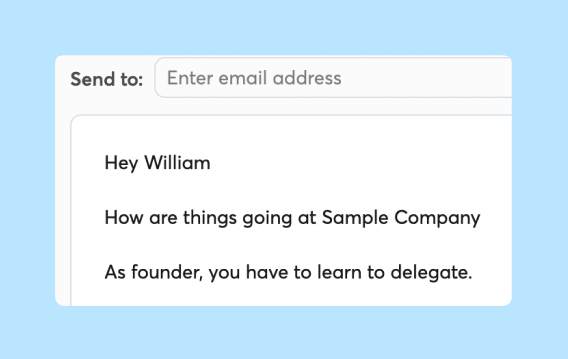
Instantly supports Spintax and custom variables up to 50 per campaign, with Liquid-style conditionals for attribute personalization. Map AI research outputs to variables like {{company_recent_trigger}} or {{industry_pain_point}}, and reference them in your sequence. The AI fills the variable. Your copy controls the message.
Managing AI compute for custom outreach
AI research costs credits. Lead Finder AI Prompts & Enrichment runs about 0.5 credits per row for most tasks, 1.5 credits per row for work-email enrichment, and 1 credit per row for engagement scoring. Data cleanup is free. Track consumption in the Credits dashboard and set monthly budget caps per client.
Benchmarking reply rates pre- and post-AI
Run a controlled test: send one campaign with manually researched leads and one with AI-enriched leads to the same ICP, then measure reply rate, bounce rate, and meetings booked. The first-touch email generates 58 percent of replies, so give each campaign at least 200 sends before you judge. If AI-enriched leads match or beat your manual baseline, scale the workflow. If they underperform, retrain.
Track research time saved, credits consumed, and meetings booked to calculate your true cost per meeting. The example below uses a single-client starter stack, so agency-scale usage across multiple clients consumes proportionally more credits.
| Input | Formula | Example |
|---|---|---|
| Research time saved | (Manual time - AI time) × leads | Illustrative only, using assumed times: (15 min - 3 min) × 500 leads = 6,000 min, or 100 hours. Replace both times with your own measured figures |
| Credits consumed | Sum of enrichment + AI agent actions | Illustrative only: 500 leads × (0.5 credits for a standard AI task + 1.5 credits for work-email enrichment) = 1,000 credits. Your total depends on which tasks you run |
| Platform cost | Outreach + Credits subscription | $47 + $47 = $94/month |
| Reply rate | Replies / sends | 4% on 500 sends = 20 replies |
| Meetings booked | Replies × meeting conversion | 20 × 25% = 5 meetings |
| Cost per meeting | Total cost / meetings | $94 / 5 = $18.80 per meeting |
Build your first AI research workflow in Instantly
A repeatable AI research workflow needs data, validation, sync, and deliverability in one place, or you end up with five disconnected tools. Here is the full workflow in four steps, so you can build it in order.
- Prompt: Write prompts that return the same structured fields every time. Constrain them to verified work emails and a recent funding or hiring trigger so outputs do not come back generic.
- Validate: Verify emails, check AI outputs against public sources, and route low-confidence leads to manual review. Keep your bounce rate below 2 percent before anything reaches a sequence.
- Sync: Map every AI output field to a CRM field, match column names to your campaign variables, and push enriched data into campaigns without manual re-entry.
- Optimize: Compare reply rates by lead source against the 3.43 percent platform average from Instantly's 2026 benchmark report. Test email variants, and retrain prompts when AI-enriched leads underperform.
Instantly covers the pipeline with flat-fee Outreach, which includes unlimited accounts, built-in warmup, and Automations, plus a separate Instantly Credits subscription that powers Lead Finder and Copilot. The 14-day free trial needs no credit card, so you can test your workflow on a small batch before you scale it across client domains. Start a free trial and build your Stage 1 prompt template today.
FAQs: AI company research workflow
Which AI models work best for company research?
Lead Finder's AI Prompts & Enrichment supports models from six providers: OpenAI, Anthropic, Google, DeepSeek, xAI, and Perplexity. You can also connect your own API key. Constrained prompts with clear output fields work across all models.
How much does an AI research workflow cost to run?
Instantly Credits start at $9 per month for 150 credits, scaling to $47 for 1,500 to 2,000 credits. AI Sales Agent costs 5 credits per generated lead, AI Reply Agent costs 5 credits per reply, and Lead Finder enrichment runs 0.5 to 1.5 credits per row depending on the task.
How do you measure ROI on AI-powered research?
Calculate ROI with this formula: (Revenue from AI-assisted deals minus total platform cost) divided by total platform cost, per Instantly's AI Reply Agent pricing guide. Track time saved on research against credits consumed and meetings booked.
What happens if AI data causes a high bounce rate?
Instantly's high bounce auto-pause triggers at 5 percent after 200 sends and pauses the campaign automatically. You get a 7-day exemption from re-triggering after a resume, but you should re-verify the list and lower the send cap before restarting.
Key terms glossary
Waterfall enrichment: A data lookup method that checks multiple providers in sequence until it finds a match. Instantly checks its own database first (1 credit), then sequences through seven partner providers (2 credits each).
BounceShield: Instantly's default feature that automatically skips known high-risk recipients based on real-time and historical bounce data. The in-app toggle is labeled BounceProtect.
Spintax: Per-lead email variation using {{RANDOM | option1 | option2}} syntax, so each recipient sees a slightly different version of the same email.
Unibox: Instantly's unified inbox for managing replies across all connected email accounts.
Lead Finder Agent: An AI agent that monitors campaign lead counts and automatically tops up fresh leads when the count drops below your threshold, with three audience strategy fallbacks.
Instantly Credits: A separate subscription that powers Lead Finder lookups, Copilot, Lead Finder Agent, and six credit-billed AI agents: AI Reply Agent, AI Sales Agent, AI Recruiting Agent, AI Investment Agent, AI User Research Agent, and AI Partnership Agent. Credits expire 2 months after purchase on monthly plans, 1 year on annual plans.
Read Next
- Industry-specific outreach prompts: SaaS, agency, recruiting, and e-commerce: Prompt examples you can adapt to the triggers and pain points of each vertical, so your research fits the market you sell into.
- AI SDR best practices for maximum lead generation output: Practical guidance on running AI SDR tools so you get more leads without sacrificing data quality or sender reputation.
- ChatGPT prompts for CRM notes, follow-up tasks, and pipeline updates: Prompts you can use to log CRM notes, create follow-up tasks, and keep pipeline stages current.


