



Updated November 27, 2026
TL;DR: SaaS prospecting prompts tend to perform better when built around software buying signals (usage data, tech stack, renewal timing, PLG behavior) than around generic B2B pain points. The prompts in this guide follow a four-part structure: Goal, Context, Constraints, Output Format. Instantly.ai's 2026 benchmark report puts the average reply rate at 3.43%, with top-quartile senders reaching 5.5%+. The templates below are copy-ready prompt cards you can adapt to your own funnel stages and buyer signals. Test them inside Campaign Builder and measure lift against your own baseline.
The average cold email reply rate is 3.43%, according to Instantly's 2026 benchmark report (2025 data). Use that as your control. An AI-generated prospecting email can miss that baseline when the prompt ignores how software is actually bought. A generic prompt that asks only for "pain points" and "value propositions" leaves out what tools the prospect already uses, when their contract renews, and which features they have ignored.
If you are a growth marketer at a B2B SaaS company looking for AI prompts that reflect real software buying behavior, this guide is for you. The 12 prompt blueprints below use SaaS-specific inputs such as product usage data, tech-stack fit, renewal timing, and PLG handoff logic. Each follows a repeatable four-part structure you can copy, test, and measure against your own reply-rate baseline.
Adapting AI logic for complex software sales
SaaS buyers respond to signals: which tools they already run, how they use your free tier, when their contract renews, and which features they have ignored. A prompt asking for "three pain points" produces the same email every other vendor sends. A prompt asking for "the prospect's current tech stack and one integration gap" produces something specific enough to earn a reply.
Software buying differs from services or physical products for three reasons. First, the buyer often already uses a competing or complementary tool, so your prompt needs to reference that stack. Second, the decision involves multiple stakeholders (end users, department heads, procurement), so your prompt needs persona adaptability. Third, timing matters more because contracts renew on fixed cycles and free trials expire on fixed dates.
Every prompt in this article follows the same four-part structure:
| Prompt Part | Purpose | Example |
|---|---|---|
| Goal | What you want the email to achieve | Book a 15-minute demo |
| Context | SaaS-specific signals to reference | Prospect uses Salesforce and just raised Series B |
| Constraints | Length, tone, format limits | Under 80 words, no jargon, one CTA |
| Output Format | How the AI should structure the response | Subject line + 3-sentence body + P.S. |
This modular structure lets you swap the Context block for different segments without rewriting the whole prompt.
Mapping AI prompts to SaaS buyer stages
Different buyer stages need different prompt goals. The prompt's Goal and Context blocks change for each stage, but Constraints and Output Format stay consistent.
| Buyer Stage | Prompt Goal | Example Signal |
|---|---|---|
| Free-tier user | Drive activation or qualify for sales | Signed up 7 days ago, used 2 of 5 core features |
| Active trial | Book a demo before trial expires | Trial ends in 5 days, logged in 4 times this week |
| Paid customer | Expand seats or upsell tier | Hitting usage limits on current plan |
| Renewal risk | Re-engage before renewal date | Renewal in 45 days, login frequency dropped 60% |
| Churned account | Win back with new features | Churned 90 days ago, competitor mentioned in exit survey |
| Power user | Ask for referral or case study | Top 10% usage, invited 3 teammates |
Create one prompt per stage and swap the Context block as leads move through your funnel.
When to escalate PLG leads to sales
Product-led growth (PLG) companies face a specific challenge: when does a product-qualified lead become sales-qualified? A free user who logs in once is not sales-ready. A free user who invites five teammates and hits a usage limit is.
Encode that escalation logic in your prompt. The Context block should include the specific usage event that triggered the handoff ("invited 3+ teammates" or "used advanced feature X twice this week"), and the Goal block should shift from "drive activation" to "book a sales call" once thresholds are met.
Targeting leads by their software stack
Integration-stack targeting means reaching out based on the tools prospects already use. If your product integrates with Salesforce, HubSpot, or Slack, prospects using those tools are warmer. If your product competes with a specific tool, users of that tool are high-intent switching targets.
The Context block should reference the prospect's current stack and position your product as complement or replacement: "Prospect uses Outreach for sales engagement but does not have a built-in lead database" positions Instantly as a complementary add. "Prospect uses Apollo and complains about credit limits on Reddit" positions Instantly as a replacement.
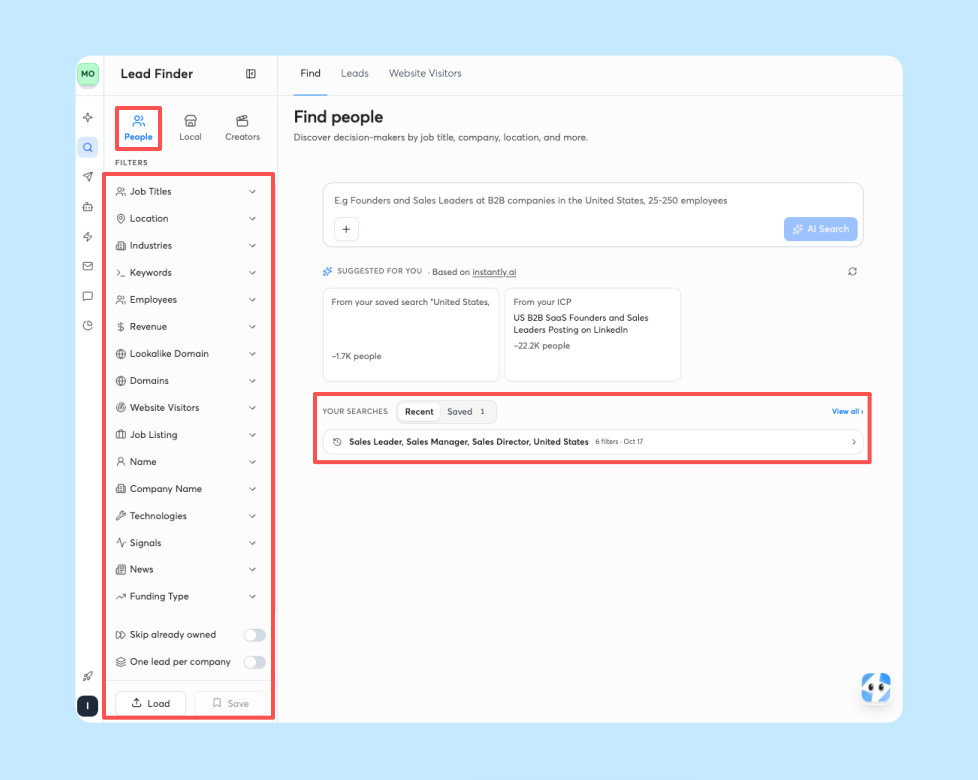
Lead Finder includes tech-stack filters that let you search for companies using specific tools and export them directly into a campaign, removing the manual research step.
Deploying sales prompts for maximum reply rates
Writing a good prompt is only half the work. Instantly's 2026 benchmark report puts the average reply rate at 3.43%, which gives you a control. Top-quartile senders reach 5.5% or higher. Use that as your target, and test prompt variants, tighter copy, and Spintax to see what moves your own reply rate.
The testing loop has five steps. Write the prompt, generate copy, split test, measure reply rate, and refine. Treat prompts like ad copy and test subject lines, opening lines, CTAs, and send windows until you find a winner.
Campaign Builder includes A/Z testing on Growth, but the full 26-variant capability is gated to Hypergrowth ($107/mo) and above, so you can test multiple prompt outputs in a single campaign. Unibox NLP automatically classifies replies with built-in labels such as Interested, Not interested, and Out of Office, removing manual triage.
Customizing prompts for your ICP
The same product value proposition needs different framing for different ideal customer profiles (ICPs). Instantly's guide to value proposition messaging shows how to adapt one core story to every persona. You do not need to rewrite the whole prompt for each ICP. You swap the Context block:
Generic SaaS prompt:
- Goal: Book a demo
- Context: Prospect is a VP of Sales at a B2B company
- Constraints: Under 80 words, one CTA
- Output Format: Subject + 3 sentences
ICP-specific prompt (HR tech):
- Goal: Book a demo
- Context: Prospect is a Head of Talent Acquisition at a 200-person SaaS company using Greenhouse, hiring 15+ roles per quarter, and struggling with candidate drop-off between phone screen and onsite
- Constraints: Under 80 words, reference Greenhouse integration, one CTA
- Output Format: Subject + 3 sentences
The second prompt produces copy that references specific tools, hiring volume, and funnel stages. That specificity lifts reply rates because it shows you did the work.
Validating copy with split tests
A/Z testing lets you test multiple variants per step without cloning campaigns. Growth includes A/Z testing, but the full 26-variant capability is gated to Hypergrowth ($107/mo) and above.
Start with this test matrix:
- One variable per test: Test subject line A vs. subject line B, not subject line and opening line at the same time.
- Two to three variants: More variants dilute your sample size.
- 200+ sends per variant: Smaller samples produce noisy data.
Instantly's 2026 benchmark report found that 58% of replies come from the first email in a sequence. The report does not say where to focus testing, but step one drives the most replies, so it is a reasonable place to start. Test there first, then roll the winner into follow-ups.
Quantifying AI-driven reply lift
To measure lift, compare your control (current best-performing email) against the variant (AI-generated version) over a fixed send window. Track reply rate, not open rate, because replies map to meetings and pipeline.
Instantly's 2026 benchmark report found that consistent senders see 15–20% higher reply rates than erratic senders. Keep sending volume consistent to isolate the variable that matters.
The top 10% of senders clear 10.7% reply rates, roughly 3x the platform average. Instantly's 2026 benchmark report does not say what causes that gap, but top performers tend to test often, keep copy under 80 words, and use Spintax to vary messaging at scale. Treat those practices as habits to test, not guarantees. Prompts supply the input, and testing multiplies what that input can deliver.

12 AI prompt blueprints for SaaS lead gen
Each blueprint includes a four-part prompt card and a one-line use case. Copy the structure, swap the Context block for your ICP, and test against your baseline. These prompts assume you are using an LLM (ChatGPT, Claude, or Instantly's built-in AI tools) to generate the copy. For prompts covering outreach, reply triage, and call prep, see Instantly's ChatGPT sales prompts.
1. AI prompts for lead routing logic
Use case: Classify inbound leads by fit score and route them to the right sequence.
Goal: Score and route leads based on firmographic fit
Context: Lead's company size, industry, tech stack, and funding stage
Constraints: Output a score (1–10) and a recommended sequence (enterprise, mid-market, SMB)
Output Format: JSON with score, sequence name, and reasoning
Run this as a pre-send filter so high-fit accounts get your best copy and low-fit accounts get a lighter touch.
2. AI prompts for free-tier lead triage
Use case: Score free-tier users by activation signals and flag sales-ready accounts.
Goal: Identify which free users are ready for a sales conversation
Context: User's signup date, features used, teammates invited, login frequency
Constraints: Flag as sales-ready only if user has used 3+ core features OR invited 2+ teammates
Output Format: Sales-ready (yes/no) + one-sentence reason
Free-tier users are high-volume and low-intent until they hit an activation threshold. This prompt separates noise from signal so your sales team only touches warm accounts.
3. Targeting prospects by installed tools
Use case: Reference a prospect's current tech stack and position your product as a complement or replacement.
Goal: Book a demo by highlighting an integration or competitive gap
Context: Prospect's current tools (CRM, marketing automation, analytics) and one known limitation
Constraints: Under 80 words, mention the specific tool by name, no generic "integrates with everything"
Output Format: Subject + 3 sentences + P.S. with integration link
Source leads from Lead Finder's tech-stack filters, which let you search for companies using specific tools and export them directly into a campaign.
4. Automated playbooks for renewal risk
Use case: Flag accounts approaching renewal with low feature adoption and generate a save-playbook email.
Goal: Re-engage the account before renewal
Context: Renewal date (45 days out), features used vs. features ignored, support ticket history
Constraints: Empathetic tone, offer a quick win (training session, feature walkthrough), no pressure
Output Format: Subject + 3 sentences + calendar link
Renewal-risk accounts need value, not urgency. This prompt frames the email around an unused feature that could drive ROI before the renewal decision.
5. Re-engaging inactive feature users
Use case: Reference a specific unused feature and offer a quick win to reactivate the account.
Goal: Drive feature adoption
Context: Feature the user has never touched, use case for that feature, time to value (e.g., "5-minute setup")
Constraints: Under 60 words, focus on one feature, include a help doc link
Output Format: Subject + 2 sentences + help doc link
Inactive users often ignore features because they do not know the use case. This prompt ties the feature to a specific workflow the user already runs.
6. Accelerating paid subscription upgrades
Use case: Target users hitting usage limits on a lower tier and frame the upgrade as the logical next step.
Goal: Upgrade to a higher plan
Context: Current plan, usage limit hit (e.g., "5,000 emails/month"), cost of upgrade vs. cost of staying capped
Constraints: Under 80 words, focus on ROI (time saved, revenue gained), no discount language
Output Format: Subject + 3 sentences + upgrade link
Usage-limit triggers are high-intent moments. This prompt frames the upgrade as removing a blocker, not adding a cost.
7. Targeting competitor users via AI outreach
Use case: Target users of a competitor and position a switch based on a specific pain point with that tool.
Goal: Book a demo by highlighting a competitor gap
Context: Competitor name, known limitation (pricing, features, support), your product's advantage on that dimension
Constraints: Under 80 words, no competitor bashing, focus on your strength
Output Format: Subject + 3 sentences + comparison page link
Source leads from Signals filters in Lead Finder, which surface Reddit complaints, G2 reviews, and churn-risk signals for competitor products.
8. Targeting new buyer personas
Use case: Adapt the same product value prop to a different persona, such as moving from end users to department heads.
Goal: Book a demo with a new persona
Context: Persona's title, KPIs, and pain points (different from your current ICP)
Constraints: Under 80 words, use persona-specific language (e.g., "team productivity" for managers, "ease of use" for end users)
Output Format: Subject + 3 sentences
Persona expansion lets you grow without building a new product. This prompt ensures your messaging adapts to the new buyer's priorities.
9. Triggering outreach for power users
Use case: Identify power users and ask for referrals, case studies, or expansion conversations.
Goal: Secure a referral, testimonial, or upsell
Context: User's usage percentile (top 10%), features mastered, teammates invited
Constraints: Grateful tone, specific ask (referral OR case study OR expansion call, not all three), under 80 words
Output Format: Subject + 3 sentences
Power users are your best advocates. This prompt makes the ask specific and low-friction so they can say yes in one click.
10. Reviving inactive prospect accounts
Use case: Re-engage prospects who went cold, referencing their original interest and a new feature or pricing change.
Goal: Restart the conversation
Context: Original inquiry date, feature or pricing update since then, reason they went cold (if known)
Constraints: Under 80 words, acknowledge the gap ("the last conversation was in Q2"), lead with the new value
Output Format: Subject + 3 sentences
Cold prospects are not dead. They are waiting for a reason to re-engage. This prompt gives them that reason.
11. Reducing SaaS vendor bloat
Use case: Position your product as a consolidation play, replacing two or more tools in the prospect's stack.
Goal: Book a demo by highlighting cost and complexity savings
Context: Tools the prospect currently pays for (e.g., separate email outreach + lead database + CRM), your product's all-in-one advantage
Constraints: Under 80 words, quantify savings (dollars or hours), no feature dump
Output Format: Subject + 3 sentences + ROI calculator link
Consolidation is a strong angle in budget-conscious markets. This prompt focuses on the outcome (fewer tools, lower cost) rather than the feature list.
12. Driving adoption with feature updates
Use case: Announce a new feature and tie it to a specific workflow the prospect already runs.
Goal: Drive feature adoption or re-engage inactive users
Context: New feature name, workflow it improves, time to value
Constraints: Under 60 words, focus on one workflow, include a demo video or help doc
Output Format: Subject + 2 sentences + video link
Feature announcements work best when they solve a problem the prospect already has. This prompt ties the feature to an existing workflow.
Optimizing SaaS prompts for higher reply rates
Optimization is about copy length, data mapping, send timing, and variation. Instantly's 2026 benchmark report found that elite performers average fewer than 80 words per first-touch email, so brevity is a competitive advantage.
Limit copy length to 80 words
Instantly's 2026 benchmark report found that emails under 80 words perform best. Add a word-count constraint to your prompt card:
- Bad: "Write a cold email to a VP of Sales"
- Good: "Write a cold email to a VP of Sales in under 80 words with one clear CTA"
The second prompt produces copy that respects the reader's time and aligns with benchmark data.
Map usage data to outreach sequences
Product usage events (signups, feature adoption, usage limits) are high-intent triggers. Feed them into the Context block so the AI generates copy referencing the specific action the user just took.
Instantly's Automations let you trigger outreach based on lead activity, such as moving a lead to a new campaign when they reply or when their interest status changes. You can also use the API or webhooks (available on Hypergrowth and above) to push usage events from your product into Instantly and trigger sequences automatically. The prompt stays the same. The Context block updates with fresh usage data.
Map optimal send windows to target profiles
Instantly's 2026 benchmark report found that Monday is the best day to launch a campaign and Wednesday sees the highest reply rates. Set send windows in Campaign Builder to match your target profile. When prospecting to sales leaders, send Tuesday through Thursday between 8 a.m. and 11 a.m. in the prospect's timezone. When prospecting to founders, early morning (6 a.m. to 8 a.m.) often works better because they check email before meetings start. Late-evening sends are untested, so treat them as a variant to split test, not a default.
Test send windows the same way you test copy. Split your list, send half on Monday and half on Tuesday, and measure reply rate.
Optimize reply rates via Spintax
Spin syntax (Spintax) lets you vary your copy at scale so no two emails are identical, protecting sender reputation and improving deliverability.
Instantly's AI Spintax Writer automatically adds Spintax using the syntax {{RANDOM | option1 | option2}}:
Subject: {{RANDOM | Quick question | Following up | One idea for you}}
The AI generates variants for each spin block, and Instantly randomizes the output per lead. Use Spintax for subject lines, opening lines, and CTAs. Spin the framing, not the substance.
Common mistakes with AI prompts for software sales
Most mistakes come from stale templates, missing activity data, and short cadences. Teams write one prompt, use it for six months, and wonder why reply rates decay. Or they ignore product usage signals and send the same generic email to a free user and a power user. Or they stop after two follow-ups and miss part of the 42% of replies that come from follow-up emails.
Fixing stale AI prompt templates
Static templates decay because the market changes. Your product ships new features. Competitors launch new pricing. A prompt that worked in Q1 produces stale copy by Q3.
Refresh the Context block with current signals: recent product updates, competitor moves, or industry trends. Set a calendar reminder to review your prompt library every quarter. Instantly's AI prompt library gives you fresh templates to compare against. Swap outdated signals for fresh ones and re-test against your control.
Missing critical lead activity data
Prompts that ignore usage data produce generic copy. A free user who logged in once gets the same email as one who invited five teammates and hit a usage limit. That wastes your highest-intent leads.
Lead Finder's Signals filter surfaces buyer intent, funding events, new tech adoption, and hiring activity across 450M+ B2B leads. You can filter by Reddit-sourced pain points, competitor mentions, churn risk, and growth signals, then export those leads directly into a campaign.
The fix: add usage data or intent signals to the Context block. The prompt structure stays the same. The output gets specific enough to earn a reply.
Losing conversions via short cadences
Instantly's 2026 benchmark report found that 58% of replies come from the first email, but the remaining 42% come from follow-ups. Teams that stop after two or three steps miss nearly half their potential replies.
The optimal sequence length is four to seven steps. Use the same four-part structure for follow-ups but adjust the Goal block: step two might be "restate value prop in one sentence," step three might be "share a customer result," step four might be "ask a yes/no question."
Conclusion and next steps
The 12 prompt blueprints above give you a modular framework for SaaS prospecting. Each follows the same four-part structure: Goal, Context, Constraints, Output Format. Swap the Context block for your ICP, add usage data or tech-stack signals, and test the output against the 3.43% baseline.
The testing loop is simple: write prompt, generate copy, split test, measure reply rate, refine. Instantly's 2026 benchmark report gives you the baseline. Campaign Builder gives you the testing infrastructure. Unibox NLP gives you clean reply data to optimize against.
Try Instantly free and build your first SaaS prompt sequence. The 14-day trial includes 250 uploaded contacts and 1,000 emails, no credit card required.
FAQs: AI prompts for SaaS prospecting
What are the best AI prompts for SaaS prospecting?
The best AI prompts for SaaS prospecting reference software buying signals like product usage data, tech stack, renewal timing, and PLG behavior instead of generic pain points. Each prompt in this guide uses a four-part structure: Goal, Context, Constraints, and Output Format.
How to qualify free-tier users with AI prompts?
Score free-tier users by activation signals like features used, teammates invited, and login frequency. Flag users as sales-ready only if they have used three or more core features or invited two or more teammates.
Should PLG handoffs use different prompts?
Yes, PLG handoff prompts should shift the Goal from "drive activation" to "book a sales call" once usage thresholds are met. The Context block should include the specific usage event that triggered the handoff, such as hitting a usage limit or inviting teammates.
How long should SaaS prospecting emails be?
Instantly's 2026 benchmark report found that emails under 80 words perform best. Add a word-count constraint to your prompt card so the AI generates tight copy by default.
What reply rate can SaaS prompts reach?
Instantly's 2026 benchmark report puts the platform average reply rate at 3.43%. Top-quartile senders reach 5.5% or higher. Test prompt variants, keep copy under 80 words, and use Spintax to see what moves your own reply rate.
Key terms glossary
PLG (product-led growth): A go-to-market motion where the product itself drives user acquisition, activation, and expansion. PLG companies rely on free tiers or trials to let users experience value before talking to sales.
Free-tier user: A user on a free plan with limited features or usage caps. Free-tier users are high-volume and low-intent until they hit an activation threshold like inviting teammates or using core features.
Integration stack: The set of tools a company uses to run its business, such as CRM, marketing automation, analytics, and communication platforms. Integration-stack targeting means reaching out based on the specific tools a prospect already uses.
Renewal risk: An account approaching its contract renewal date with low feature adoption or declining engagement. Renewal-risk accounts need re-engagement campaigns focused on value, not urgency.
Reply rate: The percentage of sent emails that receive a reply. Instantly's 2026 benchmark report puts the average at 3.43%, with top-quartile senders reaching 5.5% or higher.
Read next
- AI prospecting prompts: common mistakes and fixes: Learn which prompt errors weaken AI prospecting emails and how to fix them.
- ChatGPT prompts for CRM notes, follow-up tasks, and pipeline updates: Use prompts to turn call notes into clean CRM records, follow-up tasks, and pipeline updates.
- AI prompts for sales rep onboarding: the complete guide to faster ramp times: Use prompts to help new reps learn your messaging and start selling sooner.


