


Updated November 18, 2026
TL;DR: Reply triage is the process of sorting inbound sales replies into five clear buckets: interested, objection, out-of-office, unsubscribe, and wrong person. You can run AI prompts for sales reply triage by copy-pasting them into ChatGPT, or automate the whole loop with Instantly.ai's Unibox NLP and AI Reply Agent, which classify replies and respond in under 5 minutes without leaving your inbox. This guide gives you five tested classification prompts, a three-option workflow comparison, and a 10-minute setup checklist. Test any prompt on 20 real replies before you trust it, and always honor opt-outs immediately.
Your inbox is where hot leads go to cool down. A founder who replies in 4 hours loses deals a 5-minute reply would have won.
Most founders treat reply triage as inbox cleanup. It is actually a revenue recovery system. The faster you sort and respond to interested leads, the more meetings you book and the less pipeline slips through the cracks.
This guide gives you tested AI prompts for sales reply triage, a five-bucket classification framework, and a clear path to automation. You will learn how to triage sales replies faster, whether you copy-paste prompts into ChatGPT or automate the entire loop inside Instantly.
Stop losing hot leads in your cluttered inbox
Reply triage is not housekeeping. It is a revenue lever.
Automating email response sorting
Reply triage means reading every inbound reply, deciding what it is (interested, objection, out-of-office, unsubscribe, or wrong person), and taking the right next step, such as sending a scheduling link, pausing a sequence, or blocklisting the contact.
Manual sorting works when reply volume is low, but it breaks as replies pile up because switching between tasks slows you down and off-hours replies sit unread.
Automated classification solves this. An AI reads the reply, applies your rules, and sorts it into a bucket. You only touch the replies that need a human decision.
Quantifying your lost meeting volume
Speed matters. In practice, faster replies tend to convert better than slower ones. The exact impact varies by industry and audience, but the pattern holds: faster replies win more deals.
If you get 20 replies per week and respond to 5 within 5 minutes, the other 15 are cooling. Some will book later. Many will not.
In practice, many teams respond hours or days after a reply arrives. If you respond in minutes, you can win deals that slower competitors lose.
The bottleneck of manual lead review
Manual review fails because it is slow, inconsistent, and exhausting.
Manual review looks like this: read a reply, decide what it means, draft a response, send it, then log it in a spreadsheet or CRM. Repeat 20 times and you have spent an hour on busywork that an AI can handle automatically.
You are building the product, closing deals, and managing contractors, so reply triage becomes the bottleneck.
The fix is not working harder. It is automating the sort-and-respond loop so you only handle the replies that need your judgment.
Mechanics of intelligent lead prioritization
Before you write a single prompt, define your classification buckets. AI cannot sort replies if you have not told it what the buckets are.
Defining your 5 lead response groups
Here are the five buckets every founder should use:
| Bucket | Signal | Next Action |
|---|---|---|
| Interested | Asks a question, requests a demo, says "tell me more" | Send scheduling link or first reply within 5 minutes |
| Objection | Pushes back on price, timing, or a tool they already use | Send a reply that addresses the objection |
| Out-of-office | Auto-reply with return date | Pause sequence, resume on return date |
| Unsubscribe | "Remove me," "stop emailing," clicks unsubscribe | Add to blocklist immediately, stop all sends |
| Wrong person | "I am not the decision-maker," "you want Sarah in sales" | Ask for referral or route to correct contact |
Define these buckets before you write a prompt. The AI will follow your rules, but only if your rules are clear.
ChatGPT vs. native email filters
Gmail filters are rule-based. You tell Gmail to look for keywords like "unsubscribe" or "out of office," and Gmail moves the email to a folder. The problem is context: Gmail does not understand intent, so a reply saying "I am interested but not until Q2" gets filed as interested even though it is really a timing objection.
ChatGPT understands context and can tell you what a reply means, but you have to copy-paste every reply manually and wait for a response.
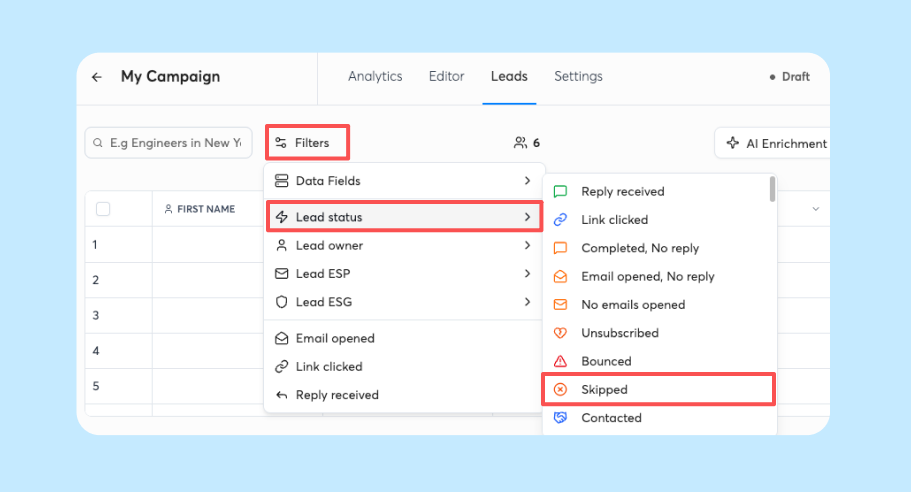
Instantly's Unibox NLP is the middle path: it auto-classifies replies using sentiment and context detection across 50+ languages, with no copy-paste and no separate subscription for base labeling. Base labeling is free on all plans, and custom label selection is available on Hypergrowth and Light Speed plans.
Where to execute your triage prompts
You can run your triage prompts in three ways, from fully manual to fully automated:
- ChatGPT manual workflow: Copy the reply, paste it into ChatGPT with your classification prompt, read the output, act. Cost: free, or a paid plan (check ChatGPT's pricing page for current rates). Works at low reply volume, but the copy-paste step becomes the bottleneck as you scale.
- Zapier or Make with API: Connect Gmail or Outlook to ChatGPT via Zapier or Make. When a reply arrives, Zapier sends it to ChatGPT, gets the classification, and routes it. Cost: Zapier starts at $29.99/mo billed monthly plus ChatGPT API costs. Time: setup typically takes under 30 minutes, and the workflow needs ongoing maintenance when APIs change. Gives you flexibility to connect any tool, and Instantly supports the same integrations on a flat fee with pre-built triggers maintained by Instantly.
- Native automation in Instantly: Unibox NLP classifies replies automatically. AI Reply Agent drafts and sends responses. Automations routes classified replies to Slack, HubSpot, or a contractor without Zapier for core flows. Cost: Instantly Growth starts at $47/mo. Unibox NLP base labeling and Automations are included. AI Reply Agent runs on Instantly Credits, a separate subscription from $9/mo. Removes the manual copy-paste step and the ongoing Zapier maintenance entirely.
ROI comparison: manual vs. automated triage
| Scenario | Manual (ChatGPT) | Zapier + API | Instantly Native |
|---|---|---|---|
| 1,000 sends at 3.43% reply rate | About 34 replies per 1,000 sends | About 34 replies per 1,000 sends | About 34 replies per 1,000 sends |
| Time per reply | 2.5 min | Near zero (auto) | Near zero (auto-classified) |
| Estimated weekly time | ~85 min (34 × 2.5 min, assumed) | Near zero | 0 min |
| Monthly cost | $0–$20 | ~$40–$60 | $47 (Growth) plus Instantly Credits for AI Reply Agent (from $9/mo) |
| Best for | Low reply volume | Flexible custom routing | Fully automated triage |
All three work. The question is how much time you want to spend on setup and maintenance versus how much you want to spend on a tool that removes the manual step.

Proven templates to sort your sales replies
Here are five tested classification prompts. You can copy-paste them into ChatGPT for manual triage or use the same logic to configure Unibox NLP custom labels in Instantly.
Identifying high-intent sales replies
Use this prompt to classify a reply as interested and draft a first response:
You are a sales assistant. Read the following reply to a cold email and classify it. If the person is interested, respond with "INTERESTED" and draft a reply that includes a scheduling link. If not, respond with "NOT INTERESTED."

Reply:
[paste reply here]

Classification and draft response:
Example input: "This looks interesting. Can you send me more info on pricing?"
Example output: "INTERESTED. Thanks for reaching out. Here is a link to book a 15-minute demo: [calendar link]. Looking forward to showing you how it works."
Test this prompt with 20 real replies from your inbox. Measure how often it classifies correctly.
Automated detection of buyer friction
Use this prompt to detect objections and categorize them:
You are a sales assistant. Read the following reply and identify the objection. Classify it as BUDGET, TIMING, AUTHORITY, or NEED. Then draft a short reply that acknowledges the objection and suggests one low-pressure next step.

Reply:
[paste reply here]

Objection category and draft response:
Example input: "This is too expensive for us right now."
Example output: "BUDGET. I understand budget is tight. Would it help if I showed you how customers typically see ROI in the first 30 days? I can send a one-page case study."
Objection detection improves when you add real examples to the prompt. Pull actual objections from your inbox and paste them into the prompt as training data.
Vacation and absence responder prompt
Use this prompt to detect out-of-office replies and extract the return date:
Read the following reply. If it is an out-of-office auto-reply, respond with "OUT OF OFFICE" and extract the return date. If not, respond with "NOT OOO."

Reply:
[paste reply here]

Classification and return date:
Example input: "I am out of the office until November 15. I will respond when I return."
Example output: "OUT OF OFFICE. Return date: November 15."
Instantly's Out-of-Office Resume does this natively. It detects OOO replies, extracts the return date, pauses the lead, and auto-resumes sending on that date. It is included on all plans at no extra cost.
Setup note: Out-of-Office Resume only works when "Stop on Auto-reply" is disabled and "Automatically tag interest status in replies" is enabled.
Opt-out and suppression handling
Use this prompt to detect unsubscribe requests:
Read the following reply. If the person is asking to be removed from your email list, respond with "UNSUBSCRIBE." If not, respond with "NOT UNSUBSCRIBE."

Reply:
[paste reply here]

Classification:
Example input: "Please remove me from your list."
Example output: "UNSUBSCRIBE."
Always honor opt-outs immediately. Add the contact to your blocklist and stop all sends. This is not optional. Compliance protects your sender reputation and your brand.
Instantly's Global Blocklist blocks entire domains or emails from import or contact, checked at import time. You can also use AI Blocklist Triggers to automatically blocklist leads based on unsubscribe status or reply-content keywords.
Routing misdirected sales inquiries
Use this prompt to detect wrong-person replies and draft a routing request:
Read the following reply. If the person is not the decision-maker, respond with "WRONG PERSON" and draft a reply asking for a referral to the correct contact. If they are the decision-maker, respond with "CORRECT PERSON."

Reply:
[paste reply here]

Classification and draft response:
Example input: "I am not the right person for this. You probably want to talk to Sarah in sales."
Example output: "WRONG PERSON. Thanks for letting me know. Can you introduce me to Sarah, or should I reach out to her directly? I appreciate the help."
Wrong-person replies are a gift. The person who replied is engaged. Ask for a referral and you often get one.
Turn cold lead responses into booked demos
Classification is step one. Conversion is step two. Here is what to do after the AI sorts the reply.
Automate scheduling for hot leads
When a reply is classified as interested, send a scheduling link within 5 minutes.
Here is a short reply template:
Thanks for reaching out, [First Name]. Here is a link to book a 15-minute demo: [calendar link]. I will walk you through [one-sentence value prop] and answer any questions. Looking forward to it.
Keep it short. Instantly's 2026 benchmark report found outbound emails under 80 words perform best, and the same principle works well for reply scripts.
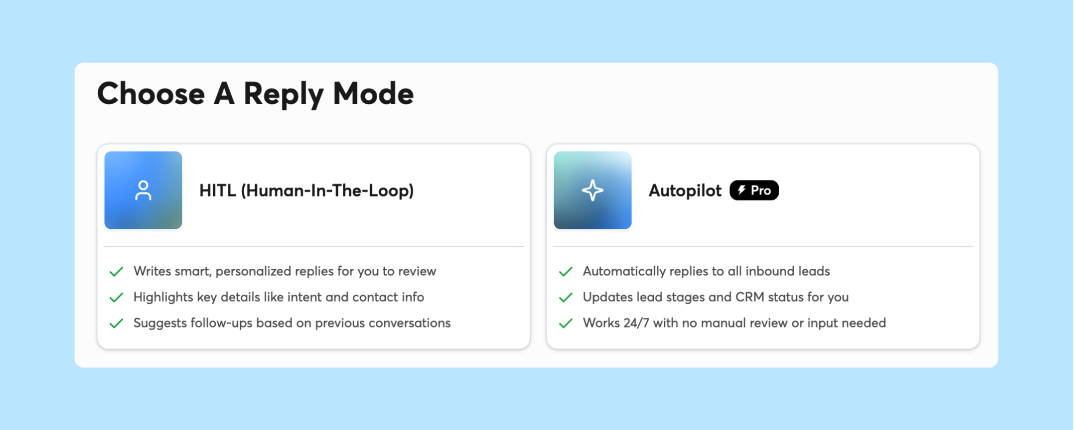
You can also let Instantly's AI Reply Agent handle the first response. It drafts and sends replies in under 5 minutes, with Human-in-the-Loop or Autopilot modes. You review the draft before it sends, or let it run on autopilot once you trust the output.
Tactical scripts for common blockers
Use these three scripts. Each is under 80 words with one clear ask:
Budget objection:
I understand budget is tight. Would it help if I showed you how customers typically see ROI in the first 30 days? I can send a one-page case study. Reply yes and I will send it over.
Timing objection:
Totally fair. Would it make sense to schedule a quick call in [timeframe they mentioned] so you are ready to move when the timing is right? I can send a calendar link.
Authority objection:
Got it. Who is the best person to talk to about [specific problem you solve]? I would love to show them how [one-sentence value prop]. Can you make an introduction?
One ask per reply. Do not stack multiple CTAs. The goal is a small, easy yes.
Automating internal lead routing
Once a reply is classified, route it to the right place.
If you run sales solo, send interested replies to a Slack channel or your phone so you can answer between product tasks. If you have a part-time contractor, route interested replies to them. If you use HubSpot, create a task or deal.
Instantly's Automations builder lets you route classified replies without Zapier. You set a trigger (lead replies with interested label) and an action (post to Slack, create HubSpot contact, notify you or your contractor). It supports 140+ third-party platforms including Slack, HubSpot, Pipedrive, and Airtable.
How to triage sales replies faster with automation
Here are three workflows, from manual to fully automated. Pick the one that fits your stage.
Prompting ChatGPT for inbox triage
This is the manual workflow. It works, but it does not scale.
- Open your inbox and find a new reply.
- Copy the reply text.
- Open ChatGPT and paste the reply into your classification prompt.
- Read the output and copy the drafted response.
- Paste the response into your email client and send it.
- Log the classification in a spreadsheet or CRM.
Time cost: 2-3 minutes per reply. If you get 20 replies per week, that is 40-60 minutes of copy-paste work.
Instantly's Unibox NLP removes steps 2, 3, 4, and 6. The reply is classified automatically as it arrives, and AI Reply Agent drafts the response in under 5 minutes without you opening ChatGPT.
Syncing leads via Zapier and Make
This workflow removes the copy-paste step.
- Connect Gmail or Outlook to Zapier or Make.
- Set a trigger: when a new email arrives in a specific label or folder.
- Add an action: send the email text to ChatGPT via API.
- Add another action: parse the ChatGPT response and route it (post to Slack, create a task, send an auto-reply).
Setup typically takes under 30 minutes. You need a Zapier or Make account, a ChatGPT API key, and some testing to get the workflow right.
Zapier starts at $29.99/mo billed monthly. ChatGPT API costs depend on usage and model (check OpenAI's pricing page).
Automating inbox triage in Instantly
This is the native workflow. No copy-paste, no Zapier, no maintenance.
Unibox NLP auto-classifies replies into custom labels as they arrive. You define the labels (interested, objection, out-of-office, unsubscribe, wrong person) and Unibox NLP applies them using sentiment and context detection across 50+ languages. Base labeling is free on all plans. Custom label selection is available on Hypergrowth and Light Speed.
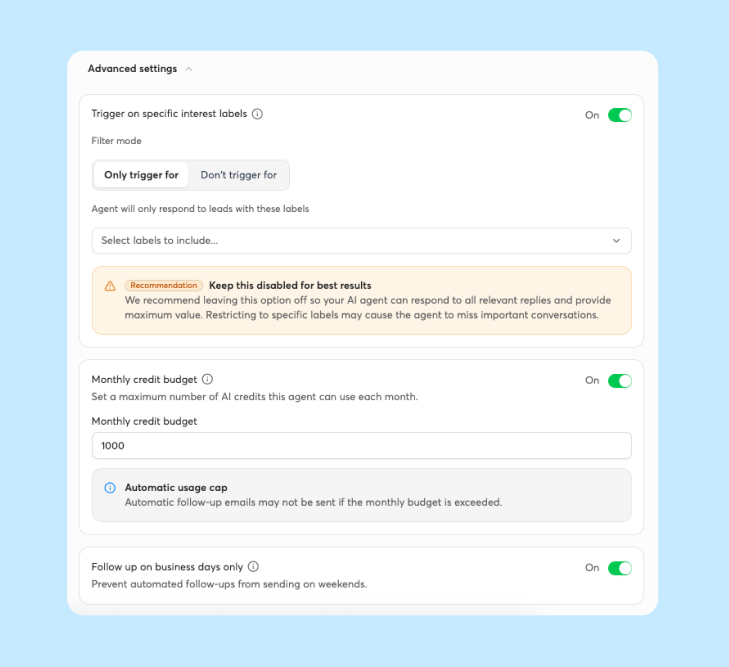
AI Reply Agent drafts and sends replies in under 5 minutes. You choose Human-in-the-Loop mode (review before send) or Autopilot mode (send automatically). It runs on Instantly Credits, a separate subscription from $9/mo, and costs 5 credits per reply once generated, regardless of whether you send, edit, or use the suggested reply. You can set monthly credit budget caps and filter by label so AI Reply Agent only handles certain buckets. It integrates with Slack so you get real-time alerts with AI-generated response previews and in-Slack approve/edit before send.
Automations routes classified replies to Slack, HubSpot, or a contractor. Set a trigger (lead replies with interested label) and an action (post to Slack channel, create HubSpot deal, send notification). No Zapier required for core flows.
Setup takes 10 minutes. You import one campaign, enable Unibox NLP, turn on AI Reply Agent, and build one automation. Then you test it with real replies.
Founder's 10-minute triage setup checklist:
- Define your 5 classification buckets and write one example reply for each.
- Connect your sending accounts to Instantly and import one active campaign.
- Turn on Unibox NLP and create custom labels (interested, objection, OOO, unsubscribe, wrong person).
- Enable AI Reply Agent in Human-in-the-Loop mode and set a monthly credit budget cap.
- Build one Automation: "Lead replies → interested label → post to Slack."
- Test with 5 real replies and adjust label definitions if accuracy falls short of your expectations.
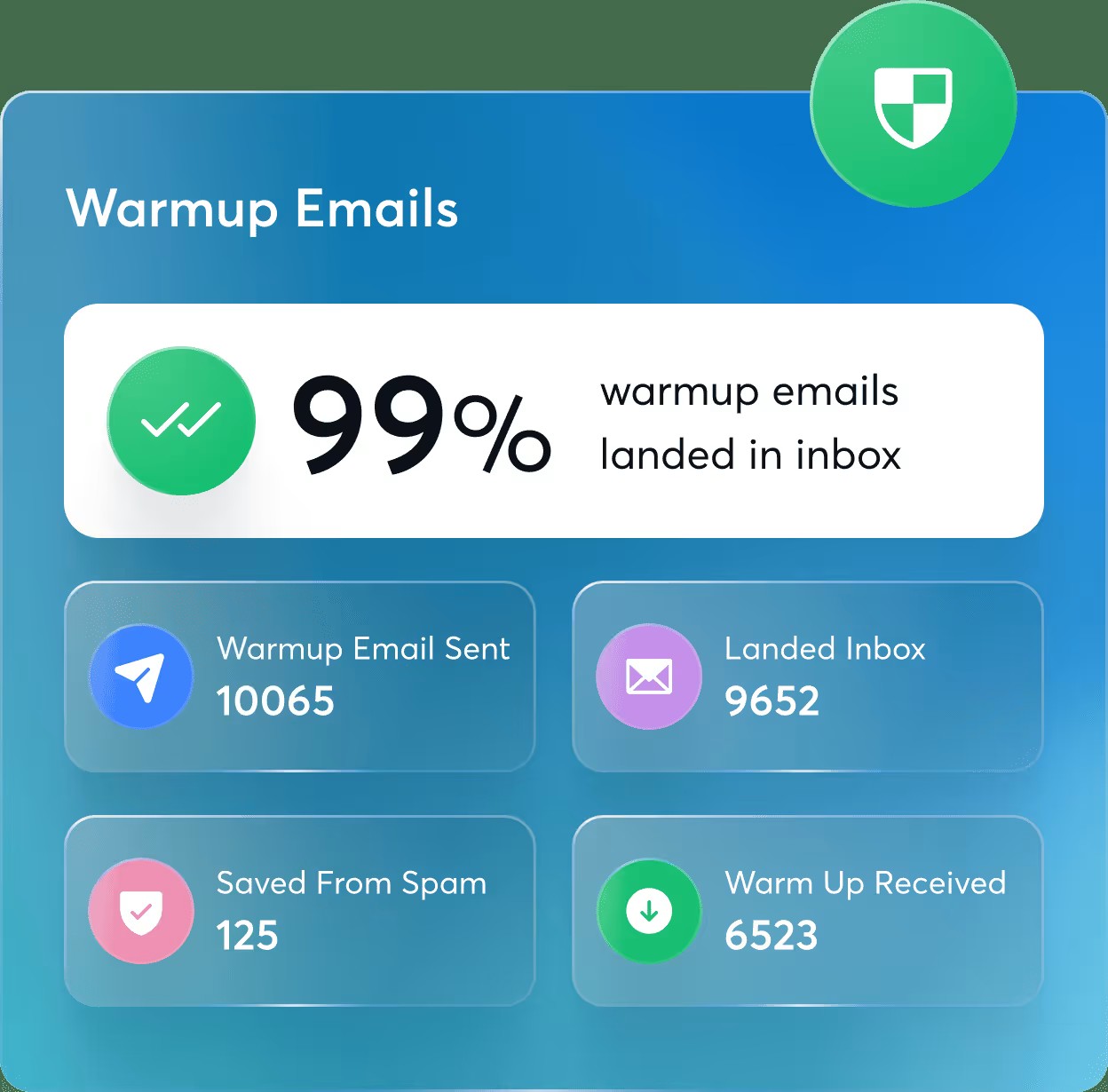
Deliverability note: AI reply speed only helps if your emails reach the primary inbox. Automating replies without proper warmup, list hygiene, and bounce management can hurt sender reputation. Keep bounce rates below 2%, follow the 4-6 week warmup timeline from Instantly's 2026 benchmark report before you scale live sends, and verify contacts before import. Instantly's 2026 benchmark report found that consistent, stable sending patterns produce 15-20% higher replies than erratic sending. Warmup and hygiene protocols help maintain that consistency.
Testing and tuning your classification prompts
Do not trust a prompt until you have tested it on real data, and watch for common prompt mistakes like missing context.
Calibrate AI with 20 sample threads
Pull 20 real replies from your inbox. Label them manually (interested, objection, out-of-office, unsubscribe, wrong person). Run each reply through your ChatGPT prompt or Unibox NLP. Compare the AI output to your manual labels.
Keep testing until the AI's labels consistently match yours before you switch on automation. If the AI misclassifies more than 2 out of 20 replies, add examples to the prompt or refine your bucket definitions.
Build a test set once, then re-test every time you tweak the prompt. Prompts drift. What works in January may not work in March if your messaging changes.
Eliminate misclassified leads
Common failure modes: sarcasm, short replies, non-English replies.
Sarcasm is hard. A reply that says "Oh sure, I definitely want to book a demo" might be sarcastic. AI sometimes misses this. Add a sarcasm example to your prompt.
Short replies are ambiguous. A reply that says "Thanks" could be interested or polite brush-off. Add a rule: if the reply is under 5 words, classify it as ambiguous and route to human review.
Instantly's Unibox NLP supports misclassification feedback. When you correct a label, you can also refine label descriptions to make them more specific and improve future accuracy.
Calibrate AI responses for brand fit
AI drafts can sound robotic. Fix this by adding brand voice rules to your prompt.
Before:
Draft a reply to this interested lead.
After:
Draft a reply to this interested lead. Use a friendly, direct tone. Avoid jargon. Keep it under 80 words. Include one clear ask. Sign off with "Best, [Your Name]."
Test the output. If it still sounds off, add 2-3 examples of past replies you have sent. Paste them into the prompt as style examples. For vertical-specific wording, see these industry outreach prompts.
Use Human-in-the-Loop mode for the first two weeks. Review every AI draft before it sends. Once you trust the output, switch to Autopilot for low-risk buckets like out-of-office or unsubscribe confirmations.
Try Instantly free and let Unibox NLP sort your replies while you focus on live conversations. Start your 14-day free trial and import one campaign to test AI Reply Agent on real replies. No credit card required.
FAQs: AI prompts for sales reply triage
Can ChatGPT classify replies in real time?
No. ChatGPT requires manual copy-paste unless you connect it via API using Zapier, Make, or a custom integration. Real-time classification requires automation, not just a prompt.
How accurate is AI reply triage?
Accuracy depends on prompt quality and training data. Test with 20 real replies and target high accuracy before trusting automation. Instantly's Unibox NLP improves over time with misclassification feedback and supports 50+ languages.
Do you need a paid ChatGPT plan?
No. The free version of ChatGPT works for manual classification. Paid plans give you more messages, uploads, and expanded access. Check ChatGPT's pricing page for current plan names and prices. API access for automation requires a separate pay-per-use plan.
What if the AI misclassifies an interested lead?
This is a missed opportunity. The lead gets sorted into the wrong bucket and you miss the chance to respond quickly. Prevent this by using Human-in-the-Loop mode for the first two weeks and by adding ambiguous replies to a human review queue.
Can you use these prompts with Gmail or Outlook?
Yes. Copy the reply from Gmail or Outlook, paste it into ChatGPT with your prompt, and use the output. For automation, connect Gmail or Outlook to ChatGPT via Zapier or Make, or use Instantly's native Unibox NLP to classify replies without leaving your inbox.
Key terms glossary
Reply triage: Reply triage is the process of sorting inbound sales replies into categories (interested, objection, out-of-office, unsubscribe, wrong person) and taking the right next action for each. It turns a chaotic inbox into a prioritized queue.
Classification bucket: A classification bucket is a labeled category you define before writing a prompt. Examples: interested, objection, out-of-office, unsubscribe, wrong person. The AI sorts replies into buckets based on rules you set.
Reply agent: A reply agent is an AI tool that drafts and sends responses to classified replies. Instantly's AI Reply Agent responds in under 5 minutes with Human-in-the-Loop or Autopilot modes and costs 5 credits per reply once generated, regardless of whether you send, edit, or use the suggested reply.
Out-of-office detection: Out-of-office detection identifies auto-replies that include a return date. Instantly's Out-of-Office Resume extracts the return date, pauses the lead, and auto-resumes sending on that date. It is included on all plans at no extra cost.
Misclassification: Misclassification is when the AI assigns a reply to the wrong bucket. Example: an objection gets labeled as interested (false positive) or an interested lead gets labeled as an objection (false negative). Prevent misclassification by testing prompts on 20 sample threads and targeting high accuracy before trusting automation.
Read next
- ChatGPT prompts for sales enablement: RevOps guide: Gives RevOps teams ChatGPT prompts they can use to support sales enablement work.
- AI prompts for sales rep onboarding: the complete guide to faster ramp times: Shows how to use prompts to help new reps learn your messaging and start selling sooner.
- AI prompts for sales sequences: the complete guide to multi-touch outbound cadences: Explains how to use AI prompts to build multi-step outbound sequences that keep leads engaged.


