


Updated November 19, 2026
TL;DR: The average cold email reply rate is 3.43% according to Instantly.ai's 2026 benchmark report. Top-quartile senders reach 5.5%+ through controlled A/B testing. This guide provides five original copy-paste ChatGPT prompts that generate matched-pair variants for subject lines, openers, CTAs, and email length, plus a sixth prompt that calculates statistical confidence. Instantly's A/Z testing engine runs the variants. The Outreach Growth plan ($47/mo) includes A/Z testing, but the full 26-variant capability is gated to Hypergrowth ($107/mo) and above. Validate winners with a statistical confidence prompt based on Evan Miller's sample size methodology. Keep emails under 80 words, run 4-7 sequence steps, and wait for 95% confidence before scaling a winner.
The average cold email reply rate is 3.43%, while top-quartile campaigns hit 5.5% or more. The difference is not luck. It is disciplined A/B testing, and most founders skip it because they think it takes too long. This article gives you a 1-paste weekly workflow: five ChatGPT prompts that generate matched-pair variants for subject lines, openers, CTAs, and email length, plus a statistical confidence calculator prompt so you know when a winner is real. No theory. Just templates, checklists, and ROI math you can run every Monday morning.
Why A/B testing cold emails beats guesswork
A/B testing means sending two versions of an email that differ by exactly one variable (the subject line, the opener, the CTA, or the length) and measuring which version gets more replies. If you change the subject line and the body copy at the same time, you cannot attribute the difference in replies to either change. You have wasted a week and learned nothing.
Instantly's 2026 benchmark report analyzed billions of cold email interactions across thousands of active workspaces from January 1 through December 18, 2025. The platform average reply rate is 3.43%. Top-quartile campaigns achieved 5.5% or more. Top 10% campaigns exceeded 10.7%. Systematic iteration on copy, timing, and list quality drives the gap between average and top-quartile performance.
Understanding the 3.43% reply baseline
The 3.43% figure is your starting benchmark. Measure every A/B test against it. If your current reply rate is 2.1%, your first goal is 3.43%. If you are at 4.2%, aim for 5.5%.
| Metric | Value | Source |
|---|---|---|
| Platform average reply rate | 3.43% | Instantly 2026 report |
| Top quartile reply rate | 5.5%+ | Instantly 2026 report |
| Top 10% reply rate | 10.7%+ | Instantly 2026 report |
| Best email length | Under 80 words | Instantly 2026 report |
| Optimal sequence length | 4-7 steps | Instantly 2026 report |
| Warmup timeline | 4-6 weeks | Instantly 2026 report |
If a variant lifts your reply rate from 3.4% to 4.8%, treat it as a promising signal, and confirm the difference holds at 95% confidence before calling it a win. You do not need 10.7% on your first test.
Key elements for top-tier email
The benchmark report identifies three variables that separate top performers. First, email length: elite performers average under 80 words per first-touch email. Second, sequence length: four to seven steps generate the highest reply rates. Third, consistency: consistent senders see 15-20% higher replies than sporadic senders, per the benchmark report.
Data reliability for small-batch tests
Founders ask whether they can A/B test with only 200 contacts. Not reliably. At 50-200 contacts per variant, a standard A/B test on reply rate can produce false winners, because the sample is too small to separate a real copy improvement from week-to-week noise. A widely used heuristic in conversion testing sets the minimum at about 100 conversions (not sends) per variation before a result is trustworthy. It is a rough guide, not a fixed rule. Treat small batches as directional indicators rather than statistically valid tests, and use Evan Miller's sample size calculator to plan how many sends you need.
Still useful, but do not kill a variant after 50 sends because it got two fewer replies. Run tests longer, pool data across weeks, or test bigger changes (a completely different angle rather than a synonym swap).
ChatGPT prompts for subject line A/B tests
Subject lines control open rates, and open rates gate replies. Reply rate is the truth metric, because Apple Mail Privacy Protection inflates opens. Still, unopened emails get no replies.
Executing controlled email pair tests
A controlled pair means two subject lines that differ by one strategic angle. For example, one leads with curiosity ("Quick question about [Company]") and the other leads with benefit ("Cut your onboarding time by 40%"). Send them to matched segments and measure replies.
Prompt 1 (Subject Line Variants):
You are a cold email subject line expert. My ICP is [ICP description, e.g., "VP of Sales at 50-200 person SaaS companies"]. They struggle with [pain point, e.g., "scaling outbound without hiring SDRs"]. My value prop is [benefit, e.g., "book more meetings using AI automation"].

Generate 10 subject lines split across the 4 groups below, with 2-3 lines per group (adjust the count and mix to fit your campaign):
- Group A: Curiosity-driven (2-3 lines, under 50 characters each)
- Group B: Urgency-driven (2-3 lines, under 50 characters)
- Group C: Benefit-driven (2-3 lines, under 50 characters)
- Group D: Social-proof-driven (2-3 lines, under 50 characters)

Starting rules: Do not use emojis, clickbait, or ALL CAPS. Write in plain language. Adapt these to your brand voice.
Paste this into ChatGPT, fill in your ICP and pain point, and you get 10 testable subject lines in under 60 seconds. Pick two from different groups (one curiosity-driven and one benefit-driven) for your first test.
Controlling for one variable only
Founders often test multiple variables at once. You change the subject line, the opener, and the CTA, then you do not know which caused the lift. This is a confounded test, and it is useless.
Test one variable per campaign. If you test subject lines, keep the body copy identical. If you test openers, keep the subject line identical.
Prompt 2 (Matched-Pair Subject Lines):
I have a subject line that got a 3.8% reply rate: "[paste your current subject line]".

Generate 2 completely different angles that test opposite psychological triggers:
- Variant A: Create FOMO or urgency (under 50 characters)
- Variant B: Lead with a specific, measurable benefit (under 50 characters)

Both should appeal to [ICP]. Do not use clickbait or vague promises.
Your current subject line is the control. Variant A tests urgency. Variant B tests benefit. You learn which psychological trigger works better for your ICP.
Validating your subject line tests
Once you have two subject lines, you need to know when the difference is real. If Variant A gets 12 replies from 400 sends (3.0%) and Variant B gets 16 replies from 400 sends (4.0%), is B actually better, or is it noise?
The answer depends on sample size. At a 5% baseline, detecting a 1-point lift (from 5% to 6%) at 95% confidence and 80% power requires roughly 8,200 sends per variant. This is an approximation based on the two-proportion z-test, and you can verify it with Evan Miller's sample size calculator.
With only 400 emails per variant, the 1-point difference might be real or random chance. Run the test longer or pool results across campaigns.

How to script high-converting opening lines
The opening line is the first sentence of your email body. It determines whether the reader keeps reading or deletes. Instantly's benchmark report found that 58% of all replies come from the first email in a sequence, so your opener carries more weight than any follow-up.
Direct vs. soft opener A/B tests
A direct opener states your purpose immediately ("[Similar Company] cut churn by 22% after switching to this approach"). A soft opener builds rapport first ("Your post about scaling CS teams without burning out your engineers stood out"). Both work, but they appeal to different buyer personalities.
Prompt 3 (Opener Variants):
You are a cold email copywriter. My ICP is [ICP]. My product helps them [value prop].

Generate 5 opening lines, one for each personalization level below (adjust the count and angles as needed):
1. Mention a specific detail about their company (requires research)
2. Reference a recent event or trigger (funding, hire, product launch)
3. Generic compliment about their work
4. Direct statement of the pain point you solve
5. Low-friction question related to the pain point

Each opener should be 1-2 sentences, under 30 words total.
Pick two openers (for example, #1 and #4) and test them in the same campaign. Keep the subject line and CTA identical. Measure which generates more replies.
Personalization token placement test
Personalization tokens (like {{firstName}} or {{companyName}}) can appear in the subject line, the opener, or the body. Placement affects reply rates.
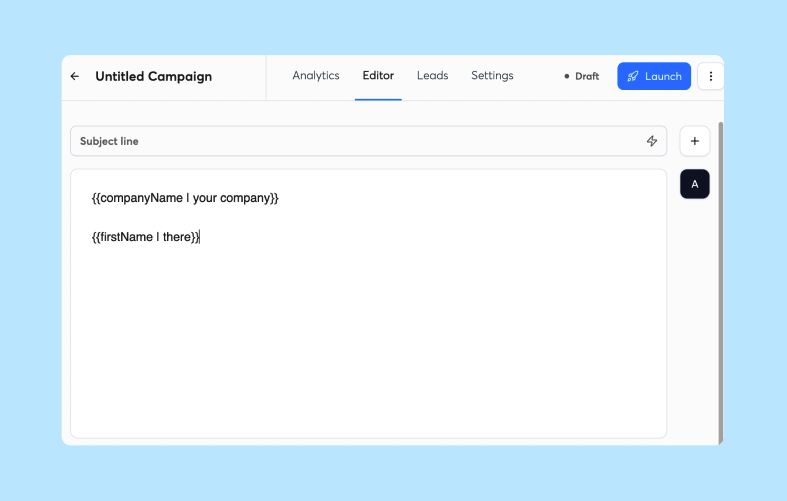
Test A: Subject line includes {{firstName}} ("{{firstName}}, quick question about {{companyName}}").
Test B: Subject line is generic, but the opener includes {{firstName}} and {{companyName}} ("Hi {{firstName}}, congrats on {{companyName}} hiring three AEs").
Run both to matched segments. The test reveals whether front-loading personalization in the subject line or saving it for the opener works better for your ICP.
Cold email opener length benchmarks
Keep the opener to 1-2 sentences, roughly 20-30 words. Shorter openers are easier to scan, and a long opener can bury the value prop before the reader reaches it. Treat 30 words as a starting guideline to test, not a proven cutoff.
Test a short opener (under 25 words) against a longer opener (35-40 words) with more context. Measure which generates more replies, and use the result to set your own word limit.
Boost reply rates via AI-generated CTA tests
The call-to-action (CTA) is the ask at the end of your email: a question ("Are you free for a 15-minute call next week?"), a meeting link ("Here's a calendar link: [link]"), or a low-friction ask ("Would it make sense to chat?"). The CTA directly controls whether a reply becomes a booked meeting.
CTA strategy: questions vs. meeting links
Questions ("Do you have 15 minutes next week?") tend to generate more replies because they are easy to answer. Meeting links ("Grab time here: [Calendly link]") may generate more booked meetings because they remove scheduling friction. In other words, questions may bring higher reply volume, and meeting links may bring higher meeting conversion. Test both with your own ICP.
Prompt 4 (CTA Variants):
You are a cold email CTA expert. My goal is to book discovery calls with [ICP].

Generate 4 CTA variants:
1. Question-based (ask if they are interested, under 15 words)
2. Direct ask (propose a specific time, under 15 words)
3. Low-friction ask (ask a yes/no question, under 15 words)
4. Calendar link offer (include a placeholder for the link, under 15 words)

Each CTA should feel natural and low-pressure. No aggressive sales language.
Test Variant 1 (question) against Variant 4 (calendar link) first. This pairing is likely to show the biggest spread in reply rate vs. meeting conversion.
Optimize CTA pressure with AI
CTA pressure is the commitment you are asking for. A low-pressure CTA ("Would it make sense to chat?") tends to get more replies but may lead to lower meeting rates. A high-pressure CTA ("Would a 30-minute demo this week work?") may get fewer replies but higher intent.
Test both ends. If your current CTA is high-pressure and your reply rate is below 3.43%, try a low-pressure version. If you get lots of replies but few meetings, try a direct ask.
Generating high-conversion CTA variants
For technical buyers such as CTOs and engineers, direct asks may work better because they value efficiency. For relationship-driven buyers such as HR and marketing leaders, questions may work better because they signal collaboration.
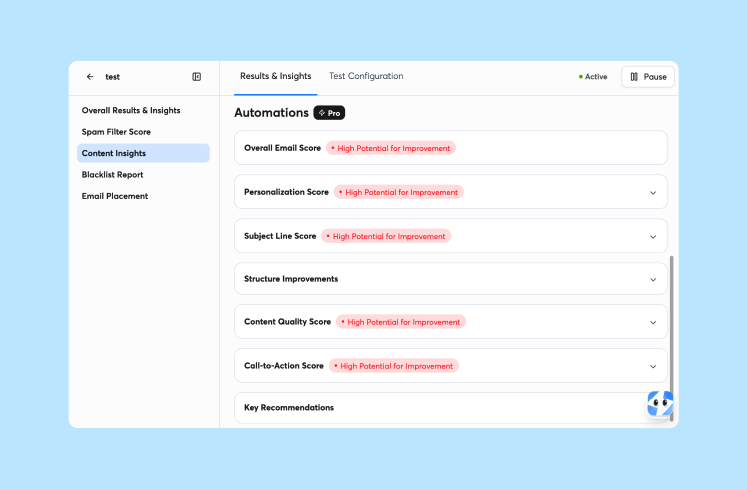
Paste Prompt 4 into ChatGPT, specify your ICP, and generate 4 variants. Pick two representing different pressure levels (one low, one high). Test them in the same campaign with identical subject lines and body copy. Store the prompts that work in a shared library, and use the sales enablement prompts guide for versioning and review steps.
Optimizing email length for higher reply rates
Instantly's benchmark report found that elite performers average under 80 words per first-touch email. Shorter emails respect the reader's time and scan better on mobile.
Testing concise vs. detailed email copy
A concise email (50-80 words) states the pain point, value prop, and CTA in as few words as possible. A detailed email (100-125 words) adds context, social proof, or a brief case study.
Prompt 5 (Length Variants):
You are a cold email copywriter. My ICP is [ICP]. My value prop is [value prop].

Write 2 versions of the same cold email:
- Version A: Concise (50-80 words). State the pain point, the benefit, and the CTA. No filler.
- Version B: Detailed (100-125 words). Include one specific example or proof point, then the CTA.

Both versions should have the same subject line and CTA. The only difference is length and detail level.
Test Version A against Version B. Most founders assume longer emails perform worse, but if your ICP is risk-averse or needs more context before replying, the detailed version might win.
When drafting longer emails, use the extra words for credibility. Mention a similar company you helped. Include a specific metric ("cut onboarding time by 40%"). Answer the objection the reader is thinking ("This takes 10 minutes to set up, no engineering required"). Keep every claim consistent with your value proposition messaging.
Optimizing for mobile readability
Mobile devices are the most popular reading environment. If your email exceeds 125 words, assume the reader will not finish it.
Test a mobile-optimized version (under 80 words, short paragraphs, single CTA) against a desktop-optimized version (100-125 words, more context, one CTA). Measure which generates more replies.
Calculating statistical confidence for email variants
Statistical confidence answers: "What is the probability this result happened by random chance?" A result at 95% confidence means only a 5% chance that random variation produced the observed difference.
Calculate cold email sample sizes
The standard method is the two-proportion z-test, which accounts for baseline reply rate, desired lift, confidence level, and statistical power.
You do not need to memorize the formula. Use a sample size calculator or ask ChatGPT to run the calculation.
Prompt 6 (Statistical Confidence Calculator):
I ran a cold email A/B test. Here are the results:
- Variant A: [X sends, Y replies, Z% reply rate]
- Variant B: [X sends, Y replies, Z% reply rate]

At 95% confidence and 80% power, is this difference statistically reliable? Use a two-proportion z-test.

If not, how many more sends per variant do I need to confidently say Variant B is better? Assume my baseline reply rate is [current rate] and I want to detect a [1-point / 2-point] absolute lift.
Paste your test results into this prompt, and ChatGPT tells you whether the difference is real or noise.
Confidence thresholds for email variants
The industry standard is 95% confidence with 80% power:
- 95% confidence: If you ran this test 100 times, 95 would show the same winner.
- 80% power: You have an 80% chance of detecting a real difference if one exists.
Lower confidence (90%) needs fewer sends but increases the chance you will call a winner when the difference is actually noise. Higher confidence (99%) needs more sends but reduces false positives. For most cold email tests, 95% confidence is the right balance. For high-stakes changes (a new domain, a new ICP), use 99%.
Eliminating lead data bias
A/B tests fail when the two variants reach mismatched audiences. If Variant A goes to CEOs at tech companies and Variant B goes to VPs at agencies, you are testing audience fit, not copy.
The fix is random assignment. Split your list randomly, assign half to each variant, and ensure both groups have the same mix of job titles, industries, and company sizes.
Most sending tools (including Instantly) handle this automatically via A/Z testing. The platform randomly assigns leads and tracks replies separately. On Instantly, Growth includes A/Z testing, but the full 26-variant capability is gated to Hypergrowth ($107/mo) and above. If you split lists manually, audit both segments before trusting results.
Your weekly 1-paste A/B testing workflow
This workflow turns A/B testing into a repeatable habit: a short working session every Monday and a quick review every Friday.
Founder's A/B Testing ChecklistPick one variable to test this week (subject, opener, CTA, or length).Paste the relevant ChatGPT prompt and generate 5-10 variants.Select the two most contrasting options.Load both into Instantly's A/Z testing and set reply rate as the winning metric. Growth includes A/Z testing, but the full 26-variant capability is gated to Hypergrowth ($107/mo) and above.Launch the campaign and let Instantly randomly assign leads.
Monday: Generate cold email variations
- Pick one variable to test this week. Subject line, opener, CTA, or email length. Only one.
- Paste the relevant ChatGPT prompt. Use Prompt 1 (subject lines), Prompt 3 (openers), Prompt 4 (CTAs), or Prompt 5 (length). Fill in your ICP, pain point, and value prop.
- Generate variants and pick two. ChatGPT gives you 5-10 options. Pick the two most different from each other. One is your control, one is your test variant.
- Load them into Instantly's A/Z testing. Open your campaign, click "Add Variant," paste the two versions, and set reply rate as your winning metric. Growth includes A/Z testing, but the full 26-variant capability is gated to Hypergrowth ($107/mo) and above. The A/Z testing setup guide walks through each step.
- Launch the campaign. Instantly randomly assigns leads and starts tracking replies.
Estimated time: 15-20 minutes for a first pass. This is a rough estimate, and your time will vary.
Analyze reply rates and ROI
Track reply rates daily. Log results in a simple spreadsheet. Let the AI Reply Agent handle incoming replies while you watch the numbers. It is billed through Instantly Credits, a separate subscription from Outreach plans.
Here is the ROI math. Suppose you are on the Starter stack: Outreach Growth ($47/mo) plus Credits Growth ($47/mo) = $94/mo total. You send 1,000 emails per month. At the 3.43% platform average, you get 34 replies per month.
If A/B testing lifts your reply rate to 5.0%, you get 50 replies: 16 extra conversations. If 10% of replies turn into booked meetings, that is 1.6 extra meetings per month. If 20% of meetings close, that is 0.32 extra customers per month.
Run the same math with your own average contract value. This example assumes a hypothetical $3,000 contract value, which is an illustration and not a benchmark. At that value, the 0.32 extra customers are worth about $960/mo against the $94/mo software cost. Under these assumptions, the 1.57-point lift in reply rate works out to roughly a 10x return on the Instantly subscription. Your own meeting rate, close rate, and contract value will change the result.
Friday: Deploy updates for better ROI
- Check your test results. Log into Instantly, open your campaign, and review reply rates by variant.
- Run the statistical confidence prompt. Paste your results into Prompt 6. If ChatGPT confirms the result at 95% confidence, you have a winner.
- Pause the loser. In Instantly's A/Z testing interface, pause the variant with the lower reply rate. Keep the winner running. Growth includes A/Z testing, but the full 26-variant capability is gated to Hypergrowth ($107/mo) and above.
- Log the result. Write down what you tested, what won, and what you learned. Example log entry: "Tested curiosity subject line vs. benefit subject line. Benefit won (4.2% vs. 3.1%). Benefit-driven subject lines work better for CTOs."
- Plan next week's test. Pick a new variable. If you tested subject lines this week, test openers next week.
Estimated time: 10-15 minutes. This is a rough estimate, and your time will vary.
After four weekly cycles, you will have tested four variables (subject line, opener, CTA, and length) and built a log of what converts for your ICP. In short, generate and launch one matched pair on Monday, review the results on Friday, and scale a winner only when it clears the 95% confidence bar. Pair it with CRM note prompts so every result and follow-up task lands in your pipeline. Instantly CRM is included free with Hypergrowth ($107/mo) and above, but the Growth plan ($47/mo) does not include it.
Try Instantly free for 14 days. Run the Monday-Friday workflow with A/Z testing (Growth includes A/Z testing, but the full 26-variant capability per step is gated to Hypergrowth ($107/mo) and above), auto-generate copy variations using the AI Spintax Writer, and catch spam triggers before you send with the AI Spam Words Checker. Includes unlimited email accounts and warmup. No credit card required.
FAQs: ChatGPT prompts for A/B testing cold emails
How many sends before you can call a winner?
At a 5% baseline reply rate, detecting a 1-point absolute lift with 95% confidence and 80% power requires roughly 8,200 sends per variant. This is an approximation based on the two-proportion z-test, which you can verify with Evan Miller's sample size calculator. If your list is smaller, run tests longer or pool results across weeks.
Should you test multiple variables at once?
No. Testing multiple variables simultaneously produces confounded results. You cannot attribute the lift to either change. Test one variable per campaign.
What if neither variant beats the 3.43% baseline?
That is useful data. If both variants are below the platform average, verify your list hygiene, extend your warmup period, or test a completely different ICP or value prop.
Can you use these prompts in Instantly campaigns?
Yes. Copy the generated variants into Instantly's sequence editor, add them as A/Z testing variants, and set reply rate as the winning metric. Instantly randomly assigns leads and tracks results separately. Growth includes A/Z testing, but the full 26-variant capability is gated to Hypergrowth ($107/mo) and above.
Key terms glossary
A/Z testing: Sending multiple email variants to randomly assigned segments and measuring which generates the most replies. In Instantly, Growth includes A/Z testing, but the full 26-variant capability is gated to Hypergrowth ($107/mo) and above.
Statistical confidence: The probability that an observed difference between variants is real, not random chance. Standard threshold is 95% confidence.
Baseline conversion rate: Your current reply rate before running a test. Use Instantly's platform average of 3.43% if you do not have your own data yet.
Minimum detectable effect (MDE): The smallest change in a metric that an experiment can reliably detect, according to Statsig's glossary (e.g., a 1-point lift in reply rate, from 3% to 4%). Smaller effects require larger sample sizes.
Reply rate: The percentage of delivered emails that receive a reply. Calculated as (replies / emails sent) × 100.
Warmup: The process of gradually increasing send volume from a new email account to build sender reputation. Instantly's 2026 benchmark report recommends 4-6 weeks before full volume.
Two-proportion z-test: The statistical method used to compare reply rates between two email variants and determine if the difference is real.
Primary inbox: The main folder in Gmail or Outlook where personal emails land. The opposite of the spam folder or promotions tab.
Read next
- AI prompts for sales rep onboarding: the complete guide to faster ramp times: Use prompts to help new reps learn your messaging and start selling sooner.
- AI prompts for sales sequences: the complete guide to multi-touch outbound cadences: Find prompts that help you write multi-step outbound sequences with consistent follow-ups.
- The essential AI and LLM prompt library for sales teams (60 templates, 2026): Browse a library of 60 prompt templates your sales team can reuse across outreach and follow-up.


