.svg)
Infra basics - getting started 4

.svg)
.avif)
This certificate would look great on you.
Complete a short quiz and it’s all yours.
Connecting Your Own Accounts
While done-for-you infrastructure offers convenience, connecting your own accounts provides flexibility and control. This lesson walks through the process of connecting email accounts you provision yourself, covering the major providers and configuration options available.
Why Connect Your Own
Several reasons might lead you to connect your own accounts rather than using platform-provided infrastructure.
Brand alignment becomes possible when you control your domains and accounts. Email addresses and sending domains can exactly match your brand identity. This professional appearance supports outreach where sender credibility matters.
Existing infrastructure can be leveraged rather than replaced. If you already have email accounts set up, connecting them to Instantly.ai adds capability without abandoning prior investment.
Cost management at scale may favor self-provisioned accounts. For operations with many accounts, direct provisioning can reduce per-account costs compared to fully managed alternatives.
Specific provider requirements sometimes dictate the choice. If your organization mandates certain email providers or has existing relationships that include email, working within those constraints means connecting your own accounts.
Google Workspace Connections
Google Workspace accounts connect through OAuth authentication. This secure connection method lets Instantly.ai send on behalf of your Gmail accounts without requiring you to share passwords.
The connection process involves authorizing Instantly.ai to access your Google account. You sign in to Google, approve the requested permissions, and the connection establishes automatically. The process is straightforward and uses Google's standard authorization flow.
Once connected, Google accounts support all platform features. Campaigns can send through Gmail, warm-up engages your Google accounts, and replies route back through the platform. Google's deliverability reputation becomes available for your campaigns.
Google imposes certain sending limits that apply regardless of how accounts connect. Daily sending limits and per-message recipient limits are Google policies that Instantly.ai works within. Understanding these limits helps you plan capacity appropriately.
Microsoft Outlook Connections
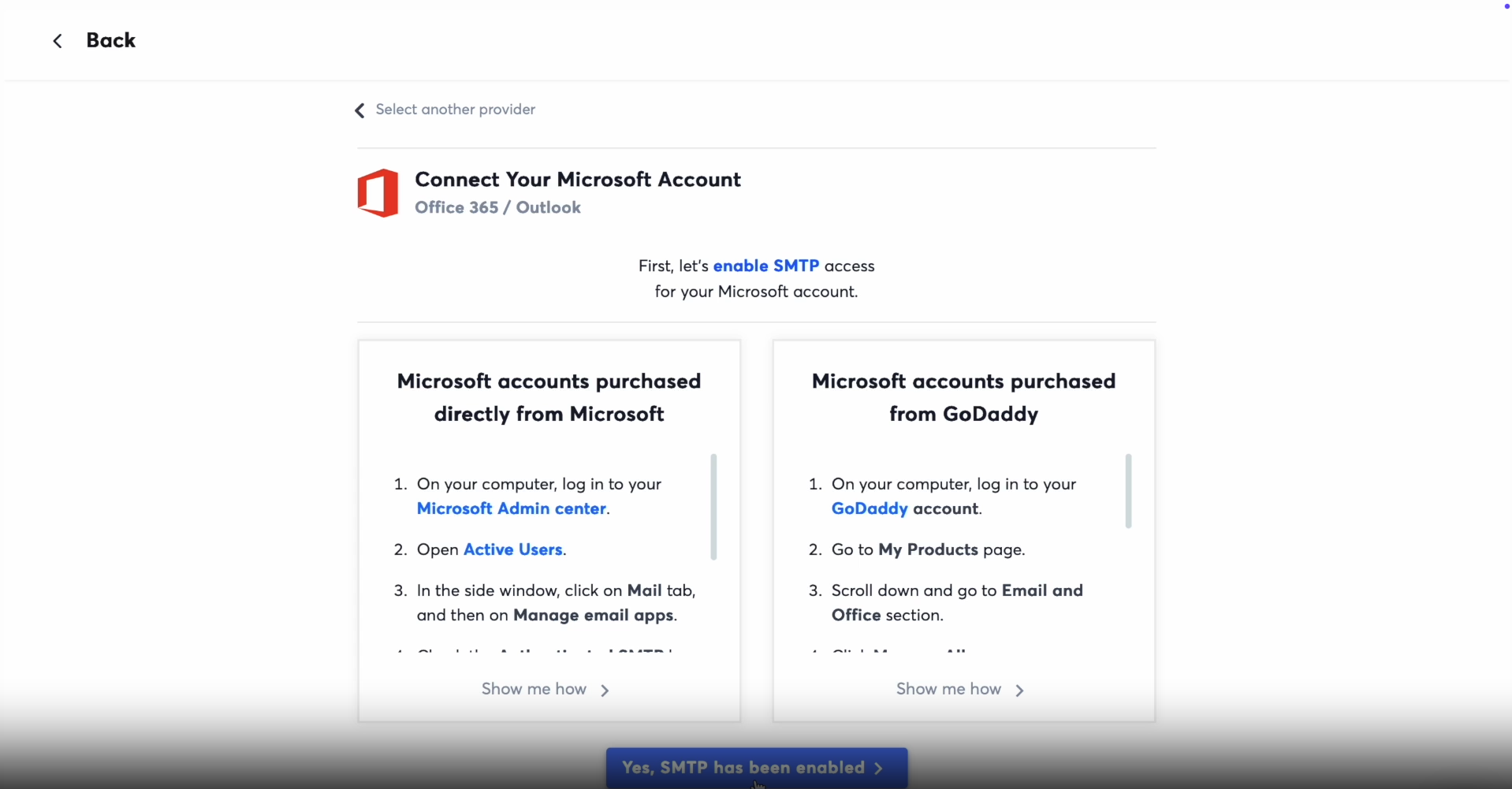
Microsoft accounts also connect through OAuth. The process mirrors Google connection, with Microsoft's authorization system replacing Google's.
Connecting Outlook and Microsoft 365 accounts brings Microsoft's email infrastructure into your sending capability. For operations targeting recipients who primarily use Microsoft email, sending from Microsoft accounts can improve delivery.
Microsoft's deliverability characteristics differ somewhat from Google's. Understanding both platforms helps you leverage each appropriately. Some operations deliberately use mixed infrastructure to benefit from both providers.
SMTP Connections
SMTP connections provide flexibility to connect email services that do not offer OAuth integration. Any email provider that supports SMTP can connect through this method.
SMTP connections require providing server details and credentials. Host addresses, ports, and authentication information configure how Instantly.ai communicates with your email server. The platform uses this information to send messages on your behalf.
Security considerations apply to SMTP connections. Credentials are stored securely, but you are sharing access information. Using dedicated accounts for cold outreach rather than primary business accounts limits exposure if issues arise.
SMTP opens access to diverse email providers. Services like Zoho, custom email servers, and niche providers all become usable through SMTP connection. This flexibility supports specialized requirements.
Tracking Domain Setup
Beyond email account connection, setting up custom tracking domains improves deliverability and branding.
Tracking domains handle link tracking in your emails. When recipients click links, they pass through your tracking domain before reaching the destination. This enables click tracking while avoiding generic tracking URLs.
Custom tracking domains use your own domain names rather than shared platform domains. This isolation prevents your reputation from being affected by other users' behavior. It also creates more professional-looking links in your emails.
Configuration requires adding DNS records that point your tracking domain to Instantly.ai's tracking servers. The platform provides the specific records needed. Once configured and verified, your custom tracking domain handles all link tracking for your campaigns.
Verification and Testing
After connecting accounts, verification ensures everything works correctly.
Send test emails to confirm that delivery functions properly. Check that emails arrive, show the correct sender information, and include working tracked links.
Authentication verification confirms that SPF, DKIM, and DMARC are configured correctly. Tools within the platform and external verification services help check these settings.
Warm-up enrollment puts newly connected accounts into the warm-up system. Even if accounts have sending history, enrolling in warm-up within the platform helps establish reputation specifically for the types of sends you will do.
Taking time to verify properly prevents problems during actual campaigns. Issues caught during testing are far easier to fix than issues discovered mid-campaign.
Video transcript
Let's say you already have warmed inbox and you want to use them. That's totally possible. Instantly lets you connect your own Google, Microsoft, or SMTP accounts and keep everything under your brand. Here's what that looks like. For Google accounts, if you're on regular Gmail connection, it is simply as logging in with Google auth and approving access.
If you're on Workspace or G Suite, there's one extra step. You'll need to create what's called an app password inside your Google's admin console. That's Google's way of saying, yes, this app is allowed to send and receive on behalf of this user. It sounds technical, but it's really just a couple of clicks, and we've got a full help guide that walks you through it screen by screen if you want that extra backup.
For Microsoft three sixty five, the process is similar, but there's a catch. You need to make sure SMTP and IMAP are enabled on your Microsoft admin settings. Without that, nothing works. Once that's switched on, it's just a matter of logging in, approving permissions, and checking the box that says consent on behalf of my organization.
After that, you're set. And if you're connecting through SMTP providers like SendGrid or Mailgun, you'll also need an IMAP inbox alongside them. That's what allows instantly to track replies, run warm up, and manage sending patterns. Usually, this looks like plugging in Gmail IMAP inbox to pair with your SNCP servers.
Again, it's a host name, a port, and your login. Straightforward. Now here's one extra piece, custom tracking domains. By default, you can use instantly tracking domain for things like open and click tracking.
But here's a trade off. That tracking domain is shared. You don't control its reputation. If you want full control, you can set up your own tracking domain or your DNS.
That way, the reputation is yours alone. And if you're a type of sender who prefers not to track opens at all, you can skip this step completely. So here's the takeaway. Connecting your own accounts gives you flexibility and brand consistency.
Yes, there are a few steps, especially with Google and Microsoft, but each one has a purpose. It's about security, authentication, and making sure inbox providers trust your traffic. And as with everything, don't stress. We've got detailed guides for each provider, so if you ever feel stuck, you can follow along click by click.
The point is, if you want to run your own warmed accounts, you can, and it's easier than you think.
Resources


Courses

.svg)








Prompts
%20(1).svg)
Unlock the power of AI
with

Get started now to access exclusive templates and elevate your projects to the next level.
Stop letting poor deliverability kill your pipeline. Join 50,000+ sales teams who've made the switch to Instantly for better inbox placement, higher response rates, and more closed deals.
No credit card required.