.svg)
Setting up AI agents - lesson 2
Lecture Description Content

.svg)
.avif)
This certificate would look great on you.
Complete a short quiz and it’s all yours.
Training and Optimizing Your AI Reply Agent
Creating a reply agent is straightforward. Making it respond the way you want requires thoughtful training through the guidance system. This training process transforms a generic AI into a representative that handles conversations according to your specific playbook.
The guidance you provide shapes every aspect of how the agent communicates: its tone, the information it shares, the questions it asks, when it escalates to humans, and how it handles different response types. Investing time in thorough guidance pays dividends through higher quality automated interactions.
Understanding the Guidance System
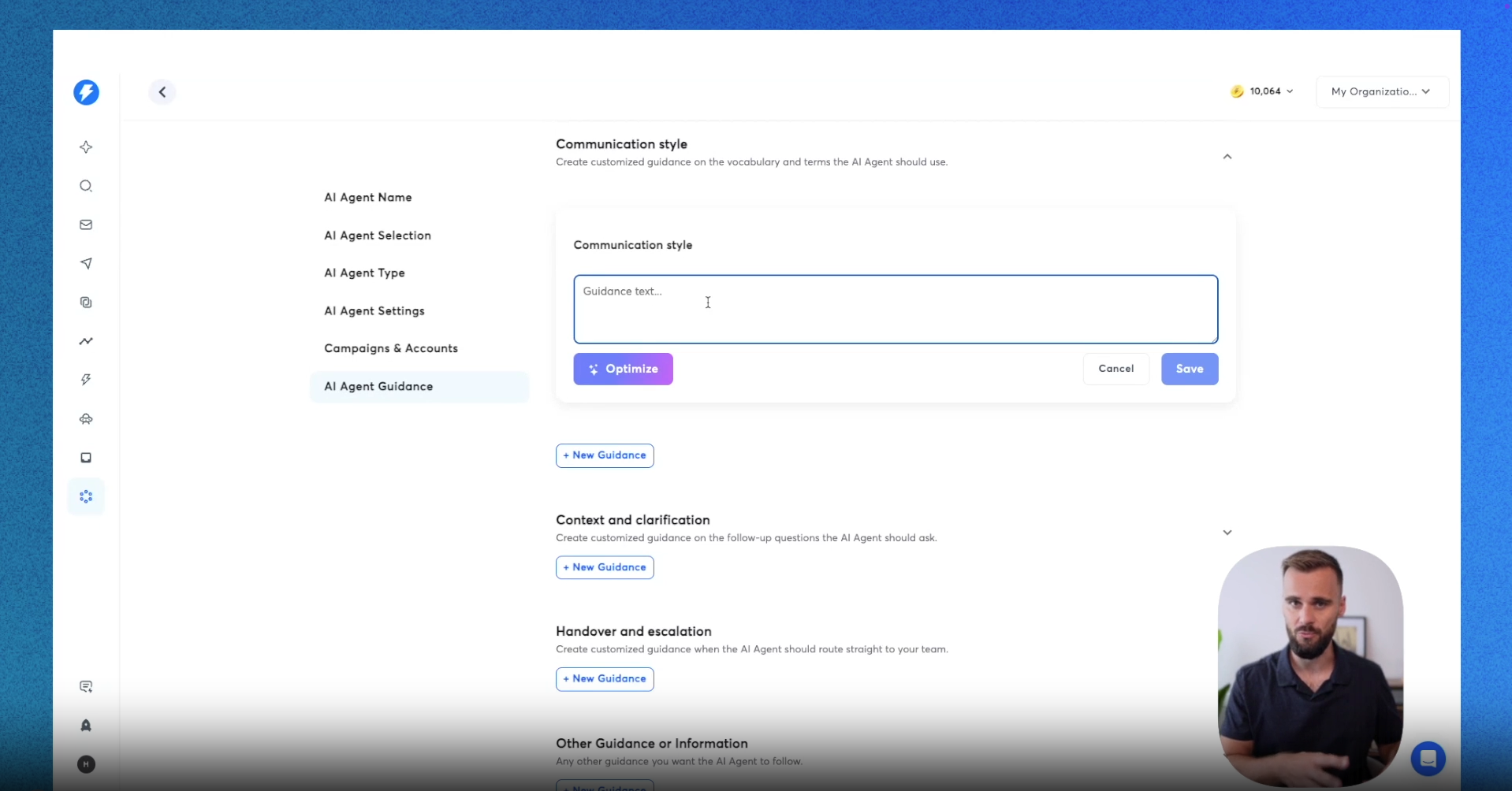
The guidance interface offers multiple categories for training your agent. Each category addresses a different aspect of conversation handling.
Tone and length settings establish baseline communication style. Professional tone suits most B2B contexts, though you can adjust toward more friendly or conversational approaches depending on your brand. Response length typically works best at standard or concise settings to keep exchanges efficient.
Communication style guidance goes deeper than tone, letting you specify particular writing conventions. Perhaps you want responses in British English. Maybe you prefer certain phrases or avoid others. This guidance shapes the voice your agent uses.
The optimizer feature provides AI-assisted refinement of your instructions. Input rough guidance and the optimizer restructures it for clarity and effectiveness. This tool helps translate your ideas into instructions the agent can follow reliably.
Building Effective Prompts
Training AI agents requires thinking differently than training human employees. Agents follow instructions literally, so clarity and specificity matter enormously.
Effective guidance includes examples of desired outputs. Rather than abstractly describing how responses should sound, show actual example replies that demonstrate the style and content you want. Similarly, showing examples of what not to say helps the agent avoid problematic patterns.
The Instantly help desk provides prompt examples worth studying. These templates demonstrate how to structure instructions for various scenarios including booking meetings, handling objections, and sharing specific information.
Context and Clarification
Beyond response style, you can train agents on the substance of conversations. The context and clarification section enables specifying follow-up questions the agent should ask in different situations.
Think about the qualification questions your sales team typically asks. What information helps determine fit? What details improve personalization? What clarifications prevent wasted meetings? Encoding these questions into guidance ensures the agent gathers the same information a skilled human would.
This guidance draws from your existing processes. Review past conversations to identify common questions you ask. Consult sales playbooks for qualification criteria. Translate this institutional knowledge into instructions the agent can execute.
Handover and Escalation Rules
Not every conversation should remain automated. Some situations warrant human involvement, and configuring these triggers prevents the agent from mishandling sensitive or complex scenarios.
Escalation triggers might include specific questions you want humans to answer, mentions of large budgets that deserve personal attention, or technical inquiries requiring expertise the agent lacks. When these triggers occur, the agent pauses automation and alerts your team to jump in.
Setting appropriate escalation thresholds balances efficiency against risk. Too few escalations may let important conversations get mishandled. Too many escalations reduce the time savings automation provides. Finding the right balance typically requires iteration based on observed agent performance.
Other Guidance and Information
The catch-all guidance section handles specific information you want the agent to share. This might include links to resources, scheduling tools, or lead magnets.
For campaigns distributing content, you can instruct the agent to send specific links when prospects express interest. For booking campaigns, the agent can share Calendly links at appropriate moments. Any repeatable information sharing becomes a candidate for this guidance.
Integrations Enhance Functionality
Beyond guidance, integrations extend what your reply agent can accomplish. Slack integration creates a channel where all agent activity posts, letting you monitor conversations without checking each one individually. This visibility helps verify the agent performs correctly while demonstrating the time savings it provides.
Calendly integration enables the agent to actually book meetings rather than just suggesting times. When prospects express interest, the agent sends your scheduling link so they can book immediately. This removes a friction point that often delays conversions.
Monitoring and Adjusting
After deploying your agent, the analytics dashboard reveals how it performs. Metrics include involvement rate, resolution rate, replies generated, hours saved, and confidence levels. Human intervention tracking shows where the agent struggled and needed help.
When performance issues emerge, the configuration interface lets you adjust guidance. Perhaps certain questions trigger inappropriate responses. Maybe the tone needs refinement for particular scenarios. Iterative adjustment based on observed behavior continuously improves agent quality.
The activity feed provides granular visibility into specific conversations. Clicking into individual threads shows exactly how the agent handled each exchange. This detail enables precise diagnosis of any issues and informed adjustments to guidance.
Reply agents represent powerful automation that transforms inbox management from a bottleneck into a scalable system. The training investment determines results, but the ongoing time savings more than justify the upfront effort. Teams that take training seriously find their agents become trusted extensions of their sales process.
Video transcript
Here under guidance, you can do exactly what it says. You can add a guidance for your AI agent, you can sort of think of it as instructing your employee on how to handle different types of replies.
Are more basic settings that I'm not going to dive too deep into, such as the agent's tone of voice, which can be more friendly, more humorous, you name it. Then there's response length, where a more concise reply is more common practice, but then a more thorough reply can simply have more information in there, which can be good in some cases. And then we get more into things such as communication style, context and clarification. To set that up, you can see here these different buttons that say 'new guidance'.
What you can do there, you can type different guidance tags, in this case we're talking about communication style, but in a lot of cases it may be that you're a little stuck and you're not sure how to actually prompt for an AI agent. I would imagine that in a lot of cases it is your first time setting up an AI agent. For that we have the future called the optimized future where you are using AI to train AI. And in our case what we could say is respond.
So we asked it to respond in British English only. It actually made our instructions shorter. In some cases it will make it longer. In a lot of cases it will at least tell you whether or not it's feasible what you're looking to do.
It really is your coach that sits here right inside the AI agent that will help you optimize the AI agent. You can add more guidance here after you save this further guidance, but if you want more information on what it takes to prompt for AI for AI agents here in the Instantly help desk, are a few more examples and here's an example of what it can look like. As you can see, here's a booking prompt example, for example, and here are things about replies, I'll keep them direct and friendly, and more importantly, there's an example style. If you have examples or if you can think of them, they're really important when working with AI that you can show examples of what the output should look like, and in a lot of cases it's also as important to show what it shouldn't look like, so the types of things it shouldn't say.
Here are different prompts that you can use, different things you can use, and I definitely recommend checking out this help desk article. And here back inside instantly you can add things such as context and clarification.
There we're talking about follow-up questions the AI agent should ask and these are things that you have internally, maybe inside your SOPs that you're aware of, that you usually ask your sales team, or that you usually ask. The best way to think about this is to really think what are things that you often ask during these conversations. You can look in your inbox, you can read back some of the conversations that you've had, and you can see what type of follow-up questions you are most frequently using, and you want to add those there. When it comes to handover and escalation, there are different use cases for that.
In those cases, will route it straight to you or your team. That could for example be if a very specific question is asked, if a technical question is asked, or maybe they mention they have a certain amount of budget. In those cases you want to manually handle that. You'll see the full context, but you're able to jump in then and there.
Then there's other guidance or information.
And in our case, for example, we run some lead magnet campaigns and what we do there is we tell them, listen, here's the lead magnet that we want to send. The moment someone replies positively after we've asked them whether or not they would like to receive the lead magnet, send this link right here and it will do exactly that. It will follow the instructions and it will send that lead magnet. But there are a lot of different use cases for that besides links.
Maybe you want to shoot over your Candle link, your HubSpot link, etc. There's a different option that we have for that, which I will show you in a second. There are a lot of use cases here, and as with everything, the moment you click Add New Guidance, there's the Optimize feature that will help you optimize whatever you put in there. You can put some raw text in there, anything you can think of, or maybe some information about your product or your service that you have for PDF that you use internally, you can drop it in there and it will automatically optimize for you.
That way you can train your AI agent to behave exactly the way you would like it to behave. As we continue, we'll get to the integrations part of the agent. Slack is a common integration we use internally where we have a channel where all the replies go into. That way we can keep tabs a little bit on the AI agent, but it's also a fun way to see how much time you're actually saving because you can see all the conversations that it's having and that it's taking off your plate, which is really, really helpful.
And then there's a Calendly integration there. You drop your Calendly link and that AI agent will actually book meetings for you in a way that it will send your calendar link to anyone who replies positively, if it's a campaign that is set up for that. So if you're telling it listen, this is a lead magnet campaign, send a lead magnet instead, then it will not do it. But if you're saying our main goal is to book demos, the moment someone says sure I'm interested in what you're selling, it will send over your Calendly link and the lead can book a demo right then and there, again taking a lot of work off of your plate.
So, to quickly recap, we've set up an agent, in our case we've called it the test agent. Then you can select the agent mode, which can be human in the loop or autopilot human in loop. You still keep tabs on it and you instruct it and you can edit replies before they go out, whereas autopilot just does everything for you. Then under the settings there are a few basic settings such as replying to objections or negative replies.
You can select the campaigns or the accounts that it should work with, so that way you can set up different agents for different use cases. And then there's the guidance that we just went over, where you can not only pick the tone of voice, but also the communication style where you can add different prompts, the context and clarification, when to hand over to your team, and other guidance. With everything you can ask AI to optimize all the raw instructions you put in there to make sure that it's feasible and that the AI will actually follow-up with it. By the moment your agent is up and running, you can still keep tabs on it.
You can see exactly what's going on under the analytics tab. Click into an agent and you will see all the details here. You can see the full activity feed, but you can also see the involvement rate, the resolution rate, and you can see how many replies it generated, how many hours it saved you, and also things like the confidence rate, how much human intervention was needed. If at any point in time an agent isn't behaving the way you want it to behave, head over to the agent configuration tab right here and it will show you the exact menu again that we went over earlier where you can then adjust the guidance, the settings as you see fit based on the behavior.
With everything within the activity feed, you can click into it and you can see exactly what's going on in that conversation.
Resources


Courses

.svg)








Prompts
%20(1).svg)
Unlock the power of AI
with

Get started now to access exclusive templates and elevate your projects to the next level.
Stop letting poor deliverability kill your pipeline. Join 50,000+ sales teams who've made the switch to Instantly for better inbox placement, higher response rates, and more closed deals.
No credit card required.