


Updated November 3, 2026
TL;DR: Most AI sales agent failures trace to three architectural causes: misclassified replies, hallucinated prospect data, and broken CRM handoffs. Each one is auditable. An AI sales agent is a layered system of data inputs, reasoning models, orchestration logic, and guardrails. A well-designed agent restricts its output to verified data, uses versioned models, and syncs with your CRM in both directions. If a vendor cannot explain where prospect data comes from or how the model is versioned, walk away. Before you sign, run the five verification steps in the due diligence section: data provenance, model lineage, CRM sync, action logs, and guardrails.
If you are a Head of Sales or RevOps leader who needs reliable, auditable email execution your reps can run without babysitting, this guide is for you. Most AI sales agent failures are not model problems but data problems, integration problems, and guardrail problems. The demo will look great, but what matters is what happens when the agent misclassifies a reply, invents a prospect's job title, or drops a lead during CRM handoff. This guide explains how AI sales agents work at each architectural layer, where they break, and which vendor questions expose weak design before it costs you pipeline.
Key components of AI-driven sales outreach
An AI sales agent runs on five core layers: data, memory, reasoning, orchestration, and guardrails. Each creates a failure point you can test during evaluation.
| Layer | What it does | Business outcome | Instantly.ai feature |
|---|---|---|---|
| Data | Sources and verifies prospect records | Clean lists, low bounces | Lead Finder, 450M+ B2B leads |
| Memory | Stores business context and rules | Consistent messaging | Copilot guidance rules |
| Reasoning | Classifies incoming replies by intent and applies labels | Accurate reply triage | Unibox NLP |
| Orchestration | Triggers the right tool at the right time | Coordinated execution | Automations |
| Guardrails | Protects sender reputation | Deliverability stability | BounceShield |
Why agents outperform automation
Traditional email automation follows a static sequence. An AI sales agent adds a decision loop: it reads replies, classifies intent, adjusts follow-up timing, and escalates to a human when confidence drops. The AI Sales Agent in Instantly sources leads, writes sequences, and adjusts based on reply patterns. The AI agents overview covers the separation of duties across all five agents, which matters because specialized agents outperform monolithic systems that try to do everything with one model.
How agent workflows drive results
A typical workflow follows a chain: input data feeds a reasoning model, the model generates output, orchestration routes that output to the right tool, and guardrails check the result before anything sends. Instantly's 2026 benchmark report (data from January 1 through mid-December 2025) shows that consistent sending patterns produce 15 to 20 percent higher reply rates. That consistency comes from the orchestration and guardrail layers, not from a smarter model. For a deeper look at how cold email infrastructure supports these workflows, Instantly's selection guide covers the operational checklist.
Where agents live in your tech ecosystem
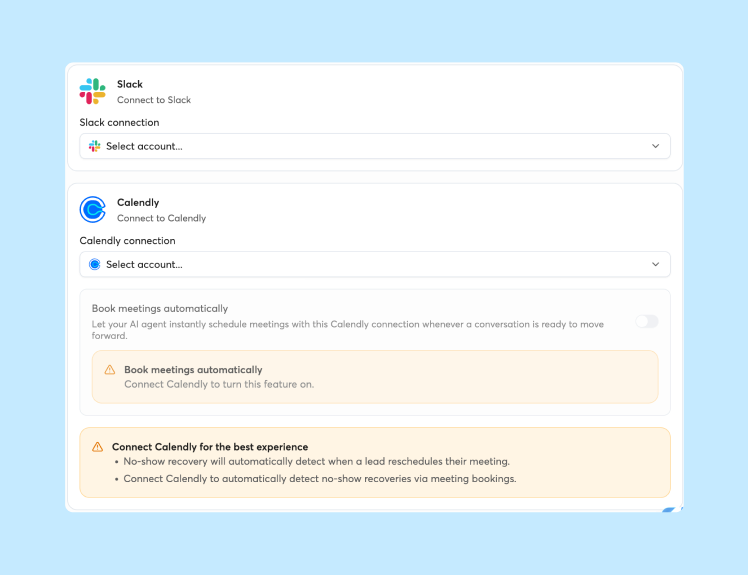
An AI sales agent sits between your lead data and your sending infrastructure, passing results back to your CRM. If it cannot push reply events, status changes, and meeting bookings automatically, your reps end up doing manual data entry. Instantly connects to HubSpot natively through the Automations builder, with two-way sync that brings HubSpot contacts into Instantly and pushes positive replies, status changes, and engagement outcomes back to HubSpot.
Instantly also supports Pipedrive, Slack, and other platforms. The key question is whether the vendor offers bidirectional sync, or whether data flows only one way.
Evaluating the engine behind your sales AI
Data quality, orchestration logic, and guardrail design determine whether the agent books meetings or burns your domain reputation. Direct the evaluation conversation toward data provenance, workflow logic, and audit trails.
Fueling AI with clean lead lists
Every downstream decision depends on input quality. If the lead list contains invalid emails or outdated job titles, the agent personalizes around bad information. Instantly's Lead Finder runs waterfall enrichment across seven data providers and labels leads as valid, risky, or invalid before upload. During sending, BounceShield skips invalid and risky leads unless you explicitly override it. Ask every vendor: which providers power your database, how often are records refreshed, and what verification step runs before a lead enters a campaign?
How AI models interpret sales intent
Intent classification is where the reasoning layer meets real-world messiness. The agent reads a reply and assigns a label: interested, not interested, out of office, unsubscribe, or a custom category. Unibox NLP handles this across 50 or more languages, with misclassification feedback to refine accuracy per label. Accuracy is refinable, not perfect. A well-designed system flags low-confidence classifications for human review instead of acting on them.
Operationalizing AI sales playbooks
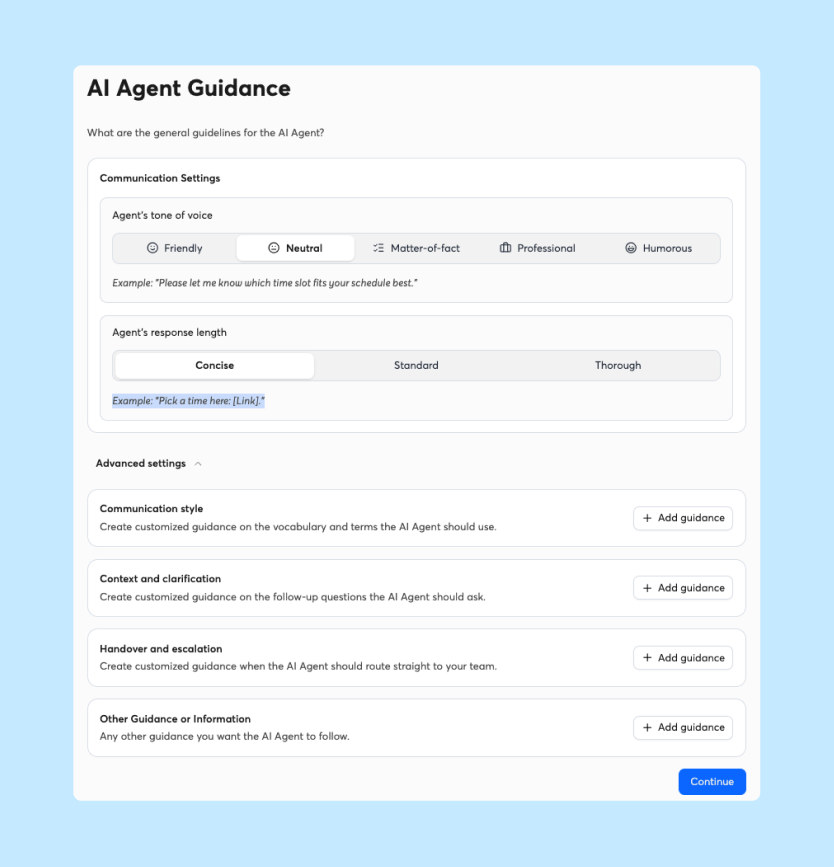
Your playbook defines what the agent says and when it stops. The AI Sequence Writer generates multi-step sequences from your offer and audience inputs, and guidance rules in the Copilot Guidance tab define how your emails sound, including tone, structure, and do's and don'ts. You can start with the three predefined rules or create your own. This embeds your playbook as explicit constraints rather than hoping the model "learns" preferences over time. During evaluation, confirm you can inspect the rules the agent follows and version-control changes to your playbook.
Ensuring accurate CRM data handoff
The CRM handoff is where many agents lose data. Three problems cause most of the losses:
- Webhook timeouts: A webhook is an automatic message one system sends to another when something happens, such as a new reply. A timeout means the receiving system did not answer in time, so the update never lands in your CRM.
- Unscoped API keys: An API key is a credential that lets software access your account. An unscoped key has no limits on what it can do, which creates a security risk.
- One-way sync: Data flows into the CRM but never flows back, so reps see incomplete records.
Instantly's API v2 supports granular per-key permission scopes (limits on what each key can access), and the webhook documentation covers event types and payload schemas (the list of events and the data each one carries). The API and webhook setup documentation shows how scoped keys and event payloads work in practice.

How AI agents manage daily sales tasks
The agent needs to categorize replies, draft personalized follow-ups, sync calendars, and know when to hand off to a human rep. Each task maps to a specific layer.
How AI agents categorize lead intent
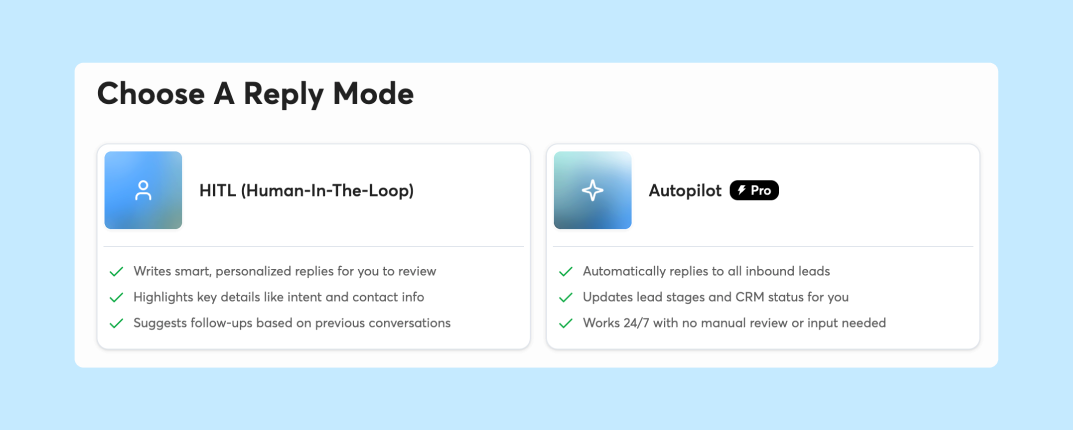
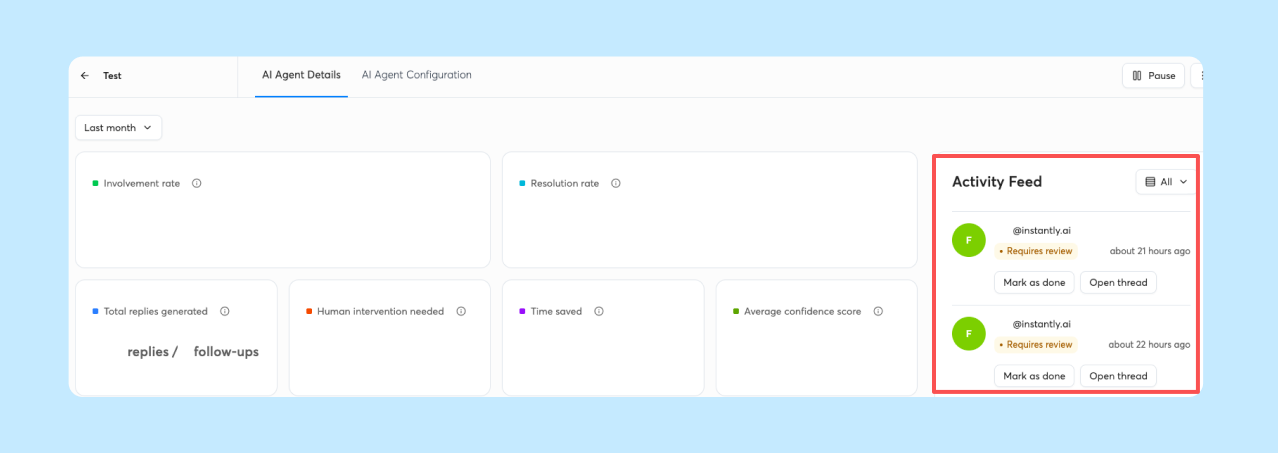
The AI Reply Agent classifies incoming replies and generates a response in under five minutes when confidence is high. It operates in Human-in-the-Loop mode (a person approves each reply) and Autopilot (the agent sends without approval), tracking Involvement Rate and Resolution Rate. Unibox NLP auto-labels replies by sentiment and context, and the AI Inbox Manager auto-schedules a reply five minutes after a lead's first response, but only when the AI is confident. Replies the AI is not confident about are not scheduled automatically.
"Instantly AI Sales Agent was a huge time-saver for me. It was able to source quality leads and write emails on my behalf, which made my workflow much easier." - Akira M. on G2
Automating personalized email outreach
Personalization means the agent combines lead data with your guidance rules to generate a unique message per recipient. The AI Spintax Writer adds variation by generating Spintax alternatives from your existing copy. Before any copy goes out, the AI Spam Words Checker evaluates the full message context for language that triggers spam filters.
Automating calendar sync and CRM handoff
When a lead agrees to a meeting, the agent needs to update the CRM, notify the assigned rep, and stop the sequence. Instantly's Automations builder handles this through trigger-action workflows. The AI Reply Agent's Slack integration sends real-time alerts with reply text and AI-generated response previews, and reps can approve or edit directly in Slack.
"Very easy to use, and it syncs all my email workflow in one place. I've personally been using this for almost 4 years." - Renegade E. on G2
When to alert your sales team
A well-designed agent escalates when confidence drops, when the reply contains a complex question, or when the lead requests human interaction. The AI Reply Agent supports label-based filtering to define which categories route to your team. The Out-of-Office Resume feature detects auto-replies, extracts the return date, pauses the lead, and resumes sending when the prospect is back.
How AI reasoning powers sales outreach
The reasoning layer decides what to do with the data it has. This is where hallucinations, context loss, and model drift create the most risk.
Model accuracy and hallucination rates
Research published in a medical context found hallucination rates of 39.6 percent for GPT-3.5 and 28.6 percent for GPT-4 on structured reference tasks. A separate analysis of citation validity across models found rates from 14.23 percent to 94.93 percent. You need the vendor to tell you which model version powers each function, how they handle updates, and whether they test outputs against ground truth before pushing to production.
Preventing hallucinations in outreach
Hallucination in sales outreach means the agent invents a prospect's job title, references a funding round that did not happen, or claims familiarity with a company initiative that does not exist. The primary defense is grounding: restricting the agent to verified data fields. Instantly grounds AI output in verified Lead Finder data rather than letting the model generate prospect details from scratch. Ask vendors to show you which data fields are exposed to the model and whether the system validates generated output against source records before sending.
Contextualizing AI with your CRM data
A summary of research from Stanford and UC Berkeley shows that language models pay the most attention to the beginning and end of their input, and information in the middle gets systematically under-attended. Dumping your entire CRM history into the prompt does not reliably improve personalization. A better approach is structured context injection, which means giving the model only a few carefully chosen facts instead of everything. Pull the three or four most relevant data points and place them at the start of the prompt (the instructions the model reads before it writes). Copilot in Instantly stores business context in a persistent memory layer so the agent does not start from zero on every interaction.
Common failure points in AI sales execution
Every layer has a specific failure mode. Here are the four most common, their architectural causes, and the vendor question that exposes each one.
| Failure mode | Architectural cause | Vendor question to ask |
|---|---|---|
| Misclassified replies | NLP confidence threshold too low | How do you handle low-confidence classifications? |
| Hallucinated data | No grounding in verified sources | What data does the model reference when generating copy? |
| Broken CRM handoff | One-way sync or webhook timeout | Can you show your webhook delivery logs and retry logic? |
| Context loss | Input too long, middle ignored | How do you structure prompt context for personalization? |
Why AI misinterprets lead interest
Intent misclassification happens when the NLP model encounters language patterns it was not trained to handle. Sarcasm, industry jargon, and multilingual replies all increase error rates. Instantly's Unibox NLP allows misclassification feedback so the system improves per label over time.
Fabricated output and model inaccuracies
When an agent references "your recent Series B" and the prospect raised a seed round two years ago, that is a grounding failure. Hallucination risk exists across all general-purpose models, with rates of 14 to 95 percent in the studies cited above. The fix is architectural: restrict the agent to verified data fields, run output through a validation layer, and log every generated claim. Leads from Instantly's Lead Finder arrive already verified, so they need no extra verification step. For leads from other sources, Instantly's email verification costs 0.25 credits per lead and labels each address Verified, Invalid, or Risky. You can run it as leads are uploaded to a campaign, and invalid and risky leads are not contacted by default.
System disconnects during handoffs
A reply comes in and the agent classifies it as interested. The webhook (the automatic alert sent to your CRM) fires, but your CRM does not update and the rep never sees the lead. This is the most damaging failure in practice because it is invisible until someone audits the pipeline. Instantly's webhook documentation lets you track delivery activity, and the Automations builder includes execution history review. During evaluation, ask the vendor to show you a live execution log.
"The best thing I like about Instantly.ai is setting up different campaign at a same time. Clear Analytics, warming of your email domains and AI Agent adds an extra layer of use for any sales people who want to run different email campaign." - Rahul Vithlani on Trustpilot
How input size impacts message recall
A summary of the "Lost in the Middle" research shows that models do not use context uniformly, and performance degrades as input length grows. Details buried in the middle of a long prompt get ignored. Ask the vendor: how do you structure prompt context? Do you prioritize specific fields? A vendor that says the AI receives everything has not solved the recall problem.
Due diligence: 5 signs of a stable AI provider
Run each of these verification steps before signing a contract. Treat any step a vendor cannot answer clearly as a gap to resolve first, because unanswered questions about data, models, or logs are where lost pipeline and deliverability problems tend to start.
Verifying prospect data provenance
Ask where lead data comes from and how it is verified. Instantly's Lead Finder gives you access to a database of 450M+ B2B leads. When it enriches work emails, it uses waterfall enrichment across seven providers, and leads ship pre-verified. Check the vendor's data processing agreement for sub-processor transparency. The DPA should list every third party that touches your data.
Verifying AI model lineage and logic
Ask which model powers each agent function, how version updates are communicated, and whether the vendor tests outputs against ground truth before deploying changes. If the answer is simply "the latest AI" without specifics, the vendor has not invested in model governance. Instantly's Copilot documentation describes how memory, guidance rules, and data layers interact.
CRM sync and data integrity
Test the CRM integration during your trial. Create a lead, trigger a reply, and verify that the CRM record updates with the correct status, timestamp, and reply content. Instantly's HubSpot integration in Automations supports bidirectional sync (data moves in both directions), and the webhook documentation lists the event types and payloads (the events Instantly reports and the data each one carries), so you can compare them against CRM records to confirm no events were silently dropped.
Verifying AI actions through logs
Every action the agent takes should be logged and retrievable: which leads were contacted, what copy was generated, how replies were classified, and what CRM updates were pushed. Instantly's API v2 provides scoped API keys (access credentials limited to specific actions), and the webhook documentation lists the event payloads (the data each automatic alert carries). Your ops team can check these with a third-party tool such as RequestBin, which displays what a webhook sends, before going live. The API keys and webhook configuration guide maps the setup process step by step.
Automated guardrails for sales agents
Guardrails are the automated checks that prevent the agent from damaging your sender reputation. Available on Hypergrowth and above Outreach plans, Instantly's Deliverability AI Agent runs a full audit every 24 hours, monitoring DNS health, blocklist status, warmup scores, bounce rates, provider balance, and campaign copy. It also tracks additional signals, such as abuse complaints, domain reputation, and warmup and reply momentum. BounceShield skips known high-risk recipients before sending. The high bounce auto-pause stops campaigns when bounce rate exceeds 5 percent (configurable) after a minimum 200 sends. Instantly's 2026 benchmark report confirms that consistent senders see 15 to 20 percent higher reply rates, and consistency is a guardrail output, not a model output.
Use the five verification steps above as a checklist. A vendor that answers each one with specifics, such as named data sources, versioned models, and retrievable logs, gives you evidence you can audit before you trust it with your pipeline.
Ready to see this architecture in practice? Start a free Instantly trial (14 days, no credit card required) and run the five verification steps above against your own lead list and CRM.
FAQs: AI sales agents
What's the difference between an AI sales agent and a chatbot?
A chatbot typically responds to messages in a single channel using scripted or generative replies. An AI sales agent is a multi-layer system that sources leads, writes and sends outreach, classifies replies, and hands off to your CRM, all with guardrails and audit logging at each layer.
How accurate are AI agents at classifying replies?
Accuracy varies by vendor, reply type, and language. Instantly's Unibox NLP lets you submit misclassification feedback to refine accuracy per label over time.
Can AI sales agents integrate with an existing CRM?
Most AI sales agents connect through APIs, webhooks, or native integrations. Instantly supports HubSpot natively with bidirectional sync, plus Pipedrive, Slack, and 15 or more platforms through the Automations builder.
What happens when an AI agent makes a mistake?
The answer depends on the guardrails in place. A well-designed system pauses the affected workflow, flags the error for human review, and logs the event for audit. Instantly's high bounce auto-pause and AI Blocklist Triggers are examples of automated responses to specific failure types.
How much technical knowledge do you need to manage an AI sales agent?
You don't need to configure the agent yourself. You need to understand the five architectural layers well enough to hold the vendor accountable using the due diligence checklist above, and to confirm your reps can run the agent without babysitting. Instantly's help center documents each agent's setup and configuration in plain language, so your RevOps owner or admin can roll it out and standardize the process across your team. For a look at how this skill set compares with training a human team, see AI sales agents vs. traditional sales training.
Key terms glossary
AI sales agent: A multi-layer software system that automates lead sourcing, outreach, reply handling, and CRM updates using language models, orchestration logic, and guardrails. Distinct from a chatbot or simple email sequence.
Orchestration layer: The component that decides which tool the agent uses and when, connecting the reasoning model to sending infrastructure, CRM integrations, and notification systems.
Grounding: Restricting the AI model to verified data fields rather than allowing free-form generation. Grounding prevents the agent from inventing prospect details.
Confidence threshold: The minimum certainty level at which the agent acts autonomously. Below this threshold, the system flags the item for human review.
Waterfall enrichment: A data verification method that checks a lead record against multiple providers in sequence, improving data coverage.
Human-in-the-Loop (HITL): An operating mode where the agent drafts actions but a person approves each one before execution. Contrasts with Autopilot, where the agent acts without approval.
Execution history: A log of every action the agent takes, including timestamps, inputs, outputs, and outcomes. Required for auditing agent behavior and diagnosing failures.
Spintax: A syntax for generating email variations per recipient using randomized phrase options. Reduces duplicate content across large campaigns.
Read next
- AI sales agent use cases for lead generation agencies: Learn how agencies apply AI sales agents to source leads, run outreach, and handle replies for multiple clients.
- AI sales agents for startups: the complete 2026 buyer's guide: See what startup teams should look for when choosing an AI sales agent on a lean budget.
- AI sales agent workflow: the complete template library for cold outreach: Browse ready-made workflow templates you can adapt for your own cold outreach.


