.svg)
Orchestrating multi-channel outreach 4
.svg)
.avif)
This certificate would look great on you.
Complete a short quiz and it’s all yours.
Webhooks and Cross-Channel Orchestration
With campaigns running and reply agents managing conversations, the next layer of sophistication involves connecting your outreach to external platforms. Webhooks provide the bridge that extends your reach beyond email into advertising, LinkedIn, CRM updates, and any other system that accepts automated triggers.
Understanding Webhooks
Webhooks send data from Instantly to external destinations whenever specific events occur. They are essentially automated notifications that tell other systems when something important happens in your outreach.
This might sound technical, but the practical application is straightforward. When a prospect opens an email, you can trigger an action elsewhere. When someone clicks a link, another action. When they get marked as interested, still another. Each event type can fire data to a different destination based on your orchestration needs.
Automation platforms like Make, Zapier, and n8n serve as common webhook destinations. These tools receive the data and route it to final destinations: your CRM, ad platforms, LinkedIn automation tools, Slack notifications, or anywhere else that completes your workflow.
Setting Up Event Triggers
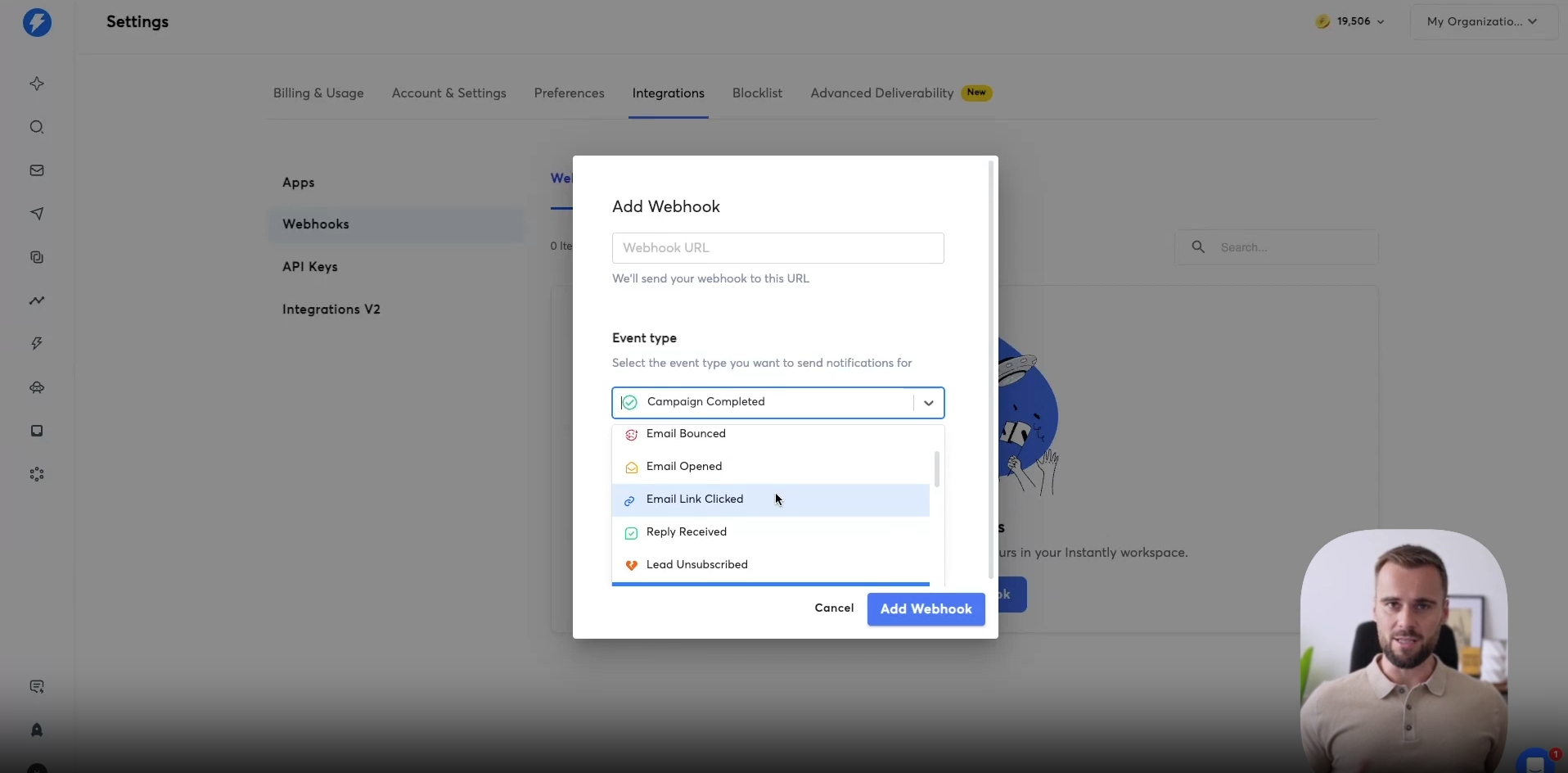
The webhook configuration in Instantly offers various event types to trigger on. Email sent, email opened, link clicked, lead marked as interested, demo booked, campaign completed. Each event serves different orchestration purposes.
Email sent triggers can add prospects to ad audiences immediately. The moment they receive your email, they also start seeing your ads. This surrounding effect creates familiarity that enhances email effectiveness.
Link clicks indicate active engagement and often warrant immediate action. A prospect clicking through to your content just signaled interest. This might trigger a Slack notification prompting someone to call while the prospect is actively engaged.
Campaign completion events enable channel escalation. After email outreach concludes without conversion, you can automatically route prospects to LinkedIn sequences or increased ad spend. The webhook ensures no qualified account stops receiving attention simply because one channel exhausted its touches.
The Interested Lead Webhook
One particularly valuable configuration triggers webhooks when leads get marked as interested. Whether marked by your reply agent or manually, this status indicates someone worth additional investment.
Upon receiving this trigger, you can add the prospect to retargeting campaigns showing case studies and social proof. They've expressed interest but haven't yet converted. Surrounding them with validation content helps push them toward a meeting.
This becomes especially powerful for longer sales cycles. A prospect who showed interest might not book immediately. But if they keep seeing your case studies and testimonials over the following days, they remain engaged with your brand. When they're ready to move forward, you're top of mind.
The Demo Booked Webhook
Booked meetings present another high-value trigger opportunity. These prospects have committed to a conversation but the meeting might be days away. The time between booking and meeting represents risk. Prospects forget, reprioritize, or develop cold feet.
Webhooks triggered by demo bookings can activate specific ad campaigns designed for this moment. Show deep-dive content that pre-educates prospects about your solution. Display customer testimonials that build confidence. Remind them why they booked in the first place.
Prospects who arrive to meetings already warmed up by this content convert at significantly higher rates. They've essentially done their research through ads you curated for them. The sales conversation starts from a stronger position.
The Campaign Completed Webhook
When email campaigns complete without conversion, you face a decision. Let the prospect go or activate additional channels. For tier one accounts especially, giving up after email feels premature.
The campaign completed webhook enables automatic channel escalation. Prospects who received all your emails without responding can flow into LinkedIn sequences. They might enter more aggressive ad campaigns. The system maintains engagement even when email alone didn't convert.
This approach maximizes the value of your targeting work. Identifying and qualifying accounts takes effort. Discarding those accounts after a single channel seems inefficient. Cross-channel escalation gives you multiple shots at conversion with each qualified prospect.
Coordinating Multiple Webhooks
Sophisticated orchestration often involves multiple webhooks working together. One fires on email sent to start baseline ads. Another fires on interest to escalate ad spend. A third fires on meeting booked to switch creative to pre-meeting content. A fourth fires on campaign completed to activate LinkedIn.
This layered approach creates dynamic experiences that adapt to each prospect's journey. Rather than fixed sequences, prospects experience flows that respond to their behavior. The orchestration happens automatically based on signals your system captures.
Connecting to Your Stack
The specific platforms receiving your webhooks depend on your technology stack. HubSpot might receive lead data for CRM updates. Google or LinkedIn ad platforms might receive audience updates. Slack might receive notifications for human action.
The common pattern involves automation platforms as intermediaries. Make, Zapier, or n8n receive the Instantly webhook, then route data to multiple destinations based on logic you configure. This hub approach simplifies management while enabling complex routing.
With webhooks configured, your outreach extends beyond email into a truly multichannel system. Every campaign interaction can trigger appropriate actions across your entire stack. The next step involves using Copilot to monitor and optimize this orchestrated system.
Video transcript
Now let's first have a quick look at the different event types. So there's for email sent. You can say whenever someone received that first email, add them to my ad audience. Like, I can add them to a active HubSpot list, and that HubSpot list is integrated with my Google Ads.
So now someone received my email, and the moment they receive that, they will also start seeing my ads, for example. Or you can do it the other way around. First show ads, they know who you are, and only after they've seen your ads at least three times, could add them to a campaign. There's a lot of there are a lot of different creative ways you can run this motion, and it's a matter of testing and see what works for you.
I'm not gonna run through all of them specifically, but if you're tracking email opens or email clicks specifically, then that can make for some really interesting automations. The moment someone clicks a link in your email, they're definitely obviously engaging with your content, and that's when you maybe wanna pick up the phone. You can set up an automation, you can do that from within instantly, and that's a true multichannel approach when people think about multichannel, they think email, LinkedIn, maybe some ads, whereas the phone is a really big part of that. The moment you see someone engaging with your content, that is usually the very best time to pick up that phone.
So they click an email, you can set up an automation to ping a rep, and they maybe get a notification on Slack. They go into instantly within your CRM, you have a phone number set up, you see the lead that click that link, and you pick up the phone and try and book them for a demo right then and there. So that is a great Allbound related automation you can set up as well. In the moment someone's market is interested, we're going to dive into that in just one second.
Someone changed the status to meeting books, then maybe you want to update that in your CRM, or you want to make sure they're added to your unsubscribe or your block list or your do not contact list. And then after, you know, six months, you remove them from there, because then you can potentially reach out to them again if they're not closed won, etc. A lot that you can set up there. Right now, we're just going to focus on this campaign completed option right here.
And what we want to do is we want to select the campaign of over fifty million. These are our tier one accounts. These are the companies that are doing over fifty million. We're excited about these accounts, and the moment that the campaign has been completed, they will be sent to, for example, to Make or to NNN.
We can do a quick check. Okay, who didn't reply? Who did we not book a demo with? Those people we're now going to add to Xpendi, to HeyReach, and now we're going to start reaching out to them on LinkedIn.
Just to make sure that we're getting the most out of everything. Yeah, we're gonna send emails, maybe from an instantly, we're going to call them as well within that same campaign. But the moment the campaign's been completed, we're just gonna take the people haven't booked a demo, and we're going to start reaching out on different platforms. And that's how we wanna use this webhook.
That's the webhook that you want to add, and we're going to add that webhook. There is another webhook that we're going to add as well. This will make for some really interesting ad campaigns that I've set up in the past that are just ones that are really important when it comes to actually helping your sales conversion rates. So your outbound motion, how you set it up, it really is, you have to really think bigger picture, not okay, there's outbound, we booked a demo, and then that job is done, but really think more holistically, and I'll show you why and I'll show you what I mean exactly by that.
So we're going to add a webhook again, and the webhook that we're going to set up is Lead is marked as interested. Now, the moment someone is marked as interested, regardless of the campaign, so in this case, I'm going to set it to All campaigns, then I want to start showing them different case study ads or social proof ads, because they are interested and they're likely going to book a demo. I can even set this up as the moment someone booked a demo, so demo scheduled. Then start showing them those case study ads or in our case, we often have a long form video that performs really well.
Basically, everyone who said, okay, I saw that video, they convert it. Then we want to make sure that we're the moment someone's interested or booked a demo, we add them to, for example, a HubSpot active list or different type of ad campaigns that show them those ads and those types of content specifically. So they come onto the call just warmed up and sort of pre closed, and they know about you, they've seen your case studies because you've shown that, like you've paid to show them to them, because you cannot rely on them booking that demo, and then doing their own research, and reading all your case studies, and looking at all your testimonials, and just sort of like reselling themselves, because they're busy, and they're likely not going to do that.
So you want to make sure that they don't forget about you, because maybe they booked a call for next week, and then that day comes out thinking, who was that person again? Who was that company again? You want to set up that retargeting campaign. Okay, anyone who was interested, book the demo, show them our case study, show them social proof, make sure they get added to those ad campaigns.
And that's how you set that up. You add your webhook URL right here, whether you're using Make, Zapier, or directly into HubSpot, doesn't matter. You set it up right here, Lead is marked as interested or Demo booked. All the campaigns, they go into a different list, and they get shown these specific retarding ads with all your social proof.
And you will see your conversion rates go all the way up and just really skyrocket as they say.
Resources


Courses

.svg)








Prompts
%20(1).svg)
Unlock the power of AI
with

Get started now to access exclusive templates and elevate your projects to the next level.
Stop letting poor deliverability kill your pipeline. Join 50,000+ sales teams who've made the switch to Instantly for better inbox placement, higher response rates, and more closed deals.
No credit card required.