.svg)
Finding leads - Lesson 3
Lesson Description Content

.svg)
.avif)
This certificate would look great on you.
Complete a short quiz and it’s all yours.
Enriching Leads: From Names to Complete Profiles
Finding leads is just the beginning. Raw lead data often lacks the information you need for effective outreach. Enrichment transforms bare names and titles into complete profiles that enable personalization, qualification, and intelligent campaign design.
What Enrichment Adds
Lead enrichment fills gaps in your data by pulling information from various sources. The specifics depend on your enrichment tools, but common enrichments include contact information, company details, professional background, and social profiles.
Contact information enrichment finds email addresses and phone numbers when you have names and companies but lack direct contact details. Email finding is particularly critical for cold outreach, and waterfall approaches that check multiple data sources maximize find rates.
Company enrichment adds firmographic detail beyond what you captured in your initial search. Revenue data, employee counts, technology usage, and recent news all provide context that informs targeting and messaging.
Professional enrichment builds out individual profiles. Work history, education, published content, and social activity help you understand each prospect as a person rather than just a title.
The Waterfall Approach to Email Finding
Different data providers have access to different email addresses. No single provider has complete coverage. The waterfall approach addresses this reality by checking multiple sources sequentially until an email is found.
When you enrich a lead for email, the system first checks the primary provider. If an email is found, you are done. If not, it checks the second provider, then the third, and so on. This cascading approach maximizes the percentage of leads that get valid emails.
Instantly.ai's enrichment integrates waterfall email finding automatically. You do not need to manually check multiple sources. The system handles the cascade and returns the best available email for each lead.
Find rates vary by lead characteristics. Well-established professionals at major companies often have email addresses in multiple databases. Newer employees at smaller companies may be harder to find. Understanding expected find rates helps you plan list sizes appropriately.
Company-Level Enrichment
Company data enrichment adds organizational context that supports both targeting and personalization.
Technology stack data reveals what tools a company uses. This information enables targeting based on technology fit and provides personalization angles for outreach. Knowing a prospect uses a complementary tool gives you something specific to reference.
Financial data like revenue and funding history helps with qualification. Companies with appropriate budgets for your solution become priority targets. Companies outside your price range can be filtered out or approached differently.
Recent news and events provide timeliness for outreach. A company announcement gives you a natural reason to reach out now rather than some arbitrary day.
Automation and Workflow Integration
Manual enrichment works for small volumes but cannot scale. Automated enrichment that runs as part of your lead management workflow ensures every lead gets enriched without consuming your time.
Configure enrichment to trigger automatically when new leads enter your system. As soon as a lead is created, enrichment processes should fire to pull additional data. By the time you are ready to campaign, leads have complete profiles.
Integration with your CRM ensures enriched data lands in the right places. Fields should map correctly so enrichment updates CRM records automatically. This integration maintains your single source of truth without manual data entry.
Data Quality Considerations
Enrichment improves data quality but also requires quality attention. Not all enriched data is accurate. Validation steps help ensure you are working with good information.
Email verification confirms that enriched emails are valid and deliverable. Sending to invalid addresses damages your reputation. Always verify before sending campaigns.
Data recency matters because professional information changes. Someone's title from a year ago might not reflect their current role. Regular re-enrichment keeps profiles current.
Source quality varies across providers. Understanding which sources are more reliable helps you weight conflicting information appropriately. When two sources disagree, knowing their relative reliability guides which to trust.
Video transcript
Okay. Now that we have our list of people, how do we actually enrich them, find their email data, but also find other data that might help us personalize our outreach, filter out leads that maybe are a good fit and enrich our CRM if we want to.
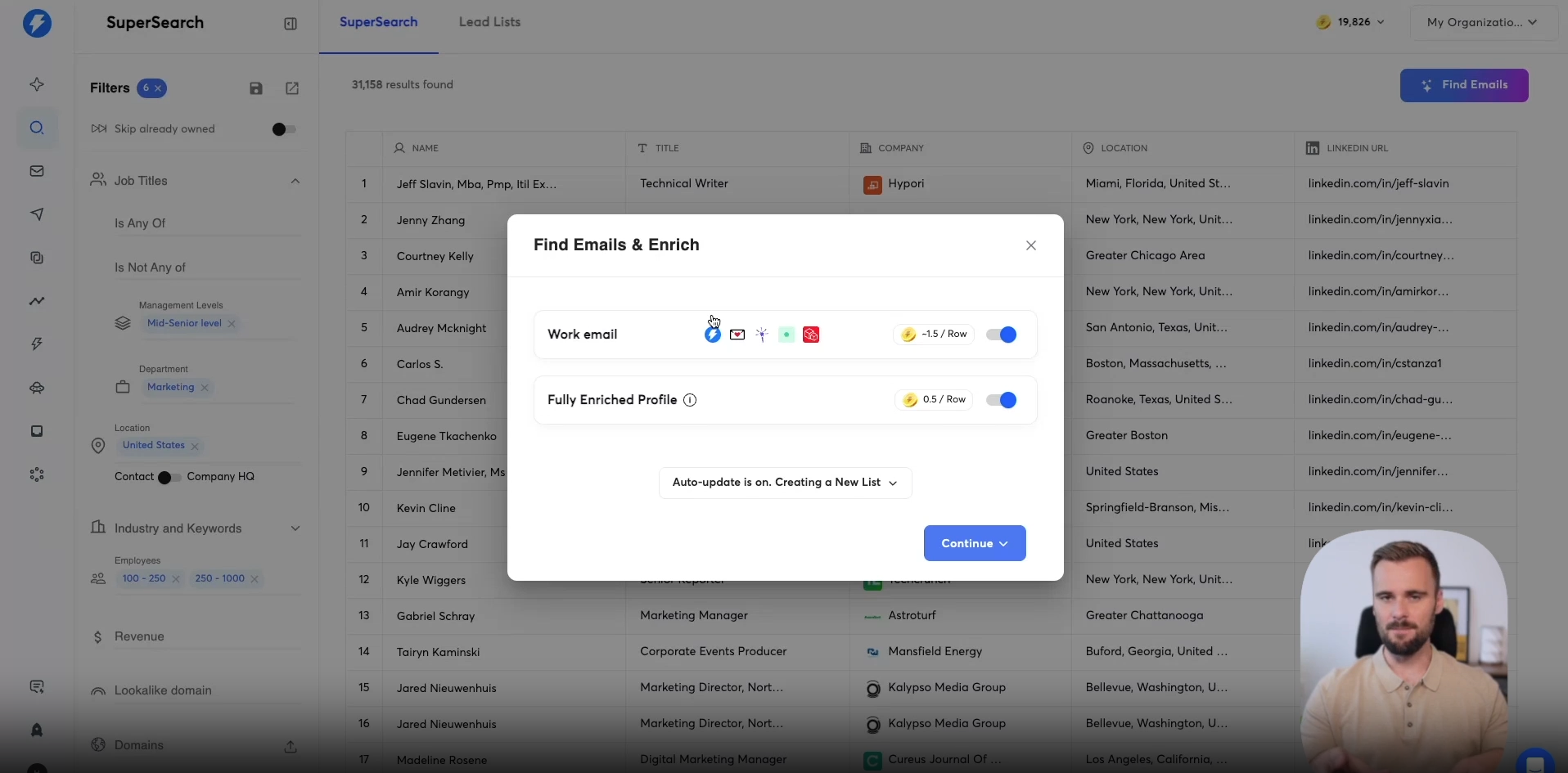
There's the button right here that says find emails. So that's pretty straightforward. We click that button right there. Then we have two different options.
So we have the work email option. Now the best part about this is that it uses something that is called a waterfall method. What the waterfall method is, it will ensure you the best coverage for email data that's possible right now. It will ping different providers to find the work email for these people.
First, we have our own email finder. At times, it doesn't find the email. In that case, it will look at different email providers, couldn't find email, Leadmagic, Prospeo, etc. They're all different email finders, and they all have different gaps that they can fill.
Maybe they have better coverage in Europe, in the UK, maybe for a small segment in the US, they may have different coverage than we have. And that means that if we cannot find the email, then someone else probably will altogether, you'll get the best possible coverage for email data. If you cannot find the email right here in SuperSearch, the chances that you can find it somewhere else are pretty close to zero. Then below that we have the fully enriched profile option, it gets you a lot more data about the person, about the company.
I'm going to leave this toggled on for now, so you can see exactly the additional data that you will get by allowing it to fully enrich the profile.
Then below that, there are a couple of options. So there is the auto update is on, and there's the option that says creating a new list, few other toggles, so let me walk you through what they mean exactly. So the auto update rows, that means that we're building this list right now. We're going to, for example, call this tutorial list.
Then this is our first list. Maybe we'll add a hundred leads to it. That campaign is going well. Tomorrow, we'll add another hundred leads to it.
It will go through the exact same steps as we're going through now. So finding the emails, enriching the profiles, etcetera, whatever steps we take. If we toggle that off or if we uncheck that rather, then if we add new rows and new profiles tomorrow, then we have to manually click and risk these as well. So that's just if you uncheck that, it's a good way to make sure you're not spending any credits on leads that you accidentally add.
For example, I usually leave it checked on. Again, it's obviously completely up to you. Then here, this one I also definitely recommend checking on, unless you're maybe exporting these leads to a different location, maybe doing LinkedIn outreach, maybe enriching your CRM. But this will make sure that only when we find a work email, we will go through the next enrich step.
But that is fully enriching your profile, or maybe later on, we're adding different AI enrichment that will not run if we cannot find the email. Again, if you have a different use case than just sending emails to these people, you can consider turning that off, but I usually don't recommend it. But here we can select a list or keep it empty to create a new one. There are different lists that I have here.
I'm just going to leave it empty. It will create a new list for us, and that's it. So I'm going to get the work email, fully enriched profiles, auto update is turned on, and it's only going to enrich leads that have an email. Then I click continue right here, and it will ask me how many leads I want to enrich.
You can pick a number right here, so you can pick a custom number, you can enrich the first hundred leads or enrich all the leads that are in this view. In this case, there are thirty one plus thousand leads in there, so that will cost me a lot of credits. For the sake of this tutorial, I'm going to grab the first one hundred leads for us to work with. So that's what I'm going to click.
And that's everything you'll need to do. It will actually start working on your list. It will find the emails, you can see that right here, we'll look at the different email providers that we have, find their work email, validate it, and so on. Just pinging different providers.
Here you can see condition unmet. That means that earlier in the waterfall, we already found the email. So in our case, we managed to find the email, validate it, and then later on, there's no need to ping other providers. Here we get the full profile of this person, so we get their contact, the contact headline, the summary as seen on LinkedIn, their job level.
Now, these things are great for, for example, AI personalization. If you want to take that throw it into AI and say, based on what this person does, maybe write a personalized intro for my cold email linking it to what we do. That's what you use that for. And it gives you more information about the company as well.
Company description, again, that's great to use for AI personalization, company website, and different information about the person about the company. You can find all of that in here. And that's the basic information that we have. We can add more information to this, we can enrich this even further.
We do that by clicking Enrich NAI. And then under Enriched Personal Info, for now we have all the information that's available. But under company info, there's more information that we can add, We can now add the company, their job listings, technologies, their news and the funding type. Let's start with the job listings.
We click that, we select that, we hit Update and Run, and it will find all the open job listings for that company.
And again, I can use that for qualification.
I can also then use that in AI and say, I saw you have this many roles open, saw you're looking for this role and that role. I can tie all of that together and create more personalized outreach, or I can use for enrichment of my CRM for my data set. There are different use cases for that. And you can see all the different job openings that this company that this person works for has opened.
You can run that as many times you want. You can get all the technologies, the news, the funding type. And then there are AI enrichments as well, which is something I will dive into in the next video because that's a bit more of an advanced use case. For now, we have our list.
We've enriched these people with more personal information as well as business company information. That means we're ready for the next step.
Resources


Courses

.svg)







Prompts
%20(1).svg)
Unlock the power of AI
with

Get started now to access exclusive templates and elevate your projects to the next level.
Stop letting poor deliverability kill your pipeline. Join 50,000+ sales teams who've made the switch to Instantly for better inbox placement, higher response rates, and more closed deals.
No credit card required.