.svg)
Finding leads - Lesson 4
Lesson Description Content

.svg)
.avif)
This certificate would look great on you.
Complete a short quiz and it’s all yours.
AI Enrichment: Custom Intelligence at Scale
Standard enrichment adds predefined data fields to your leads. AI enrichment goes further by applying intelligence to generate custom insights tailored to your specific needs. This capability transforms what is possible in personalization and qualification at scale.
Beyond Standard Fields
Traditional enrichment retrieves data that exists in databases. Company size, industry codes, email addresses, and similar fields are looked up and returned. This works well for standard information but cannot provide custom analysis.
AI enrichment applies language models to generate insights that do not exist in any database. Summarizing a prospect's professional background, identifying relevant talking points from company news, assessing fit against custom criteria, and generating personalized hooks all become possible.
This capability bridges the gap between data retrieval and human research. The insights AI enrichment produces resemble what a skilled researcher might provide after studying a prospect. But AI delivers this research at scale, across thousands of leads, in minutes rather than weeks.
Web Research at Scale
AI enrichment often incorporates web research that pulls fresh information about prospects and their companies. Rather than relying solely on database snapshots, the system actively searches for relevant content.
Company websites, press releases, LinkedIn profiles, and industry publications all become sources for AI-generated insights. Recent announcements that have not yet reached databases still get captured. Nuanced information that standard enrichment cannot categorize still gets processed.
This research happens automatically across your entire lead list. Every prospect gets the equivalent of a brief research report identifying what might be relevant for your outreach. The time savings compared to manual research is enormous.
Custom Processing with AI Functions
AI enrichment is not limited to predefined outputs. AI functions allow you to define custom processing that addresses your specific needs.
You might create an AI function that evaluates each prospect against your unique qualification criteria, producing a fit score and explanation. Another function might generate custom icebreaker suggestions based on recent prospect activity. Yet another might summarize relevant talking points from company news.
These functions apply across all your leads automatically. Once defined, they run on every new lead entering your system without additional effort. This automation ensures consistent enrichment regardless of volume.
AI Email Writing
The ultimate application of AI enrichment is generating personalized email drafts. Based on all the intelligence gathered about each prospect, AI can write initial outreach customized to their specific situation.
These AI-written emails incorporate personalization that would be impossible to achieve manually at scale. References to recent company news, acknowledgment of professional background, and hooks based on identified pain points all flow naturally into the draft.
The output is a starting point, not a finished product. Review AI-generated emails before sending to ensure accuracy and alignment with your voice. But starting from a personalized draft rather than a blank template dramatically accelerates campaign development.
Quality Control for AI Outputs
AI enrichment produces impressive results but requires quality control. Language models can occasionally make mistakes or generate content that does not match your standards.
Sample review is essential. Check a representative sample of AI enrichment outputs before relying on them for campaigns. Look for accuracy issues, inappropriate content, or patterns that suggest the AI is not understanding your intent.
Prompt refinement improves results over time. The instructions you give AI functions significantly affect output quality. If initial results are not quite right, adjusting your prompts often fixes the issues.
Testing before full deployment protects against problems at scale. Run AI enrichment on a small batch first, review results, and only then apply to your full list. This approach catches issues before they affect thousands of leads.
Scaling Without Sacrificing Quality
AI enrichment enables scale without the quality sacrifices that traditionally accompanied high-volume prospecting. Every lead can receive individualized attention that was previously only possible for top-tier targets.
This changes campaign strategy fundamentally. Instead of choosing between personalized low-volume campaigns and generic high-volume blasts, you can run personalized high-volume campaigns. The constraint becomes finding enough right leads, not the capacity to personalize outreach to them.
The teams who master AI enrichment gain significant competitive advantage. Their outreach feels researched and relevant even at scale. Prospects experience genuine personalization rather than obvious templates. Response rates reflect this quality difference.
Video transcript
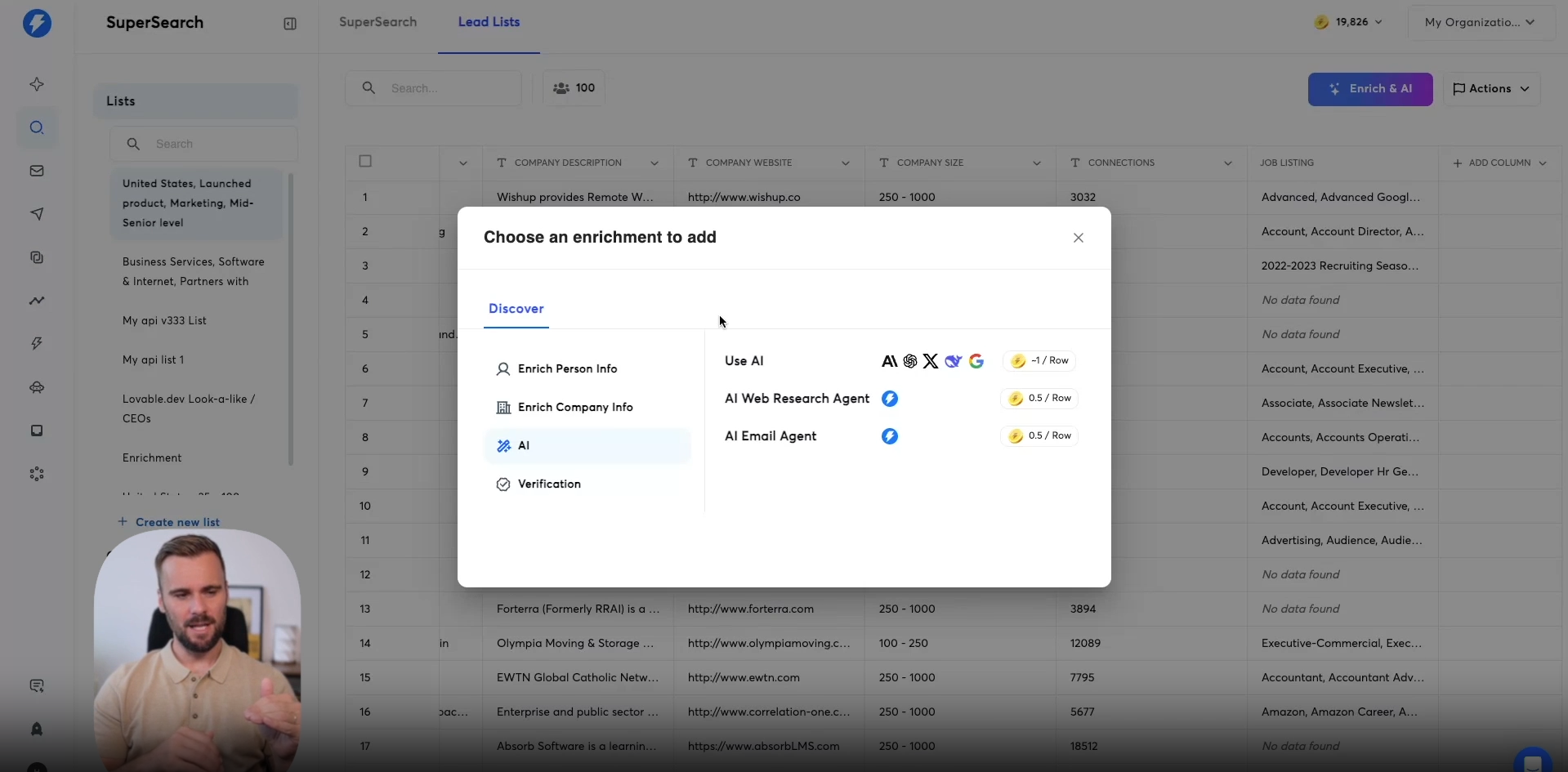
In this video, we're going to start looking at different AI enrichment options that you have available within SuperSearch. As you're on the list here that you've previously enriched with email data, you can click enrich an AI right here, and then under AI you can find three different options for now. First, there's the use AI function that allows you to tap into all these different models that are currently on the market. You can use them right here inside SuperSearch and have them work with a different data that you have available right here in this SuperSearch list.
It can help you create personalization snippets, or maybe do additional classification on the different data that you have there. Below that is the AI web research agent. It is exactly what it says in the box. It can go online and do web research.
You can use it to pull in additional information. Or you can use it to actually go and visit the website of these people and look for specific elements or keywords on that website.
Then there's the AI email agent. Again, does what it says on the box. It will write emails using AI for these people right here. We're gonna start with the first option, which is the use AI option. Now for all of these, I'm going to give you a basic overview of what they do if you want a more in-depth video or course on using AI right here in SuperSearch. There's a different course for that that you can find in our Academy.
Then under use AI, as I click into it, there are different tabs that you can see that we need to look at first. The first thing we need to look at is the settings tab. So you can bring your own API key. You drop your API key in here, for example, your OpenAI key, Anthropique, your Grok or x AI key, DeepSeek, or Google Gemini.
You drop those in there, and then we'll use those to enrich this list. Here, you can have different prompts. So you write your prompt here, and it will create a new column with the output. Then under account, you can say I want to use my own OpenAI account or the Instantly AI account.
And then you can pick the different models and behind it will show exactly how many credits it will consume if you were to use a specific model with GPT-five minutei obviously being cheaper than GPT-four or GPT-five.
Let's look a little bit at the prompting area because you can already see that you can insert personalized variables. What you could, for example, say is you could say based on this person, their summary, and then as I hit the bracket, it will show the different columns I can reference in this prompt. So I could, for example, say, contact summary, write a one liner about their professional experience. Another great prompt is just to showcase you how you can leverage all of this data that you have right here and use those data points and pull them out as different variables and use them in your prompt.
Now, if you don't have a lot of inspiration, way that I currently don't have it to write a full prompt, you can check out the templates right here. There are a lot of different templates, you can see how often they were run, so you can sort them at popularity by so that's how often people like them, the amount of runs or just simply by name.
Then company name cleanup does what it says, it will take a company name if it has like LLC or Inc or what have you text to it, it will clean that. But it will also allow you to generate like unique opening sentences, company compliments, or different first lines, pain points, different personalization. You can click that and it will load prompt for you. It just asks you to select the column, so depending on what the prompt creator references is in his original prompt, you've got to select that.
So, name, last name, and different social profiles that this person got so they enrich their data even further. And then below that, we've already selected the account, we've selected the model, and we can start having a look at the different advanced options that we have available. We can override output, maybe you want to rerun something that you ran, but you didn't like the output, can override it. You can auto update rows.
We already talked about this earlier. Whenever we add new leads here, we can auto run the same AI enrichment. So we can basically say, every week, we just go and look, we'll add another thousand leads to our list, they will automatically go through all this enrichment AI enrichment, and we can add them to our campaign. So all the work you do once, and then it will just keep running for you going forward.
And then there's a skip leads without an email, you probably want to check that to make sure you're not wasting any credits on leads that you cannot send emails to anyway. And then one of my favorites is to generate test output, you click that it will generate the first output for you. So you can then play around with your prompts a little bit, you can start looking, okay, if I change my prompt like so, does it give me the output that I'm looking for? If not, adjust your prompt a little bit and try again, so that you're not wasting any credits. Then once we click generate, we can run on the full list, the first x leads just to see a preview of what it looks like for the first ten leads. We have all those different options right there to make sure that we're getting the right output.
And that's the AI prompts option. It works with the data you have available here. You can try different prompts, you can set up your own API key to make sure that you're using that API key at that account. If you don't have any inspiration, there are a lot of different templates available that you can use.
Next up is the web research agent, which does exactly that it researches the web, and it will find different things across the web. One big use case for this is to visit the website and ask it to find maybe specific things like case studies on the website, specific keywords on the website that will tell you a bit more about the company or visit this website based on what this company does, write a personalized email, a personalized first line or write a summary of what the company does in case you don't have the company description. For that, you can say visit the website here and then you find the website of the company right there and provide me with a hundred word summary of what they do.
And it will do exactly that. It will visit the company website, and it will give you a summary of what that company does. It's a great way to research companies to maybe have these different buckets where you could say, okay, this company has, a keyword about targeting enterprise accounts on their website. So we want to talk about booking demos, and this company has the free trial option.
So we want to talk more about how do you convert trials, what have you. You can use it for a lot of different use cases, And the web research agent does exactly what it says on the front end, it will go out and research the web for you. For these leads right here, you can do it at massive scale, research thousands of accounts at the same time using the Research Agent. It works the same as in setting up your API keys, you save them once and you can then choose different research accounts that you have and choose different models that we have available.
Lastly is the AI Email Agent. You can add a lot of guidance in there. As you can see, I've added a lot of guidance previously on what it should use, but it's also pre trained on all of the emails that we see, all the data that we have, and it will write emails based on the different guidelines that we've given it, but you could add additional guidance there. You could try saying, okay, write an email has at most this many words or write an email in UK English or US English or look at this data point specifically, maybe previously you've written a personalized first line or PS section, you can say, make sure that you're levering this PS section that I have right here, or here's a summary about the prospect or about what they do, make sure you use that.
So you can just use different variables that we have available like the context summary, have that in there and just make sure that you could say, okay, here's specific guidance that I want to make sure you use this to be a framework, maybe different things that are important to you when you're writing these emails that maybe you're using internally to train your sales team, you can drop those in here, and it will tend to use that guidance to write the emails, or write a personalized email for all the people in here that you can then use in your campaign. So every single person on this list, all these one hundred people in this case, will get a personalized different email.
The same advanced options apply right here about skipping leads without an email, auto updating rows, etcetera. That's all fairly straightforward, and that is the right email with AI option we have available right here in SuperSearch.
Resources


Courses

.svg)








Prompts
%20(1).svg)
Unlock the power of AI
with

Get started now to access exclusive templates and elevate your projects to the next level.
Stop letting poor deliverability kill your pipeline. Join 50,000+ sales teams who've made the switch to Instantly for better inbox placement, higher response rates, and more closed deals.
No credit card required.